Back Original

An update on how we confirm your age group on Discord

TLDR

  • More than 90% of you won’t be asked to confirm your age. Since our last post about teen safety, we've had to launch age assurance solutions in more places, including Texas and Brazil. Laws requiring age assurance are expanding around the world. Rather than waiting to be told how to do it, we’re launching our own privacy-preserving approach: one that reflects your feedback.
  • You can check your age group status at User Settings > Account Status. We've estimated your age group automatically from account signals like how long your account has existed or the kinds of servers you're a part of. We don’t look at your messages, calls, or other content. We're launching this over the course of this week, so it may take a few days to reach your account.
  • If you're in the adult age group (18+), nothing changes. If you're in the teen age group (13-17), you can keep messaging friends, joining voice calls, and participating in non-age-restricted servers, but with additional safety protections that block age-restricted content, spaces, and settings. Otherwise, Discord works the same. More on this below.
  • We've added several new ways to confirm your age, including some that don't require an ID or selfie (including credit cards). If you're an adult but weren't automatically placed in the adult age group, you can confirm your age group at any time by going to User Settings > Account Status. More on the new options below.

In February, after listening to your feedback, I shared that we were delaying our announced plans for global age assurance. I promised we'd come back in the second half of the year with a more transparent, clearer path forward, with less friction. Here's where we landed.

Age assurance draws strong opinions and skepticism, especially when it involves sharing biometric information or a form of ID. At the same time, age assurance laws are expanding, and since my last post we've had to launch age assurance in other regions, including in Brazil and in Texas. We're hearing from policymakers in countless states and countries who want stronger teen protections, from the European Union to Indonesia. To me, that makes it more important than ever to show that this can be done in a privacy-preserving way: one where more than 90% of you won’t have to confirm your age.

That's why, starting tomorrow, we'll automatically place you in an age group using account signals, like how long your account has existed and the kinds of servers you're part of. We use multiple account signals to determine age groups at an accuracy level matching what’s possible with biometrics. No single server determines your age group, and we don't look at your messages, calls, or other content to decide which age group you’re in.

If you just want to know your age group: Go to User Settings > Account Status. We're launching this over the course of this week, so it may take a few days to reach your account. If you don't see anything yet, check back later. Your age group isn't shown on your profile or visible to other members in a server. Here's what each age group status means:

  • Adult Age Group: You're in the adult age group (18+), so nothing changes for you.
  • Teen Age Group: You're in the teen age group (13-17), so you have additional protections. Content and settings meant for adults aren't available. Otherwise, Discord works the same. Learn more here.
  • Unconfirmed: This is for cases where we don't have enough signal yet to place you in an age group, so some content and settings meant for adults aren't available until you confirm you're an adult. New accounts remain unconfirmed until we have enough information to determine an age group for them. You can continue to use Discord without taking any action, but if you want access to age-restricted content, spaces, and settings, you can confirm your age group in User Settings > Account Status.

If you're an adult but you weren't automatically placed in the adult age group, you can fix it by confirming your age group in User Settings > Account Status.
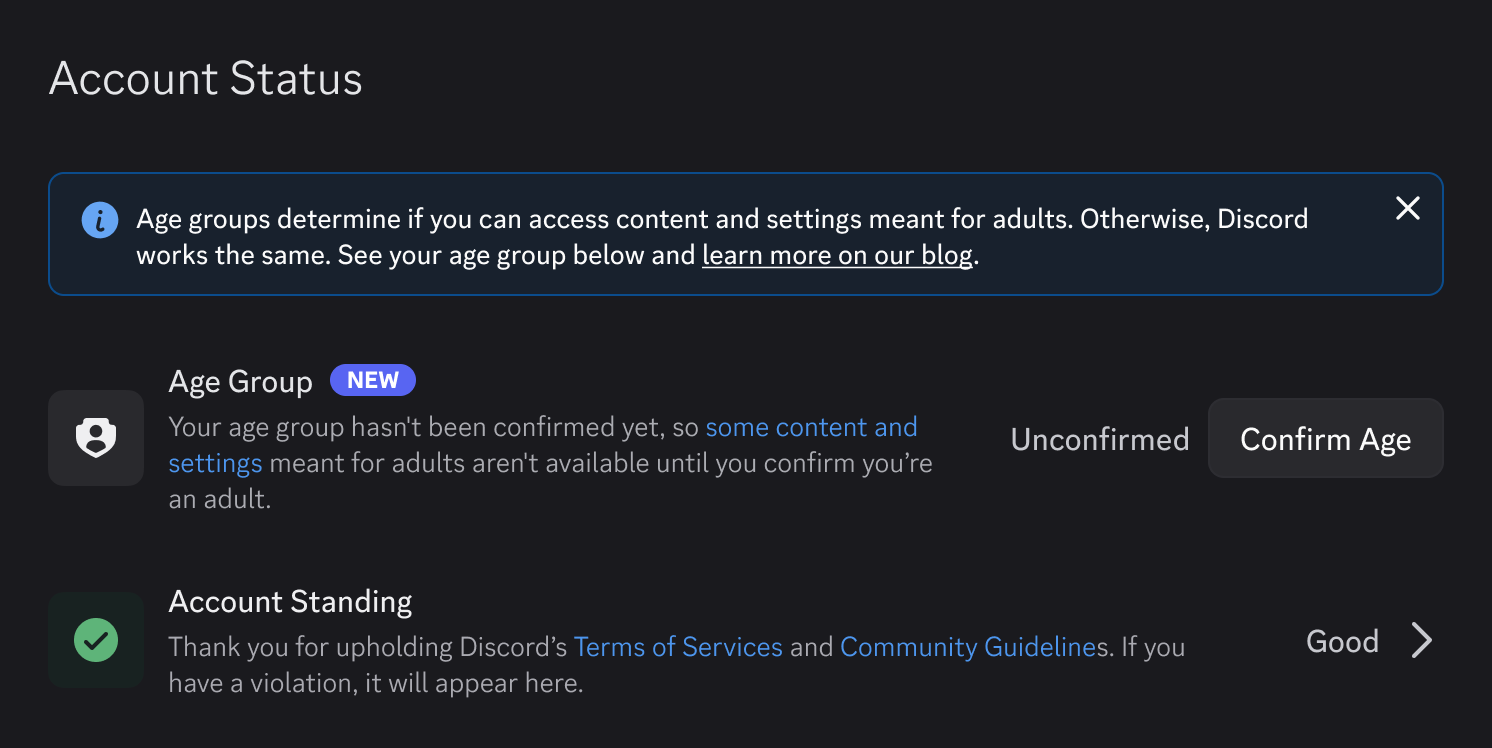
Account status settings page with new age group section.

Here's more on what we did since February and how age assurance works.
What I said we'd do before expanding

The goal hasn't changed: build in more protections for teens, while keeping the experience unchanged for adults. We don’t want or need to know more information about you aside from your age group, and for most of you we can determine that based on basic signals like account age.

In February, I set conditions we'd meet before expanding. Here's each one and where it stands:

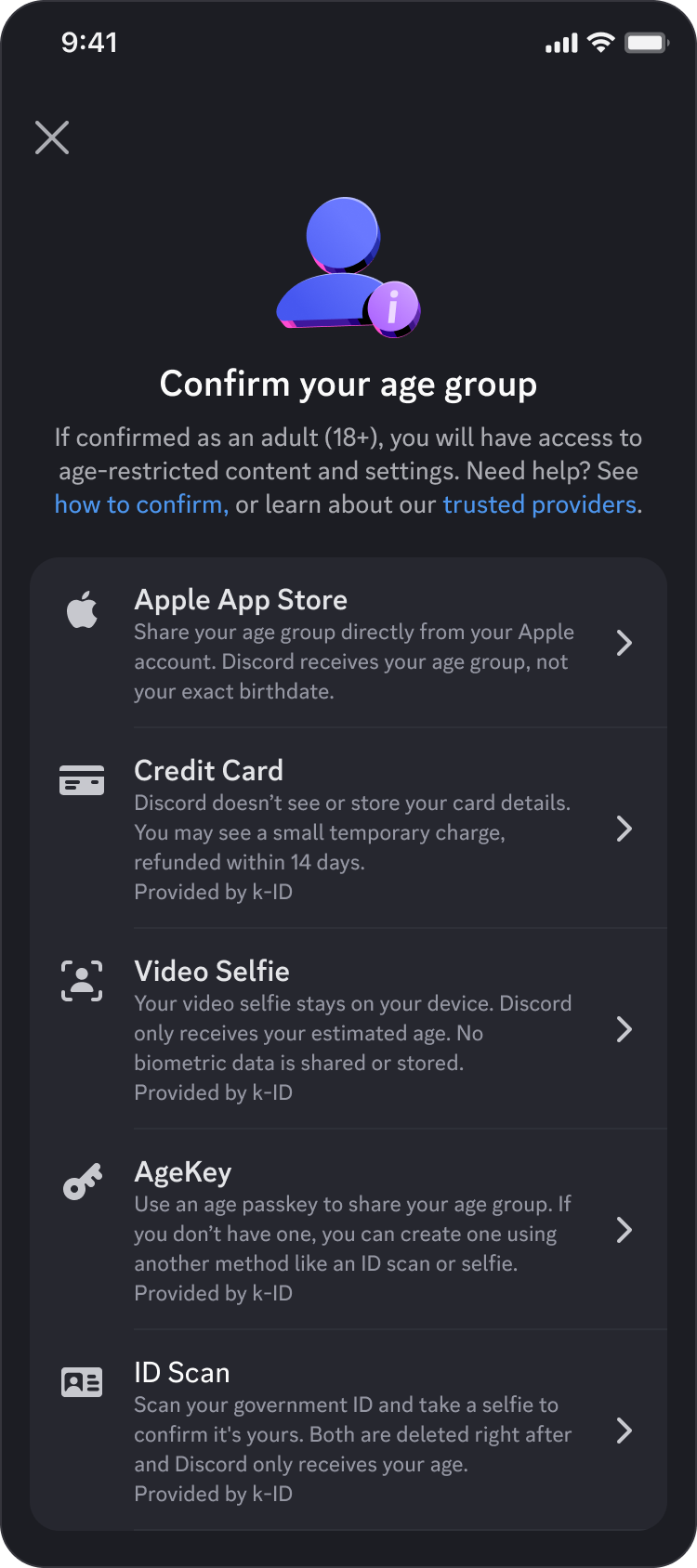
  • More age assurance options. In February, the only methods we’d planned for to confirm your age were facial age estimation or an ID scan. Based on your feedback, we committed to giving you more options that meet our high privacy standards. So we added alternatives, including some that don't require a video selfie or an ID. We've vetted every method, and the data you provide to us and our vendors is only ever used to determine your age group, so you can pick whichever option you're most comfortable with. Depending on factors such as your region or device, you may see some or all of the following options:
    • Credit Cards. You input your card information, and k-ID routes the details to Stripe to confirm the card is owned and authorized by an adult. Neither k-ID nor Discord ever sees the card details. Stripe saves the last 4 digits of card numbers after the check because of their legal obligation as a payment processor. A small temporary charge may be placed to confirm the card is valid, which is then refunded within 14 business days.
    • Apple App Store. Allow Apple to share your age range with us to help determine whether you're an adult or teen. Your exact birthdate won't be shared, only your age group.
    • Google Play Store. Allow Google Play to share your age range with us to help determine whether you're an adult or teen. Your exact birthdate won't be shared, only your age group.
    • Google Wallet. Confirms your age using the ID pass already set up in Google Wallet, based on your passport. Your ID details stay with Google. (Currently Google Wallet only support passports from Brazil, Singapore, Taiwan, the UK, and the United States.)
    • AgeKey. A reusable age credential you set up once and can use across various services, so you don't have to reconfirm on multiple platforms.

"Confirm your age group" mobile screen with various age assurance options.

  • Vendor transparency. We committed to publicly documenting every third-party age assurance vendor and make it clear who each vendor is and what their practices are, including what data they handle and how long they keep it. We've done this, and you can see it here. As a condition of working with us, we require every vendor to only store what you submit for as long as it takes to confirm your age, and to permanently delete it immediately after. We also set a hard requirement: any partner offering facial age estimation must run it entirely on your device, so your biometric data never leaves your phone. k-ID meets that bar, and we won't work with any vendor that doesn't.
  • A technical blog explaining how our age estimation model works. We said we'd publish the methodology behind our age group estimations, including the signal categories we use and the privacy protections built into the model. Today, we're publishing that technical blog alongside this announcement, so you can evaluate the approach for yourselves. You can read it here.
  • Age assurance data in our transparency reports. We said we'd report how many people were asked to confirm their age group, what methods they used, and how often our automated systems handled it without requiring a user to manually confirm their age group. In May, we published the first age assurance data in Discord's 2026 Transparency Report, which includes data from the UK and Australia launches. You can find it here. We'll keep expanding this reporting over time.
  • A dedicated spoiler channel option. We know many communities use age-restricted channels not for adult content, but for conversations people want to have on their own terms, like talking about spoilers, politics, or heavier topics. Earlier this year, we introduced spoiler channels so communities can mark content as a spoiler without age-gating an entire server. More on that here.

How we determine your age group

We believe meeting age requirements shouldn’t require ID checks or selfies for everyone. We'd prefer to give you more choices, including less intrusive options that don't require biometrics or sensitive personal data. That’s why we built an age estimation model based on account signals to determine your age group. Because of it, more than 90% of you will not be asked to confirm your age.

Our age group estimation model looks at patterns of account behavior on Discord. It does not look at your messages, calls, or other content. For example, the way a typical teen uses Discord will look different in aggregate from how a typical 30-year-old uses Discord. Our model has learned these patterns and uses them to estimate whether a given account most likely belongs to an adult (18+) or a teen (13-17).

Specifically, the age group estimation model looks at factors such as:

  • The communities, servers, and games you're connected to
  • General activity levels, such as how many channels or servers you're active in
  • Account history, such as how old your account is

No single server, community, or friend decides your age group. Our age group estimation model learns from patterns across accounts, working the same way as the safety systems we've run for years to catch coordinated abuse.

Doing this without compromising your privacy matters to us. As part of our commitment, we published a technical blog post that explains how the model works, including the privacy protections we built into it. You can read more here.

No model is perfect, and ours is going to make mistakes, though we believe our model performs as accurately as other available methods. Our model works by looking at patterns to create an age group estimation, not a certainty, so some accounts may end up in the wrong age group. We’ll keep learning and continue working to improve the model over time, even as the misses inevitably make their way into memes and social posts.

Note: The age estimation model is not currently available for Discord users in the UK and Australia. Please check this directory to learn more about how this works in your region.

If you're a teen on Discord, here's what this means for you

If the way you use Discord is hanging out, gaming, and chatting with friends in DMs and servers, that stays the same. That's the core of what Discord is for, and it's the same whether you're a teen or an adult. But there are some important differences based on your age group.

Regardless of your age group (teen or adult), you can talk to all of your friends normally no matter what their exact age is. However, teen accounts come with protections around three themes:

  1. Who can reach you: Messages from non-friends go to your message requests inbox so you can review them first. Turning this off requires confirming you're an adult. You'll also get an alert before accepting a friend request from someone you don't share mutual friends or a small server with. This won’t impact people you already talk to. It only changes how messages and requests from people you don't know are handled.
  2. What you can and can’t see: Sensitive images identified by our sensitive content filters are blurred or blocked depending on where they appear. Age-restricted servers, channels, and age-restricted bot commands aren't accessible. Changing any of this requires confirming you're an adult.
  3. What others can see about you: Your full profile details and activity, like what game you're playing, are visible only to friends and people in smaller servers you're part of. You can adjust this at any time.

Some of these are defaults you can change yourself without confirming your age group. Others can only be changed if you are in the adult age group. The full list is here.

If your age group is unconfirmed, you get the same protections except your full profile details and activity are visible to friends and people in all servers you’re part of (details here). This can also be adjusted at any time. Some settings also vary by region. Find specific settings for your region here.

One last thing, personally

I grew up on the early internet. It's where I found people who were into the same things I was, even when no one around me shared those interests, and that changed the direction of my life. It's a big part of why I built Discord. The internet has changed since then, and we don't live in a perfect world, which is why our goal is the same one I wrote about in February: more protections for teens, while keeping the existing experience intact for everyone else. My hope is that our approach shows we can preserve what makes Discord special while taking seriously the responsibility that comes with it.

Any form of age assurance, and the possibility of sharing something biometric or an ID, is a controversial topic. Rightfully so, because of what it represents and where internet legislation around the world is heading: toward a more gated internet. This is bigger than us.

We've chosen to launch our stronger protections for teens everywhere using the most privacy-preserving approach we could build, including where it isn't yet required by law, because we believe it's the right thing to do. By launching a global approach with non-biometric options, we're getting ahead of laws that might ask us to implement something less privacy-focused. The decisions policymakers make now will shape how platforms advance both teen safety and privacy for years to come, and I encourage people to make their perspectives heard where they live.

Previously, I said trust is earned through actions, not posts. This launch is where you hold us to that. We'll get some things wrong, but you can judge us on how we respond: how accurate the age group estimation gets, how fast we fix bad calls, and whether we keep publishing the data so you don't have to take my word for it. That's how we earn your trust.

Stan

Frequently Asked Questions

What is Discord launching and why?

Age assurance laws are expanding around the world, and we’ve had to launch age assurance in more places. Rather than waiting to be told how to do it, we built a privacy-preserving approach based on user feedback.

Starting today, accounts are automatically placed into an age group using account signals, like account age and the servers you're part of, never your messages or content. Because of this, more than 90% of users won't be asked to confirm their age group at all.

If you're in the adult age group (18+), nothing changes. If you're in the teen age group (13-17), you can keep messaging friends, joining voice calls, and taking part in non-age-restricted servers, with added safety protections that block access to age-restricted content, spaces, and settings.

We’ve also added new ways to confirm your age group for anyone who needs to, including options that don't require an ID or selfie, like a credit card, Apple App Store or Google Play age range sharing, Google Wallet, or AgeKey.

Will I need to confirm my age group to keep using Discord?

No. You don’t need to confirm your age group just to access Discord. The vast majority of users are placed into an age group automatically by Discord’s age estimation model and don’t need to do a thing. You will only need to confirm you’re an adult if you have not been placed into the adult age group yet and want to access age-restricted content, spaces, or settings. This doesn't affect core Discord features like messaging friends, joining voice calls, or servers that are not age-restricted.

What is my age group?

You can check your age group status at User Settings > Account Status. It may take a few days to reach your account after launch.

What are the age group statuses?

  • Adult Age Group (18+): Nothing changes.
  • Teen Age Group (13-17): Some additional protections apply. Otherwise, Discord works the same. Learn more here.
  • Unconfirmed: Discord doesn't have enough signal yet to place you in an age group. You can keep using Discord, but some content and settings meant for adults won't be available until you confirm you’re an adult.

How does Discord figure out my age group?

The model looks at patterns of account behavior, such as the communities, servers, and games you're connected to, your general activity levels, and how old your account is. It does not read your messages, and no single server decides your age group. Learn more about how this works here.

What if my age group is wrong, or I'm an adult who wasn't placed in the adult age group?

We believe our model performs as accurately as other available age assurance methods, and will keep learning and improving it over time.

However, no model is perfect, so if your age group isn't correct, go to User Settings > Account Status and confirm your age group there. We’ve added several new ways to do this, including some that don't require an ID or selfie.

What are my options for confirming my age?

Depending on factors like your region and device, you may see:

  • Credit card: k-ID routes your card info to Stripe to confirm it's owned by an adult. Neither k-ID nor Discord ever sees the card details. A small temporary charge may be placed and refunded within 14 business days.
  • Apple App Store: Apple shares your age range (not your exact birthdate) with Discord.
  • Google Play Store: Google Play shares your age range (not your exact birthdate) with Discord.
  • Google Wallet: Confirms your age using the ID pass already set up in Google Wallet, based on your passport. Your ID details stay with Google. Currently limited to passports from Brazil, Singapore, Taiwan, the UK, and the United States.
  • Video Selfie: Your video selfie stays on your device. Discord only receives your estimated age. No biometric data is shared or stored.
  • ID Scan: Scan your government ID and take a selfie to confirm it's yours. Both are deleted right after and Discord only receives your age.
  • AgeKey: A reusable age credential you set up once and can use across other services, so you don't have to reconfirm everywhere.

Learn more about how to confirm your age group here.

I'm worried about my information. What happens to the data I use to confirm my age group? This is one of the biggest concerns we’ve heard from you. We’ve taken significant steps to address your concerns and questions:

  • We’ve fully retired the previous manual review process with a customer service vendor that led to the September 2025 data breach. That process no longer exists and any manual reviews now run through our vetted age assurance vendor, k-ID.
  • We’ve significantly evolved our data-handling practices to ensure we will only ever receive information about your age group, and no personal data beyond that. No matter which vendor you use to confirm your age, we won’t receive your name, your credit card, your ID, or a scan of your face. Instead, the information is processed by vendors like k-ID, who then pass us a signal containing your age group. The vendors are then required to delete your uploaded data immediately after confirming your age group.
  • If you choose to use facial age estimation, know that we’ve set a hard requirement for vendors: any partner offering facial age estimation must run it entirely on your device, so your biometric data never leaves your phone.
  • Your age group isn't shown on your profile or visible to other members in a server, and your identity is never associated with your Discord account.

What happens if I'm in the teen age group on Discord?

You can still hang out, game, and chat with friends in DMs and non-age-restricted servers just like before. Users in the teen age group have a different experience across three areas:

  1. Who can reach you: Messages from non-friends go to your message requests inbox for review first. You'll also get an alert before accepting friend requests from people you don't share mutual friends or a small server with.
  2. What you can and can't see: Sensitive images are blurred or blocked depending on where they appear, and age-restricted servers, channels, and bot commands aren't accessible.
  3. What others can see about you: Your full profile details and activity are visible only to friends and people in smaller servers you're part of.

Learn more here.

My account hasn't been placed into an age group yet. What does that mean?

We're launching this over the course of this week, so it may take a few days to reach your account. If your status remains unconfirmed after this week, it means our age estimation model doesn't have enough signals yet to determine your age group. You get the same protections as teens, except your full profile and activity are visible to friends and everyone in your shared servers. Learn more here.

Otherwise, the core Discord experience, messaging friends, joining voice calls, or servers that are not age-restricted, works the same.

If you're an adult and want to access age restricted content, spaces, or settings, you can confirm your age group at User Settings > Account Status. See more info here.

Can other people see my age group?

Your age group isn't shown on your profile or visible to other members in a server.

Does this experience vary by region?

Teen safety protections may vary slightly depending on where you live, as some regions have specific requirements under local regulation. For region-specific information, see our directory here.

What if I already confirmed my age group?

If you've already confirmed your age group with Discord, you don't need to do it again. Your age group carries over, and you won't be reset to unconfirmed or asked to go through the process a second time.

Why am I not seeing my age group status yet?

We're launching this over the week, so it may take a few days to reach your account. If you don't see anything yet, check back later.

Stanislav Vishnevskiy

Discord CTO & Co-Founder