Don’t want to babysit your app database on a VM but not willing to pay the DBaaS tax either? We're building a third way.
Today, we’re launching Bunny Database as a public preview: a SQLite-compatible managed service that spins down when idle, keeps latency low wherever your users are, and doesn’t cost a fortune.
So what’s the deal with database services in 2026?
It’s become clear by now that the DBaaS platforms that garnered the love of so many devs are all going upmarket. Removing or dumbing down free tiers, charging for unused capacity, charging extra for small features, or bundling them in higher tiers — you already know the drill.
Hard to blame anyone for growing their business, but it doesn’t feel right when these services stop making sense for the very people who helped popularize them in the first place.
So where does that leave you?
Like SQLite, but for the web
Not every project needs Postgres, and that’s okay. Sometimes you just want a simple, reliable database that you can spin up quickly and build on, without worrying it’ll hit your wallet like an EC2.
That’s what we built Bunny Database for.
What you get:
- One-click deployment: just name your database and go, no config needed
- Language-specific tooling: SDKs for TS/JS, Go, Rust, and .NET help you handle the boring bits
- Low latency anywhere: replication regions let you serve reads close to your users
- 41 regions worldwide: choose between automatic, single-region, and multi-region deployment
- Works over HTTP: wire up anything you’d like
- Database editor: insert data or run queries on the spot
- Metrics: instant visibility into reads, writes, storage, and latency
- Affordable, pay-as-you-go pricing: only pay for what you use, but without the serverless tax
Get the full tour including how to connect Bunny Database to your app in this quick demo from our DX Engineer, Jamie Barton:
Why care about database latency anyway?
You probably optimize the heck out of your frontend, APIs, and caching layers, all for the sake of delivering an experience that feels instant to your users. But when your database is far away from them, round-trip time starts to add noticeable latency.
The usual fix is to introduce more caching layers, denormalized reads, or other workarounds. That’s obviously no fun.
And when you think about it, devs end up doing this because the popular DBaaS platforms are usually either limited, complex, or too costly when it comes to multi-region deployments. So what looks like a caching problem is actually a data locality issue.
OK, but how bad can it really be?
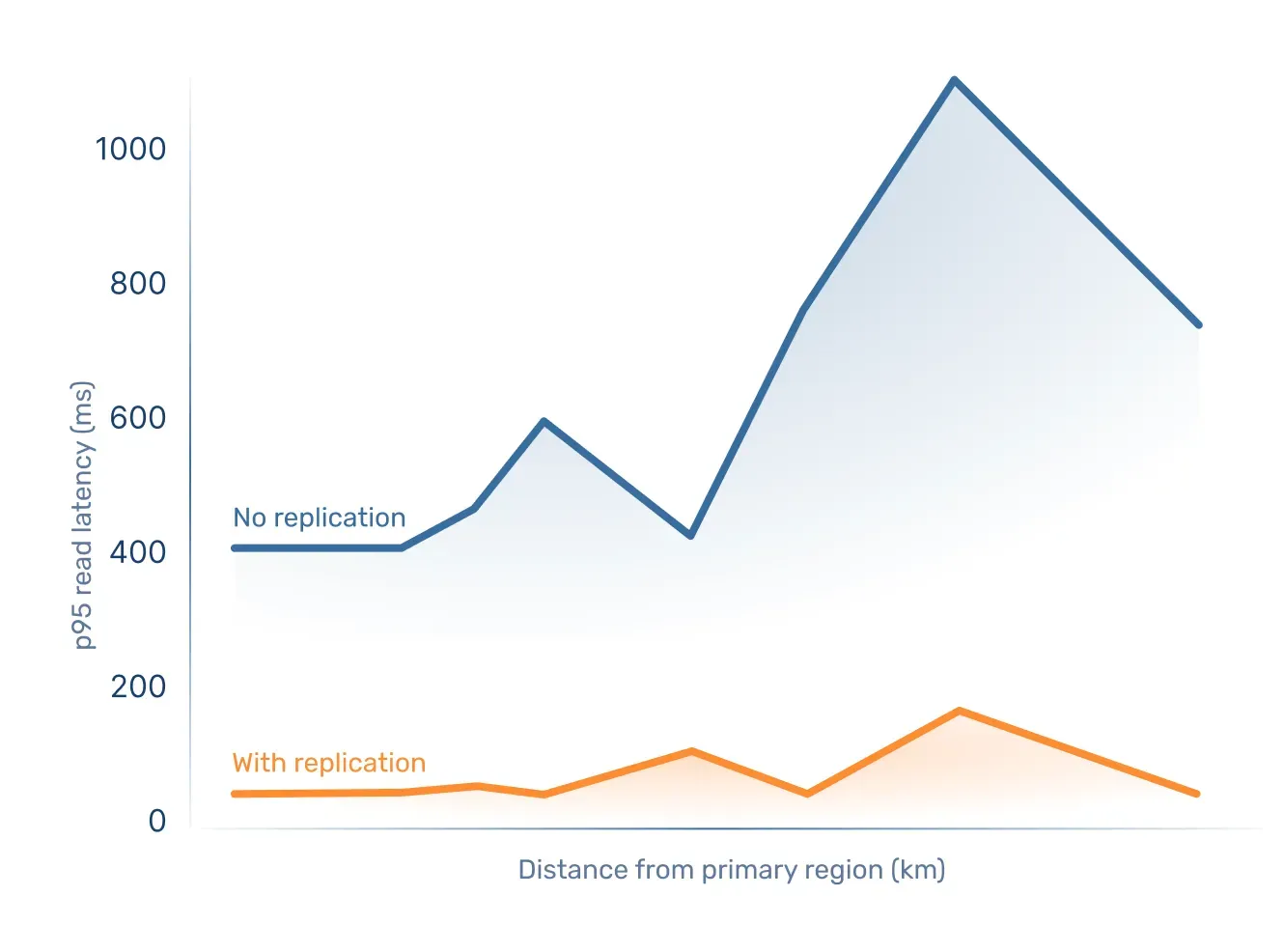
To find out, we ran a read latency benchmark and measured p95 latency in Bunny Database.
We picked a number of regions across the world and compared round-trip time for client locations ever farther away from the database in:
- a single-region setup,
- with replication regions enabled.
Turns out serving reads close to clients reduced latency by up to 99%.
Check out the full write-up on the benchmark setup and results here.
While this definitely matters most to apps with global users, data locality does apply to everyone. With Bunny Database, you don’t have to stick to major data center locations and compensate with caching workarounds any more. Instead, you get a lot of flexibility to set up regions in an intuitive interface and it’s easy to switch things up as your requirements change.
Choose between 3 deployment types when creating a database:
- Automatic region selection gives you one-click deployment with minimal latency. Bunny Database will select regions for you based on your IP address (you can check and tweak the selection in settings later).
- Single-region deployment lets you pick one of 41 regions available worldwide (check the full list here).
- Manual region selection gives you custom multi-region setup, where you can freely pick regions that make the most sense for your audience.
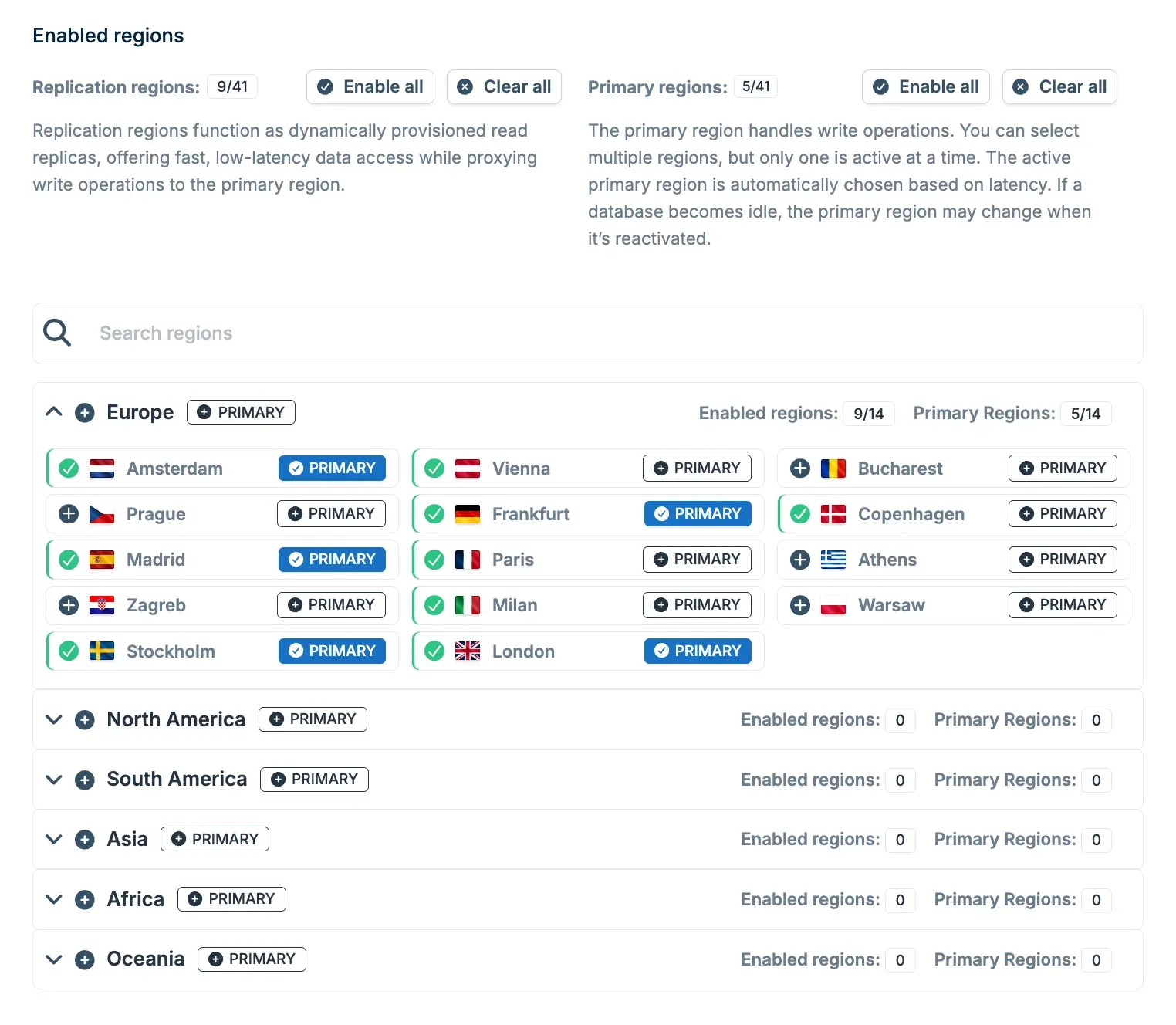
All of this lets you start wherever you’d like and add regions as needed, without re-architecting your app.
Usage-based pricing, but without the serverless tax
In the database world, capacity-based pricing gives you some predictability. But no one likes to pay for unused capacity, right?
Serverless, on the other hand, is supposed to be cost-efficient, yet can rack up bills quickly, especially when the DBaaS charges significant markups on top of already pricey compute.
We don’t do hyperscalers, though, so we can charge a fair price for Bunny Database in a usage-based model.
- Reads: $0.30 per billion rows
- Writes: $0.30 per million rows
- Storage: $0.10 per GB per active region (monthly)
- When not getting requests, Bunny Database only incurs storage costs. One primary region is charged continuously, while read replicas only add storage costs when serving traffic (metered by the hour)
- Your usage is charged continuously (pay-as-you-go) and invoiced monthly
During the public preview phase, Bunny Database is free.
Wait, what does “SQLite-compatible” actually mean?
Bunny Database wouldn’t be possible without libSQL, the open-source, open-contribution fork of SQLite created by Turso.
We run Bunny Database on our own fork of libSQL, which gives us the freedom to integrate it tightly with the bunny.net platform and handle the infrastructure and orchestration needed to run it as a managed, multi-region service.
What does this mean for Bunny Database’s upstream feature parity with libSQL and SQLite, respectively?
The short answer is that we don’t currently promise automatic or complete feature parity with either upstream libSQL or the latest SQLite releases.
While libSQL aims to stay compatible with SQLite’s API and file format, it doesn’t move in lockstep with upstream SQLite. We wouldn’t expect otherwise, especially as Turso has shifted focus from libSQL toward a long-term rewrite of SQLite in Rust.
For Bunny Database, this means that compatibility today is defined by the libSQL version we’re built on, rather than by chasing every upstream SQLite or libSQL change as it lands. We haven’t pulled in any upstream changes yet, and we don’t currently treat upstream parity as an automatic goal.
That’s intentional. Our focus so far has been on making Bunny Database reliable and easy to operate as a service. We think bringing in upstream changes only makes sense when they clearly improve real-world use cases, not just to tick a parity checkbox.
If there are specific libSQL features you’d like to see exposed in Bunny Database, or recent SQLite features you’d want us to pull in, we’d love to hear about it. Join our Discord to discuss your use cases and help shape the roadmap!
What’s ahead for Bunny Database
Speaking of the roadmap, we don’t stop cooking. Here’s what’s coming up next:
- Automatic backups
- Database file import/export
- Auto-generated, schema-aware API with type-safe SDKs
There’s even more to come, but it’s too soon to spill the beans yet, especially while we’re in public preview. We’d love to hear your feedback, so we can shape what ships next together.
Bunny Database works standalone and fits right into your stack via the SDKs (or you can hook up anything using the HTTP API). But it also plays nicely with Bunny Edge Scripting and Bunny Magic Containers.
To connect your database to an Edge Script or a Magic Containers app, simply go to the Access tab of the chosen database and click Generate Tokens to create new access credentials for it.
Once they’re generated, you’ll get two paths to choose from:
- Click Add Secrets to an Edge Script and select the one you’d like to connect from the list. You’ll also need to import the libSQL TypeScript client and use the provided code snippet to connect it to your database.
- Click Add Secrets to Magic Container App and select the one you’d like to connect from the list. You’ll also need to connect to the database from your app using one of the client libraries or the HTTP API.
After you complete the setup, the database URL and access token will be available as environment variables in your script or app. Use them to connect to your database:
import
{
createClient
}
from
"@libsql/client/web";
You can find more detailed, step-by-step integration instructions in the docs:
Hop on board
We can’t wait to see what you’ll build with Bunny Database and what you think of it. During the public preview phase, you get 50 databases per user account, each capped at 1 GB, but we hope this should be more than enough for lots of fun projects.
Just sign in to the bunny.net dashboard to get started. Happy building!