The Casio FZ-1 uses linear interpolation most of the time but you can also make it use drop sample interpolation. This is not in the user manual and I think it deserves to be more widely known.
Interpolation
Samplers play back sounds at different pitches by varying the playback speed of the sound. Usually the sampler itself has a fixed playback rate and the speed variation is achieved via sample rate conversion. If you want to change the sample rate of a recorded sound after it was recorded you have to invent – interpolate – new sample values based on the values you already have.
In the 1980s samplers couldn't do arithmetic fast enough to perform high fidelity interpolation. The simplistic interpolation methods at the time distort the sound and this distortion is what we now the call the "character" of vintage digital machines.
The simplest form of interpolation is called "drop sample" interpolation. Visually this looks like a stair stepping line between the points you want to interpolate between. You don't invent any new values, you just used the last seen value. The result is a rough-looking line even if the original line was smooth. One step up is linear interpolation, where you draw staight lines between the original points. The values you invent are points on these lines. The straight lines themselfves are smooth but you get sharp kinks at the original points, where you have to change direction. It's smoother than drop sample but it still creates noticeable aliasing distortion
According to the Rossum Assimil8or manual (p. 46),
Linear interpolation is used by most sample playback engines; drop sample was used by instruments from the PPG, through the Ensoniq Mirage, to the SP1200.
What about the Casio FZ-1? Most of the time, it's using linear interpolation, except when it doesn't.
The FZ-1 has two interpolation modes
I got curious about how the Casio FZ-1 handles interpolation because a YouTube commenter mentioned that enabling loop crossfading "disables the anti-aliasing". This made no sense to me when I first read it but then later I saw this again in a "FZ-1 tips and tricks" document. I decided I had to go and try it out myself. When you change the value of the "CROS TIME" setting in the "LOOP" menu to a number other than 0 you start to hear more aliasing noise when you play back the sample at any pitch other than its original pitch.
I recorded a pitched down square wave, and in normal mode (cross time = 0), we see a piecewise linear signal. This looks like linear interpolation.
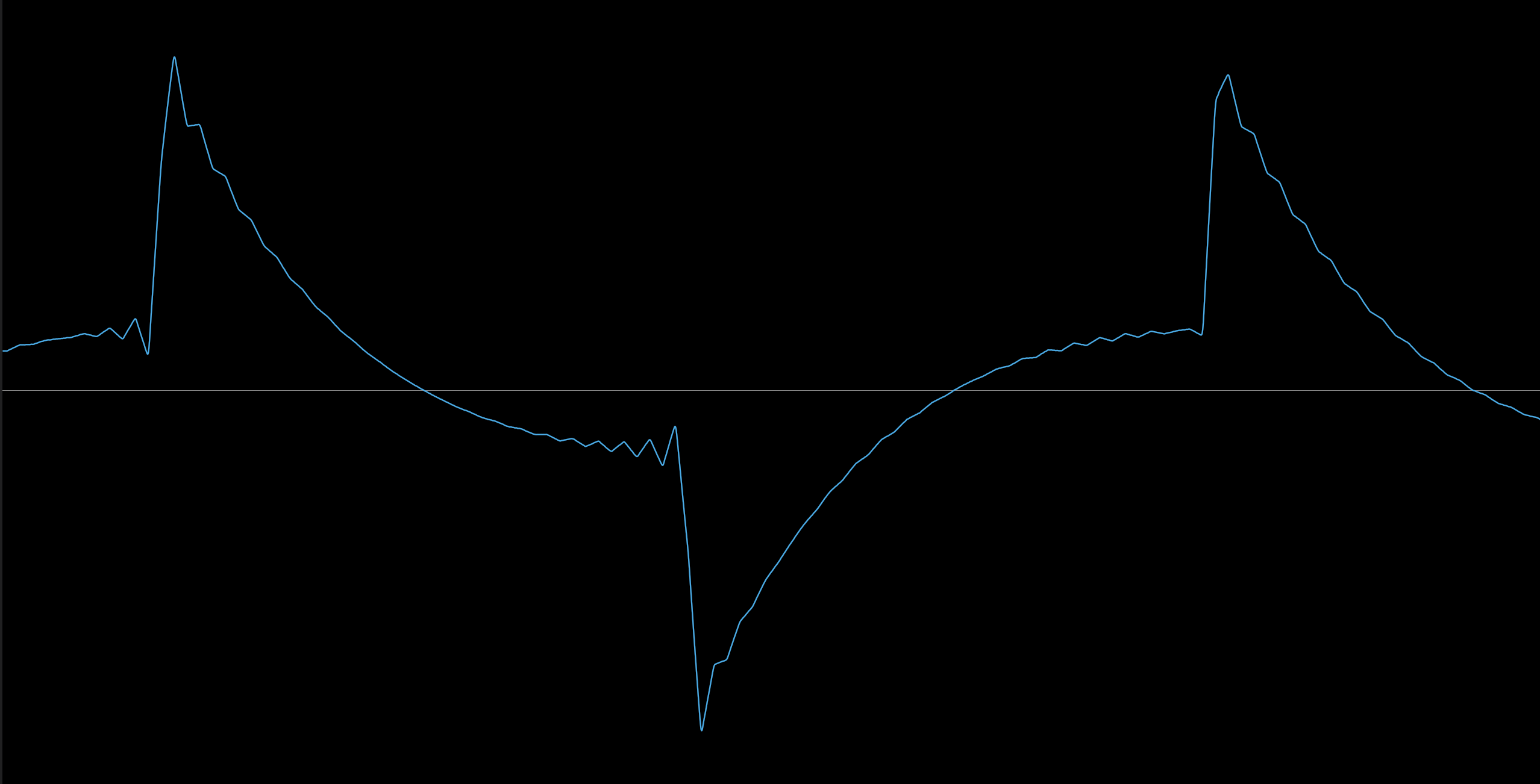 Recording of a 440Hz square wave, pitched 3 octaves down on the FZ-1 (so to 55Hz), with cross fade time set to 0. It doesn't look like a square wave because one or more highpass filters in the recording chain are attenuating the fundamental.
With 'cross time' set to 1 on the other hand, we get a stair-stepped waveform, which I believe means that we are seeing drop-sample interpolation.
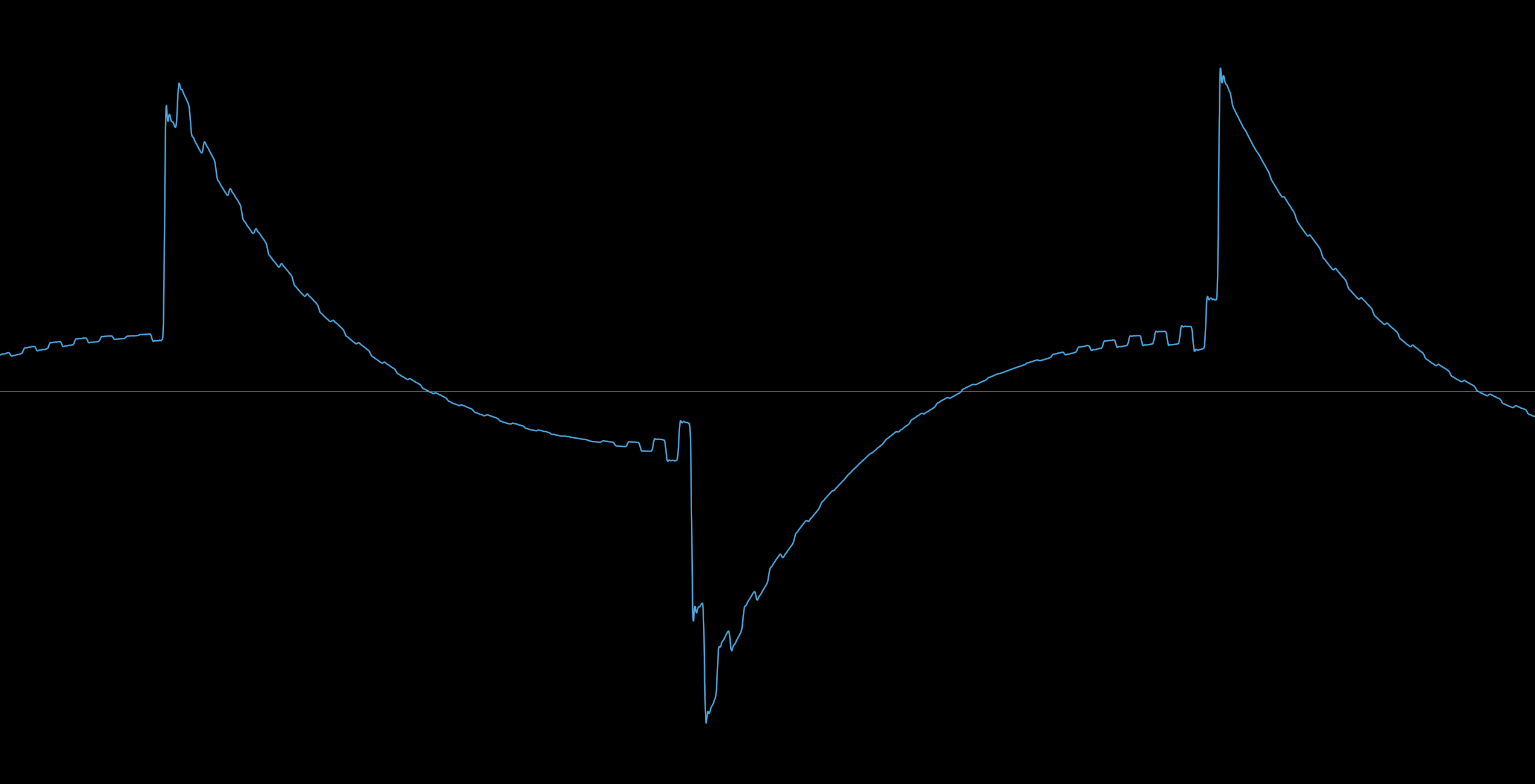 Recording of the same square wave with cross fade time set to 1. Note the stair-stepped waveform. The stair steps are not horizontal because of high pass filtering.
Questions
Isn't this documented anywhere?
Clearly people on the internet know about this but it's not in the Casio user manual. However, in the developer manual, in the description of the voice parameters on p.18 it says:
loopxf - Shows a timing duration for Cross Fade Loop and takes a number among 0-1023. The number 0 designates a minimal distorted sound from artificial data in between samples. Place a figure 0 for non-cross fade looping.
Perhaps "artificial data in between samples" means interpolation? And "minimal distorted" means "linear interpolation"?
Does it matter what loop segment you change crossfade time in?
Yes.
It seems that when not using looping, you're all the time in loop segment 1, and that is where you must change "CROS TIME" to get drop sample interpolation. If you create multiple loop segments in your voice, you can have some of them use linear and others use drop sample interpolation by varying the cross fade time of each segment.
What's with all the ringing?
In the waveform images above you can see ringing before and after each jump.
This is because the audio data, which I loaded straight from the computer into the FZ (so not by sampling on the FZ) had heavy ringing in it. I did this by mistake but I left it in the pictures because it actually makes for a nice waveform to see the impact of the different interpolation methods.
For reference, this is how I accidentally made a voice file with ringing:
sox -n -c 1 square.wav synth 1 square gain -6
wav2fzv square.wav > square.fzv
What happens here is that sox synthesizes a perfect square wave at some default sample rate, and then wav2fzv converts it to 36kHz afterwards.
To not have ringing, I had to do this instead:
sox -r 36k -n -c 1 square2.wav synth 1 square gain -6
wav2fzv square2.wav > square2.fzv
Here, we make sox operate at 36kHz by opening the dummy input (-n) as a 36kHz file. You have to put the -r 36k before -n or you still get sample rate conversion.
Can I use drop sample interpolation with wave synthesis voices?
No.
Longer answer: I tried but I couldn't get it working. You can't enter the "LOOP" menu when editing a wave synthesis voice (i.e. a voice using "preset wave", "sine synthesis", "cut sample" or "hand drawing"). I tried editing a voice dump file on the computer, to bypass the FZ menu system, but that didn't work either.
Conclusion
The FZ-1 uses linear interpolation by default but it will use drop sample interpolation if you enable loop crossfading in the right loop segment.