
All Blog Posts

October 20, 2026 · 8 min read

Jesse Donkervliet and Junhao Li
Senior Software Engineers
When I use an open-weight model, I see results that are nowhere close to what the quality benchmarks indicate.
Software developer working with AI models these days
Tool call accuracy is an important part of serving open-weight models. When your tool calls aren’t accurate, the model builds up on nonsensical context. This leads to low quality results, particularly for agentic workloads where multi-turn sessions are common.
Tool-call Schemas
You can enable an LLM to call an external tool in two steps: (1) inform the AI model about the existence of externally available tool calls and (2) provide the model with instructions on how to output structured tool-calls. For example, when connecting OpenCode to Kimi, OpenCode sends Kimi a JSON array describing available tools. One of the tools in this list is webfetch, which fetches Web page contents:
[{
  "type": "function",
  "function": {
    "name": "webfetch",
    "description": "- Fetches content from a specified URL\n- Takes a URL and optional format as input\n- Fetches the URL content, converts to requested format (markdown by default)\n- Returns the content in the specified format\n- Use this tool when you need to retrieve and analyze web content\n\nUsage notes:\n  [content redacted for brevity]\n",
    "parameters": {
      "$schema": "https://json-schema.org/draft/2020-12/schema",
      "type": "object",
      "properties": {
        "url": {
          "type": "string",
          "description": "The URL to fetch content from"
        },
        "format": {
          "type": "string",
          "enum": [
            "text",
            "markdown",
            "html"
          ],
          "description": "The format to return the content in (text, markdown, or html). Defaults to markdown.",
          "default": "markdown"
        },
        "timeout": {
          "type": "number",
          "description": "Optional timeout in seconds (max 120)"
        }
      },
      "required": [
        "url"
      ]
    }
  }
}, ...]
The inference engine then wraps this JSON description in LLM-specific tokens before passing it into the LLM, to match how the LLM was trained to recognize tool declarations. When serving Kimi, this looks something like:
<|im_system|>tool_declare<|im_middle|>[{"type":"function","function":{...}, ...]<|im_end|>The JSON object describing the tool (or function, in the JSON above) includes the tool’s parameters, their types, which of the parameters are required, etc. This is known as the tool’s schema. For an agent harness (e.g., OpenCode) to successfully execute a tool call generated by the LLM, the call must follow the rules specified in its schema.
I'll fetch that page. <|tool_calls_section_begin|><|tool_call_begin|>functions.webfetch:0<|tool_call_argument_begin|>{"url": "https://ubicloud.com", "format": "markdown"}<|tool_call_end|><|tool_calls_section_end|>These tokens are parsed by the inference server’s parser, extracting the LLM-specific tokens and turning the call into a JSON object such as:
{
  "role": "assistant",
  "content": "I'll fetch that page.",
  "tool_calls": [
    {
      "id": "functions.webfetch:0",
      "type": "function",
      "function": {
        "name": "webfetch",
        "arguments": "{\"url\": \"https://example.com\", \"format\": \"markdown\"}"
      }
    }
  ]
}
This is then sent back to your harness (OpenCode, in our example), which runs its webfetch tool and sends its output back to the model.
The Importance of Schema Accuracy
For a tool-call to succeed, the call must adhere to the tool’s schema.
Constrained Decoding
An LLM computes for each token the probability that it is the next in the sequence. It then selects the next token by performing a weighted sample. Constrained decoding avoids malformed tool calls by preventing models from sampling tokens that would result in a syntactically invalid tool call. When using constrained decoding, instead of letting the model sampling tokens freely and validating the result afterward, the inference engine guides generation step by step. At each step, only valid tokens are allowed.
# Kimi K2.6 tool call syntax:
# <|tool_call_begin|>{function.name}:{index}
# <|tool_call_argument_begin|>{arguments}
# <|tool_call_end|>
TagFormat(
    begin=f"{TOOL_CALL_BEGIN_PREFIX}{name}{TOOL_CALL_SUFFIX}",
    content=SequenceFormat(
        elements=[
            RegexFormat(pattern=r"\d+"),
            ConstStringFormat(value=TOOL_CALL_ARGUMENT_BEGIN),
            JSONSchemaFormat(
                json_schema=parameters,
                any_order=any_order,
                max_whitespace_cnt=max_whitespace_cnt,
            ),
        ]
    ),
    end=TOOL_CALL_END,
)
You can find the full implementation here.
Begin tool call → Tool name → Tool call index → Begin arguments → Schema-constrained JSON → End tool call
Invalid paths are blocked during generation. For example, when generation reaches the tool-call index phase, the engine restricts sampling to integer tokens and masks out everything else. The figure below, reproduced from XGrammar’s article, provides a good visualization of how invalid tokens are masked.
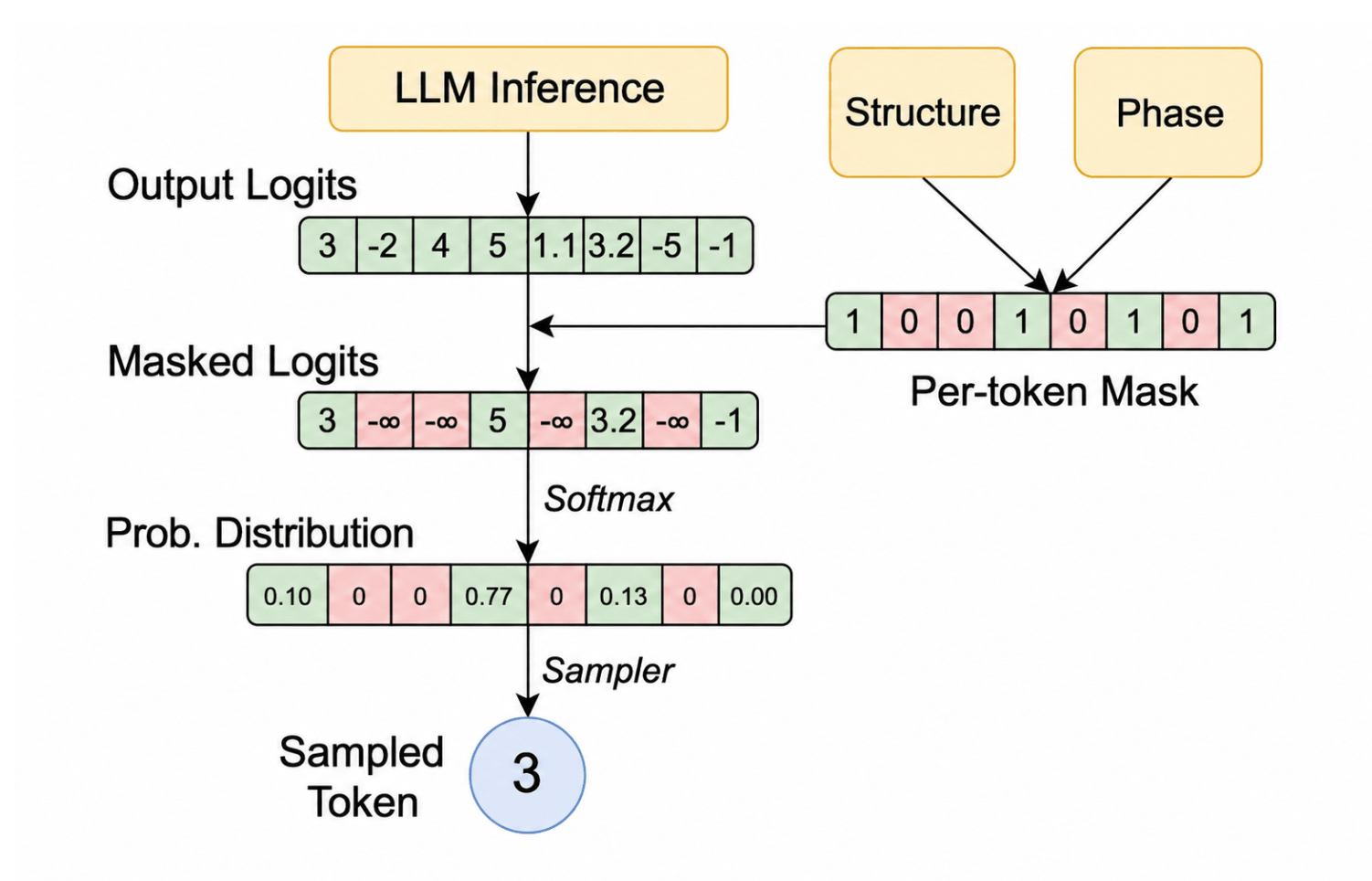
Source: Dong, Yixin, et al. "XGrammar: Flexible and efficient structured generation engine for large language models." Proceedings of Machine Learning and Systems 7 (2025). [link]
This changes schema accuracy from a best-effort approach to a runtime guarantee. The model still decides which token to generate, but now the token is selected from a restricted and syntactically-correct set.
Differences in Constrained-Decoding Behavior
Moonshot AI recommends constrained decoding to be turned on and its own API behaves as such. So we initially added constrained decoding in our fork of vLLM. After vLLM added this feature in v0.25, we switched to using this feature from upstream for Kimi and DeepSeek. Unfortunately not long after, we found out that our tool-call accuracy score dropped back to 91%!
- General model issues: For some models, their unconstrained output diverges significantly from the tool's schema or model's tool-calling format. This forces the model to select tokens it otherwise wouldn't have, leading it off course [1]. For example, gpt-oss-20b, Qwen 3.6, and GLM 5.1 users reported issues after having this feature enabled by default.
- Grammar translation bugs: vLLM might have bugs in translating a model's tool schema or tool-calling format into the model's specific grammar. This can result in problems including invalid tool calls, request failures, silently dropping the constrained decoding, and lower tool-calling accuracy [1, 2].
- Feature interaction bugs: There are bugs in the interaction between constrained decoding and other serving-engine features. For example, a bug in the interplay between constrained decoding and speculative decoding can result in speculative tokens being wrongly rejected by the grammar, leading to failing requests [1, 2].
Due to these issues, vLLM maintainers reported seeing problems with several models after constrained decoding was enabled. This made disabling constrained decoding by default the safer option for a model-agnostic serving engine such as vLLM. Later, vLLM added the --tool-strict-level flag so that users can enable tool-call strictness for their deployments.
Conclusion
When using LLMs, the quality you observe isn’t based on the model alone. The inference engine also plays an important role. Change the inference engine and its settings, and you change the model’s output quality.