FracturedJson is a family of utilities that format JSON data in a way that's easy for humans to read, but fairly compact. Arrays and objects are written on single lines, as long as they're neither too long nor too complex. When several such lines are similar in structure, they're written with fields aligned like a table. Long arrays are written with multiple items per line across multiple lines.
There are lots of settings available to control the output, but usually you can ignore most of them. FracturedJson produces nice-looking output from any set of JSON data automatically.
You can try it out with the browser formatter page. It's also available as a .NET library, a JavaScript/Typescript package, and a Visual Studio Code extension. See here for Python options.
Here's a sample of output using default settings. See the Options page for examples of what you different settings do.
{
    "BasicObject"   : {
        "ModuleId"   : "armor",
        "Name"       : "",
        "Locations"  : [
            [11,  2], [11,  3], [11,  4], [11,  5], [11,  6], [11,  7], [11,  8], [11,  9],
            [11, 10], [11, 11], [11, 12], [11, 13], [11, 14], [ 1, 14], [ 1, 13], [ 1, 12],
            [ 1, 11], [ 1, 10], [ 1,  9], [ 1,  8], [ 1,  7], [ 1,  6], [ 1,  5], [ 1,  4],
            [ 1,  3], [ 1,  2], [ 4,  2], [ 5,  2], [ 6,  2], [ 7,  2], [ 8,  2], [ 8,  3],
            [ 7,  3], [ 6,  3], [ 5,  3], [ 4,  3], [ 0,  4], [ 0,  5], [ 0,  6], [ 0,  7],
            [ 0,  8], [12,  8], [12,  7], [12,  6], [12,  5], [12,  4]
        ],
        "Orientation": "Fore",
        "Seed"       : 272691529
    },
    "SimilarArrays" : {
        "Katherine": ["blue",       "lightblue", "black"       ],
        "Logan"    : ["yellow",     "blue",      "black", "red"],
        "Erik"     : ["red",        "purple"                   ],
        "Jean"     : ["lightgreen", "yellow",    "black"       ]
    },
    "SimilarObjects": [
        { "type": "turret",    "hp": 400, "loc": {"x": 47, "y":  -4}, "flags": "S"   },
        { "type": "assassin",  "hp":  80, "loc": {"x": 12, "y":   6}, "flags": "Q"   },
        { "type": "berserker", "hp": 150, "loc": {"x":  0, "y":   0}                 },
        { "type": "pittrap",              "loc": {"x": 10, "y": -14}, "flags": "S,I" }
    ]
}
Optionally, comments can be preserved. Comments aren't allowed by the official JSON standard, but they're ubiquitous, so it's nice to have the option. FracturedJson tries to keep the comments together with whatever elements they seem to relate to.
Most JSON libraries give you a choice between two formatting options. Minified JSON is very efficient, but difficult for a person to read.
{"AttackPlans":[{"TeamId":1,"Spawns":[{"Time":0.0,"UnitType":"Grunt","SpawnPointIndex":0},{"Time":0.0,"UnitType":"Grunt","SpawnPointIndex":0},{"Time":0.0,"UnitType":"Grunt","SpawnPointIndex":0}]}],"DefensePlans":[{"TeamId":2,"Placements":[{"UnitType":"Archer","Position":[41,7]},{"UnitType":"Pikeman","Position":[40,7]},{"UnitType":"Barricade","Position":[39,7]}]}]}Most beautified/indented JSON, on the other hand, is too spread out, often making it difficult to take in quickly or to scan for specific information.
{
    "AttackPlans": [
        {
            "TeamId": 1,
            "Spawns": [
                {
                    "Time": 0,
                    "UnitType": "Grunt",
                    "SpawnPointIndex": 0
                },
                {
                    "Time": 0,
                    "UnitType": "Grunt",
                    "SpawnPointIndex": 0
                },
                {
                    "Time": 0,
                    "UnitType": "Grunt",
                    "SpawnPointIndex": 0
                }
            ]
        }
    ],
    "DefensePlans": [
        {
            "TeamId": 2,
            "Placements": [
                {
                    "UnitType": "Archer",
                    "Position": [
                        41,
                        7
                    ]
                },
                {
                    "UnitType": "Pikeman",
                    "Position": [
                        40,
                        7
                    ]
                },
                {
                    "UnitType": "Barricade",
                    "Position": [
                        39,
                        7
                    ]
                }
            ]
        }
    ]
}
FracturedJson tries to format data like a person would. Containers are kept to single lines as long as they're not too complex and not too long. If several successive inline arrays or objects are similar enough, they will be formatted as a table.
{
    "AttackPlans" : [
        {
            "TeamId": 1,
            "Spawns": [
                {"Time": 0, "UnitType": "Grunt", "SpawnPointIndex": 0},
                {"Time": 0, "UnitType": "Grunt", "SpawnPointIndex": 0},
                {"Time": 0, "UnitType": "Grunt", "SpawnPointIndex": 0}
            ]
        }
    ],
    "DefensePlans": [
        {
            "TeamId"    : 2,
            "Placements": [
                { "UnitType": "Archer",    "Position": [41, 7] },
                { "UnitType": "Pikeman",   "Position": [40, 7] },
                { "UnitType": "Barricade", "Position": [39, 7] }
            ]
        }
    ]
}
FracturedJson uses four types of formatting: inlined, compact multiline array, table and expanded.
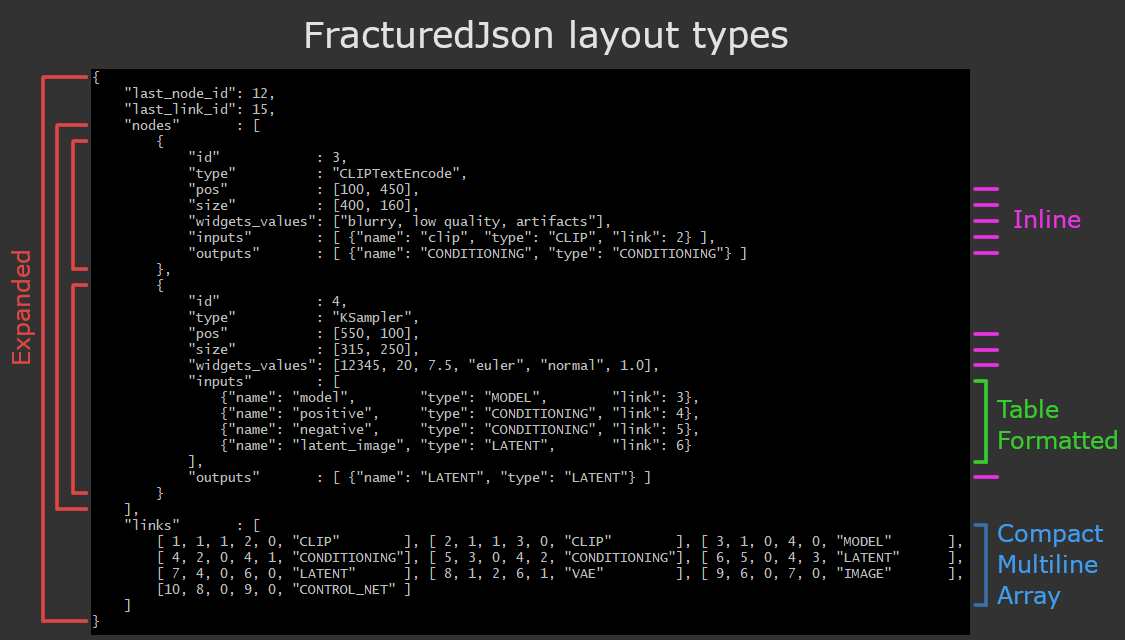
When possible, sections of the document are written inlined, as long as that doesn't make them too long or too complex (as determined by the settings). "Complexity" refers to how deeply nested an array or object's contents are.
Example:
{ "UnitType": "Archer", "Position": [41, 7] }Use the setting MaxInlineComplexity to control how much nesting is allowed on one line.
The next option, for arrays, is to write them with multiple items per line, across multiple lines.
Example:
[
    [19,  2], [ 3,  8], [14,  0], [ 9,  9], [ 9,  9], [ 0,  3], [10,  1],
    [ 9,  1], [ 9,  2], [ 6, 13], [18,  5], [ 4, 11], [12,  2]
]
Use the setting MaxCompactArrayComplexity to control how deeply nested items can be when arranged this way, or use -1 to disable this feature.
If an array or object contains inlineable items of the same type, they can be formatted in a tabular format. With enough room, all fields at any depth are lined up (and reordered if necessary).
Example:
{
    "Rect" : { "position": {"x": -44, "y":  3.4         }, "color": [0, 255, 255] },
    "Point": { "position": {          "y": 22   , "z": 3}                         },
    "Oval" : { "position": {"x": 140, "y":  0.04        }, "color": "#7f3e96"     },
    "Plane": { "position": null,                           "color": [0, 64, 64]   }
}
If the table wouldn't fit with all of the elements and subelements aligned, the inner-most containers are collapsed while keeping the outer ones still aligned.
{
    "Rect" : { "position": {"x": -44, "y": 3.4},  "color": [0, 255, 255] },
    "Point": { "position": {"y": 22, "z": 3}                             },
    "Oval" : { "position": {"x": 140, "y": 0.04}, "color": "#7f3e96"     },
    "Plane": { "position": null,                  "color": [0, 64, 64]   }
}
Use the setting MaxTableRowComplexity to control how how deeply nested rows can be, or use -1 to disable this feature. Use TableCommaPlacement to adjust where commas are placed.
If none of those options work for an element, it will be written across multiple lines, with child items indented and starting on its own line.
Example:
[
    {
        "type" : "turret",
        "hp"   : 400,
        "loc"  : {"x": 47, "y": -4},
        "flags": ["stationary"]
    },
    {
        "type" : "assassin",
        "hp"   : 80,
        "loc"  : {"x": 102, "y": 6},
        "flags": ["stealth"]
    },
    { "type": "berserker", "hp": 150, "loc": {"x": 0, "y": 0} },
    {
        "type" : "pittrap",
        "loc"  : {"x": 10, "y": -14},
        "flags": ["invulnerable", "stationary"]
    }
]
If you have any questions, comments, requests, advice, or whatever, feel free to check out the discussions area.