02 August 2026
Harder than one might assume!
I've been trying to work through SICP this year. I haven't even gotten to the good stuff yet, but in my defense "this year" I was also hospitalized with septic shock and bought my first house. Nevertheless I've returned to this project in the past few weeks, and found what I left off with: a fairly broken Emacs config for the whole process.
After starting/stopping/returning to my setup a few times over the course of several months, I've got a pretty good sense of what I want in terms of IDE/learning environment for making my way through the rest of the book. Here's the
Vision
- Working REPL and language mode for the variant of scheme used in the SICP book
- Access to SICP from within emacs natively. No pdfs!
- Ability to embed SRC blocks within an emacs .org file with syntax highlighting
- Ability to hit a keybinding and send that source block to my REPL
- Ability to hit a keybinding and export all source blocks which are under a header that contains "Exercise" to a file named after that heading in a subdirectory in the current working directory. Eg - any source block under the heading Exercise 1 would be placed in the file ./local_dir/Exercise 1. But a source block under the heading Chapter 1 notes would not! (Org users know this is called tangling!)
- Ability to "save" my window set up and place within SICP - on emacs loadup, or at any point while doing other things, I should be able to hit a keybinding and be dropped into a frame with my exact windows, buffers, and locations within those buffers as they were the last time I was working on SICP.
This is not a complicated list of requirements! But nonetheless the state of the lisp/scheme/racket ecosystem within emacs in 2026 is how I assume it's been forever: fragmented. I am a rather amateur lisper and emacs user, so figuring out where things are going wrong and what defaults are getting me into a loop where was very challenging. Furthermore many things which "should" work and seem to have once worked fine are, in 2026, broken -- the interop between various emacs packages have broken down over the years. There are no shortage of similar blog posts online --- the overlap between emacs nerds and SICP enthusiasts is large --- but I kept finding that .emacs configurations that worked for folks in 2009, 2014, or 2024 did not in fact still work for me. Hopefully this information is of service to future SICPers struggling to get a working setup.
I'm using vanilla GNU Emacs 30.2 on Arch Linux. Without further ado: Let's start with the easy things first.
Getting the SICP language
The SICP language is a Scheme. However, it is not actually exactly equivalent to the various MIT schemes available on the internet. I wanted a language which was exact to the one used in the book, so as not to waste my time going down syntax rabbit-holes where implementation details differed between my environment and the one the book assumed.
A working implementation of the SICP scheme is instead provided as a package in the Racket language. Konstantinos Chousos has an excellent blog post on getting that up and running here. Here's a basic overview:
- Install racket through your package manager. On Arch this would be
$ pacman -Syu racket - Install the SICP package through raco, the racket package manager
$ raco pkg install sicp - Test your install! The "inc" function is not available within standard racket, only SICP. Write a test.rkt file with the following contents:
Run it using racket:# lang sicp (inc 1)
You should see 2 - if so, you've successfully installed the SICP language. (inc 1) is a very helpful litmus test as you get your environment up and running as to whether your REPL/racket program is using the right interpreter for your code.$ racket test.rkt
Getting the SICP Book in Emacs
Again, credit to Konstantinos for pointing me this way. This one's easy - MELPA has a sicp package that offers the full SICP book as an additional Info mode node. This is great for me --- I like info mode conventions -- but it's also available for free on the SICP website as html and pdf if you prefer.
(use-package sicp)Working language environment in Emacs
Here's where the difficulties begin. There are any number of different modes within emacs for editing files and spinning up REPLs in the wider lisp language family. Ideally, we'd probably use racket mode for everything. Racket (and therefore racket-mode) know how to deal with the #lang sicp we have to sprinkle everywhere and don't require extra config to eg get the repl to print out variables how the SICP language should.
However, between 2011 and 2024 the racket-mode API surface seems to have changed in ways which make it interact poorly with evaluating racket source blocks from within org-mode. If you don't care about org-mode: That is amazing for you. You can just read the section on racket-mode and ignore the rest. If you want the nice bells and whistles I mentioned above where you can extract code easily from org-mode, evaluate it, etc: You'll have to put in a bit more work.
racket-mode
racket-mode is available as a MELPA package. The following should all go in your emacs setup file. I use vanilla emacs so if you're using Doom/straight.el/what have you to manage packages, edit accordingly. We also need to tell emacs to hook into it when we visit a .rkt mode file.
(use-package racket-mode
  :mode (("\.rkt\'" . racket-hash-lang-mode)))
We use racket-hash-lang-mode here because this tells racket-mode to go looking for a #lang line to tell how to lex (for syntax highlighting, indent, navigation).
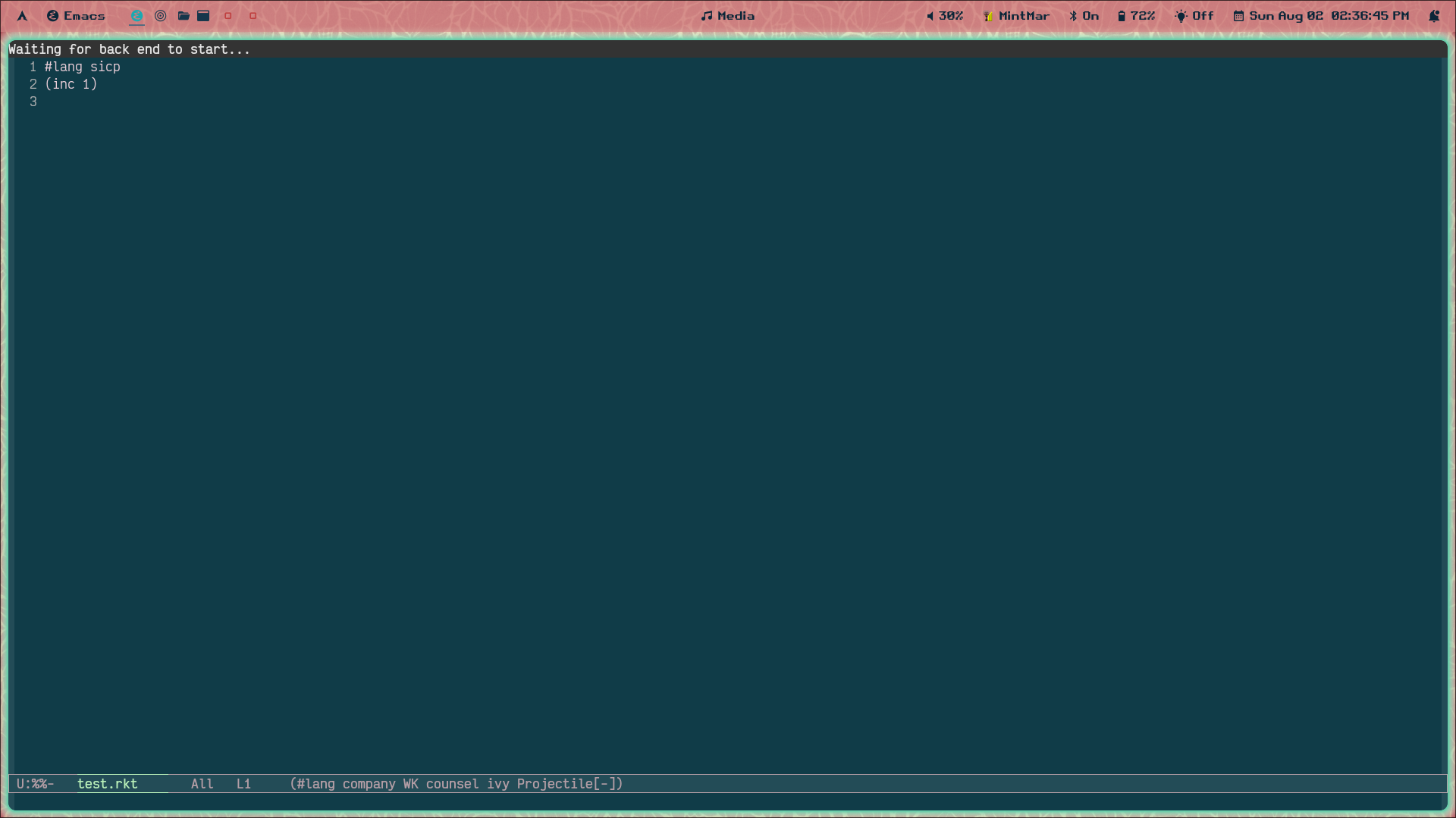
After re-evaling your init file, if you visit a .rkt file such as the test.rkt file created above, you should see a message "Waiting for backend to start...." at the top of your buffer indicating that racket-mode is going looking for your language backend:
Once that's complete you should see syntax highlighting. By running racket-run-and-switch-to-repl, by default mapped to [F5], you should then see a Racket repl which successfully evaluates your SICP-flavored Scheme:
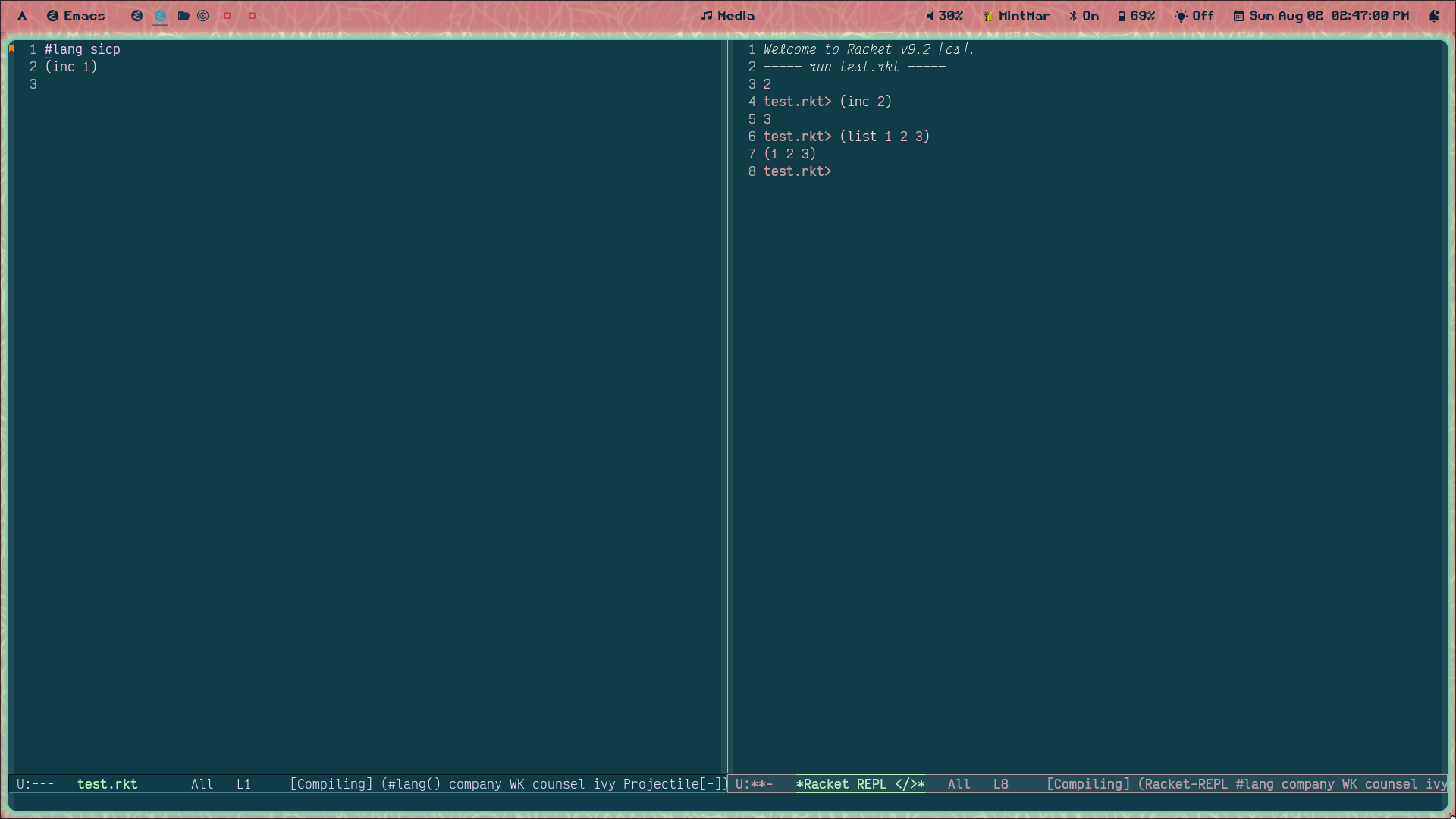
Amazing! We've got a working environment now. This knocks out the first two items in the vision. Unfortunately, the rest are a bit more of a pain.
Org Mode Interop
First, let's get racket-mode support within .org src blocks. This can be done through the packages eval-in-repl, org-babel-eval-in-repl, and emacs-ob-racket:
(add-to-list 'load-path "~/path/to/emacs-ob-racket/dir")
(package-initialize)

(use-package eval-in-repl)
(use-package org-babel-eval-in-repl)

(use-package org
  :config
  (add-to-list 'auto-mode-alist '(".org" . org-mode))
	(add-to-list 'org-src-lang-modes '("racket" . racket))
	(org-babel-do-load-languages
	 'org-babel-load-languages
	 '(
		 (racket . t)
		 ))
 	(setq ob-racket-default-lang "sicp")

	(define-key org-mode-map (kbd "<f5>") 'ober-eval-in-repl)
	(define-key org-mode-map (kbd "<f6>") 'ober-eval-block-in-repl))
Unfortunately, racket-mode support in eval-in-repl isn't currently working. I spent a good chunk of my spare time this past week trying valiantly to fix it but to no avail. I'm a thoroughly amateur emacser - my ability to use the built in debugger is limited and my ability to read elisp even more so. From what I can tell, the problem comes from the interop between racket-mode, which had a major overhaul of its api circa 2011 when the author evidently improved their understanding of the emacs window system, and eval-in-repl, which didn't get that memo. This github issue gives an overview, but the fix here doesn't work for me. I think it's becuase eval-in-repl assumes the variable "racket-repl-buffer-name" gives the name of the specific buffer you're trying to evaluate, whereas racket-mode sets that variable to nil in order to send all code evaluated to the same repl.
So, instead, we send things not to a racket-mode racket-repl, but to a Geiser repl. Geiser is another major mode for interacting with lisp-family-languages which is supposedly more powerful and fully-featured but whose major mode I never quite got playing nicely with racket's #lang lines. By default, eval-in-repl uses Geiser for its racket repl, so we don't really need to configure anything here. But it's very irritating to have two different REPLs, one for evaluating from a file and the other for evaluating from an org source block. In addition, Geiser requires some manual intervention to play nicely with the sicp language which we'll see below. If any readers have successfully mashed together the org-babel-eval and racket-mode packages, please do drop me a line.
Geiser Config
With the above config loaded, if we open up an org file, add a source block, and hit the keybinding we configured above, we should be placed into a Geiser repl:
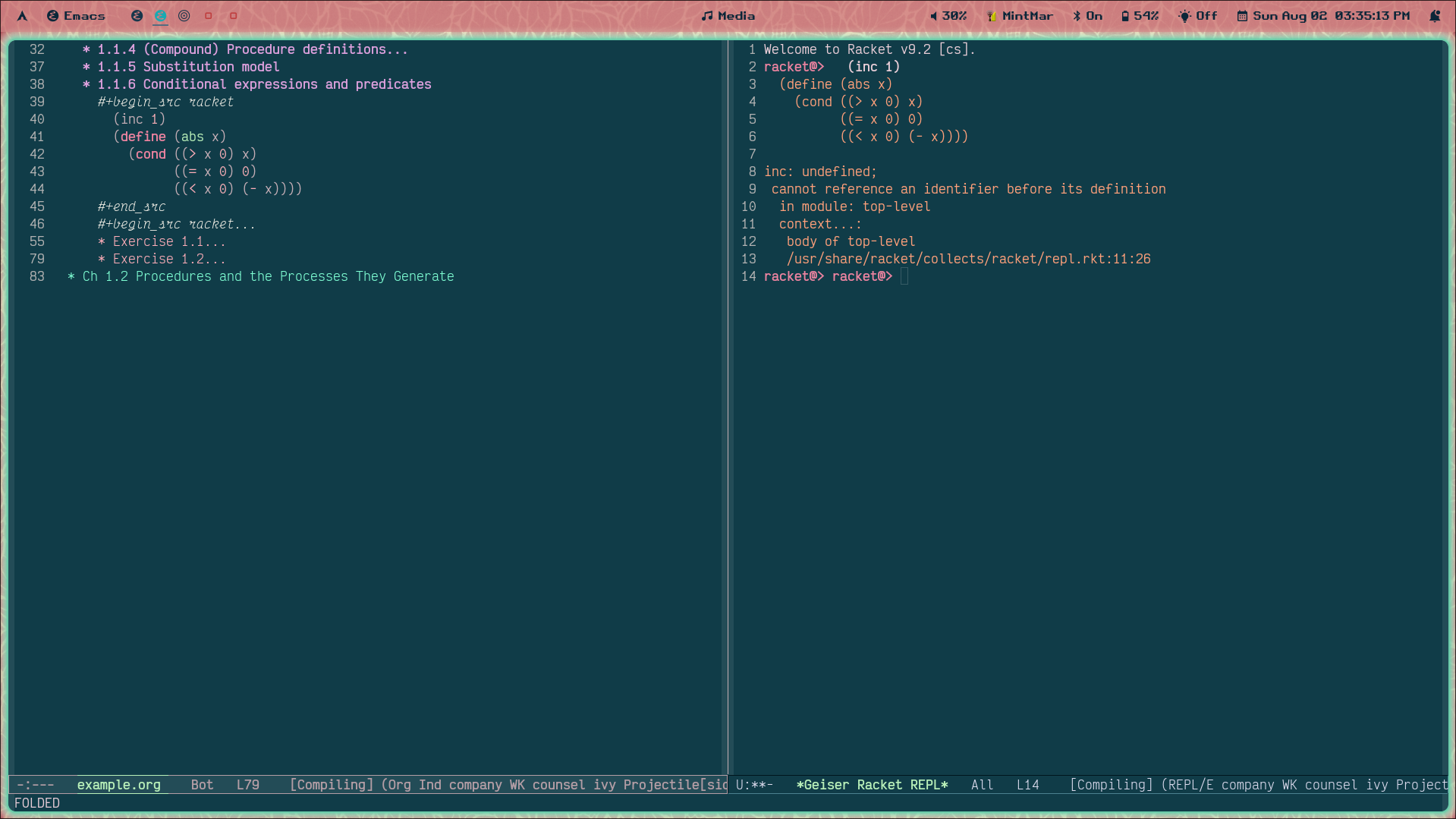
Uh oh. inc: undefined; cannot reference an identifier before its definition?? Clearly Geiser doesn't understand that we mean to use the sicp language, not default vanilla racket. We've gotta manually run (require sicp) for that. Once we've done that, let's try again:
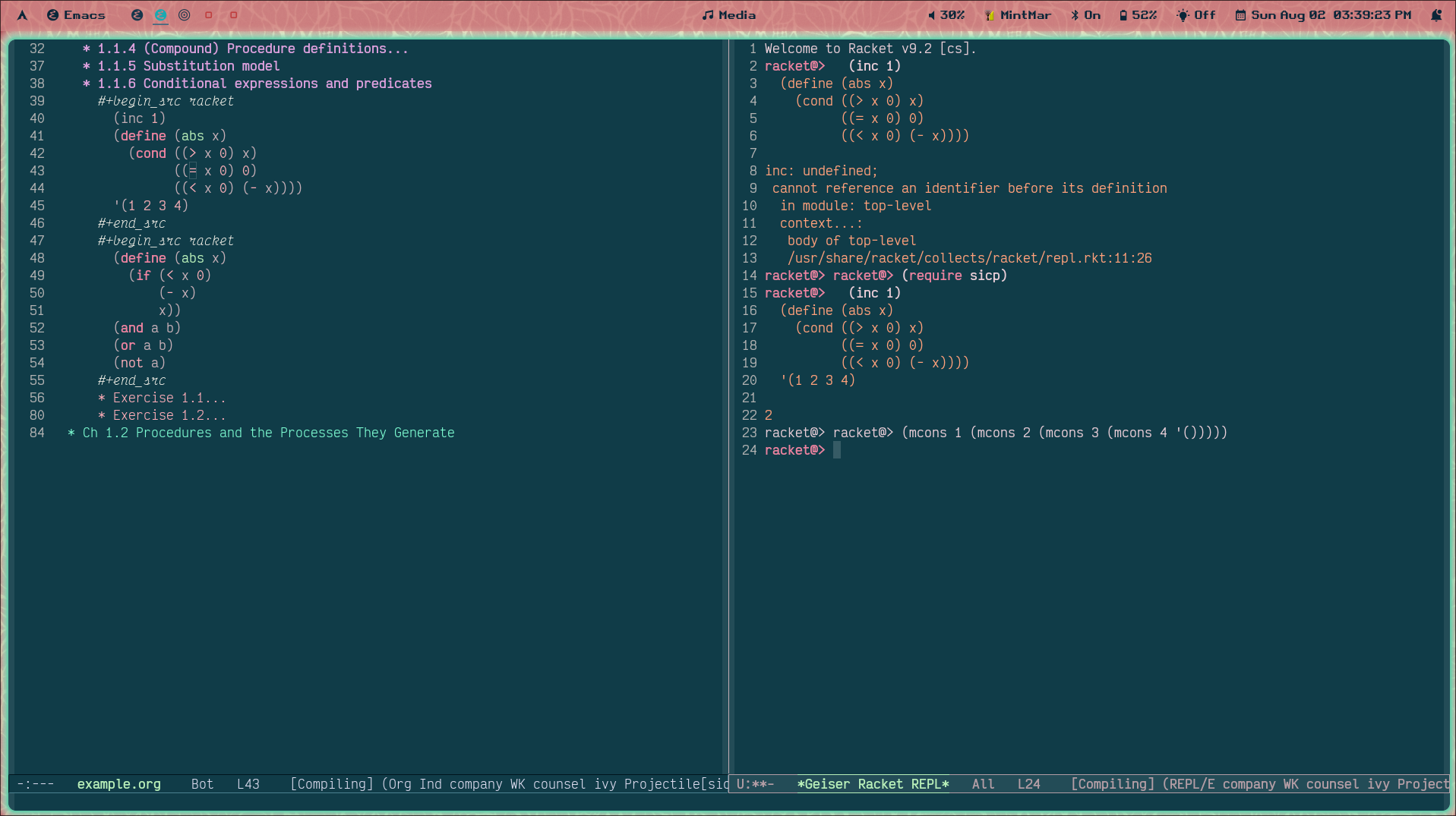
Better --- it can take an (inc 1) --- but what the heck is (mcons 1 (mcons 2 (mcons 3 (mcons 4 '()))))?
It turns out this is a quirk of how Racket-thru-Geiser is loading the SICP language - under the hood, the racket interpreter turns all our SICP conses (mutable by default) to Racket mconses (since normal Racket conses are immutable, I guess?). If we want Geiser to know to use our SICP printing rules, we can tell it so (thanks to random reddit user soegaard)::
(#%require (only racket/base
                   print-as-expression
                   print-pair-curly-braces
                   print-mpair-curly-braces))
  (print-as-expression      #f)
  (print-pair-curly-braces  #t)
  (print-mpair-curly-braces #f)
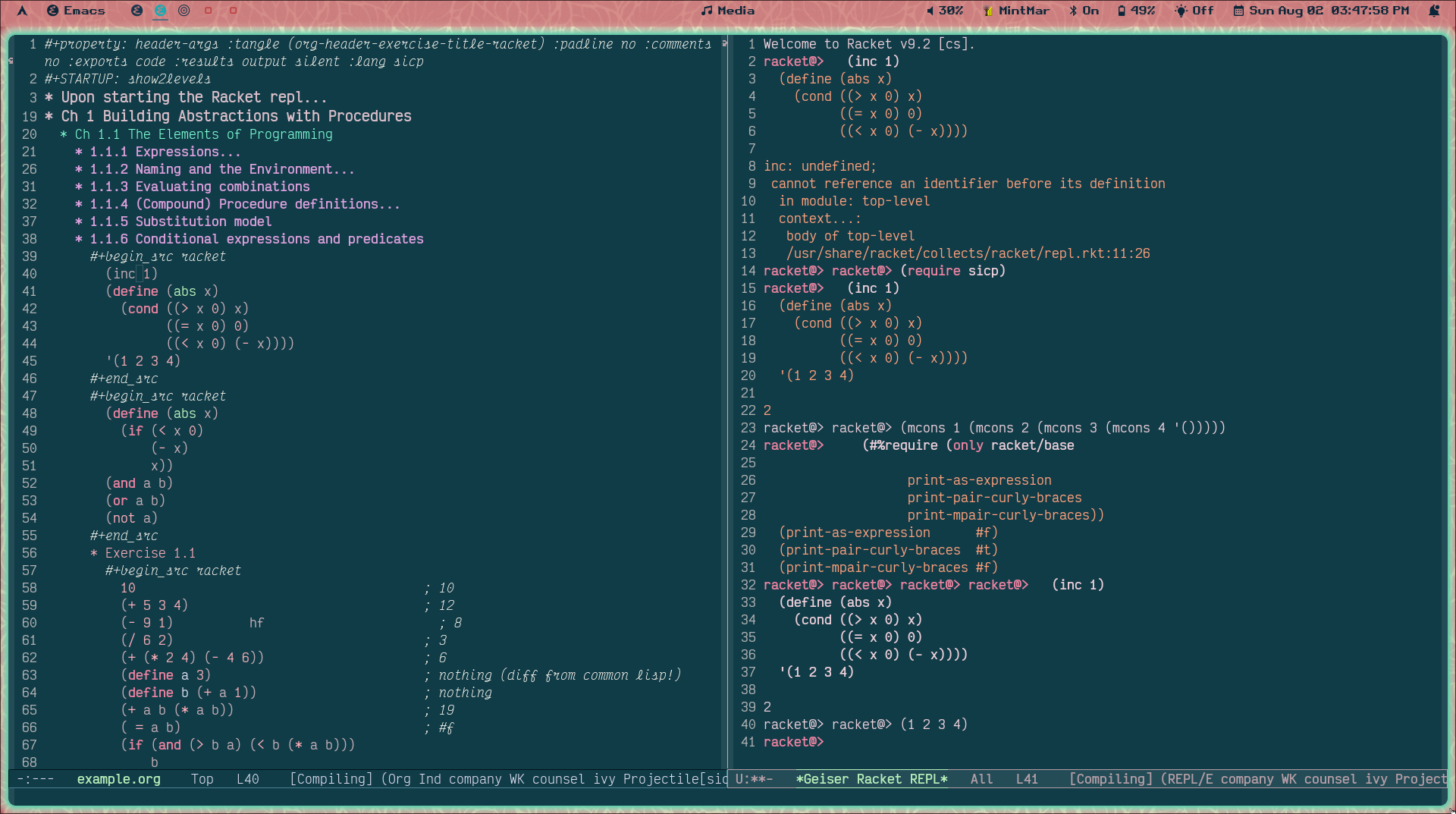
THERE we go! Irritating to have to run these every new REPL, hopefully I can find a way to hook into the geiser repl to automate that. But for now, time to move on to
Org Tangling
We need some way of telling org how to tangle (read: export our source blocks to separate non-org files) our file appropriately. In combination with the config above, we can use the following line as the first line (all on one line pls!) of our relevant .org notes file, to tell org to use it for every source block in this file (note: you'll have to close and open the file after adding this to get Org to reload it properly):
#+property: header-args :tangle (org-header-exercise-title-racket)
					 :padline no :comments no :exports code :results output silent :lang sicp
Wait, but what's :tangle (org-header-exercise-title-racket)? By default, tangling sends ALL source blocks in a given file to the same file. That's not what I wanted! I wanted the ability to easily look at each exercise independently. I also don't want to tangle non-exercise src blocks! If I'm taking notes on a given chapter, that shouldn't be exported at all. The following elisp function gives org a filename corresponding to each src block found directly under an org header named "Exercise [whatever]", and tells it to "abort mission" otheriwse. Make sure the subdirectory you're pointing it at exists (or modify the following to create it):
(defun org-header-exercise-title-racket()
 (let* ((org-nearest-heading
     (org-element-property
      :title
      (org-element-parent (org-element-parent (org-element-context))))))
  (if
    (and org-nearest-heading
       (not (string-match file-name-invalid-regexp org-nearest-heading))
       (string-match "Exercise" org-nearest-heading))
    (concat
     "tangled_exercises/"
     (format "%s" org-nearest-heading)
     ".rkt")
   "no" )
  ))
While in our org file, running the function org-babel-tangle (default C-c C-v t) will output all our "exercise" src blocks to the directory we specify, each named by their closest header. And due to the lang: sicp in our #+property org tag, we also get the #lang sicp line that tells Racket to run this with SICP scheme. Nice!
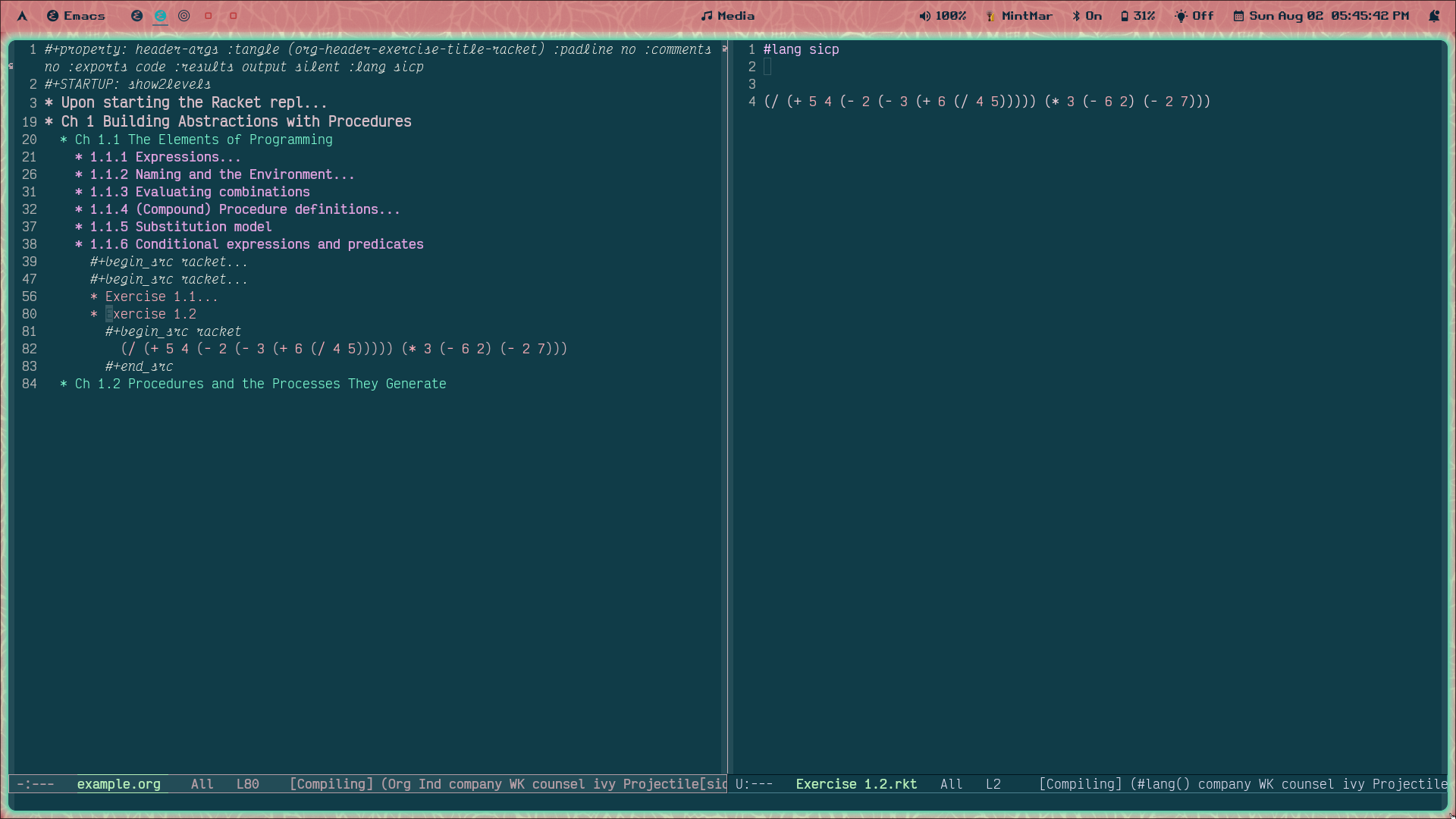
Cherry on top: Bookmarking the whole setup
Emacs natively has the ability to bookmark specific places in files (including Info nodes) via bookmark-save. It also has the ability to save "where you're at" in terms of buffers and windows via desktop-save, which will drop you back where you were the next time you load emacs. Neither of these is exactly what I want. I want to save my full buffer/window/place setup (like desktop-save) but have a list of different setups I can go to on-demand and not have that overwritten or loaded every time I open/close emacs (like bookmark-save). For this - I think? - I need an external package. There are 1000s of options for this; I chose one that's extremely simple and has what I need, which is bookmark-view.
A basic config in my init file:
(add-to-list 'load-path "/path/to/dir/with/bookmark-view")
(package-initialize)
(global-set-key (kbd "C-c b s") 'bookmark-view-save)
(global-set-key (kbd "C-c b o") 'bookmark-view-open)
When I'm done for the session, I hit C-c b s and overwrite the existing SICP bookmark. When I want to go back, whether that be from the middle of another project or in a fresh session or what have you, I hit C-c b o and my beautiful setup is loaded for me. Notes and REPL on the left, SICP in Info mode on the right:
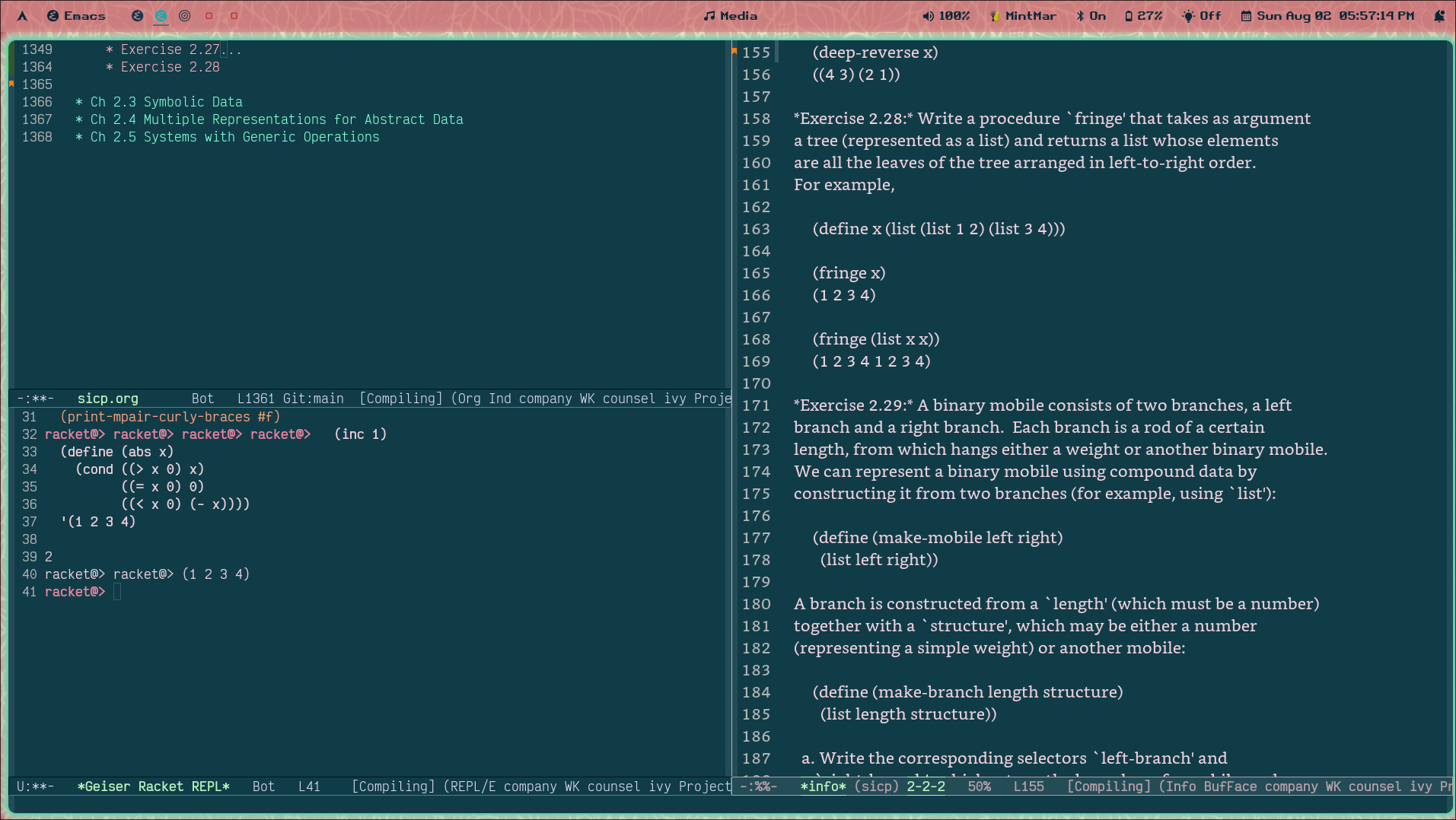
Beautiful!
An example .org file and emacs init file are available in this github repo for those who'd like to replicate my setup here. Happy lisping!
ps if you figure out racket-mode in eval-in-repl PLEASE reach out!