DISCLOSURE: If you buy through affiliate links, I may earn a small commission. (disclosures)
For the past several years I've been building server-side rendered apps using hypermedia libraries like HTMX and Datastar to sprinkle in interactivity where it's useful. I like this approach because it's simple, efficient, and allows me to use whatever language / stack I want - everything can write strings and serve web requests and therefore can serve hypermedia.
I've also been learning and using High-Level Rust so it was only natural we combine the two at some point.
This post continues my fullstack Rust web series:
- Build a Simple Single-File Rust Web API
- Build a Single-File Rust Web API with SQLite
- Build a Fullstack SSR Web App with Rust + Maud
Here we'll sprinkle in interactivity with Datastar.
What we're building
We're building a simple CRUD todo list app:
- Create todos
- Read a list of todos
- Update the completed status of todos
- Delete todos
Tech stack:
- Backend: Rust + Axum
- Data: Sqlite and sqlx
- Frontend: SSR HTML with Maud and Datastar for interactivity (using the datastar crate)
What is Datastar
Datastar is a newer entry to the Hypermedia space and is the most unusual choice in this stack so wanted to take a minute to explain a bit about what it is and how it works.
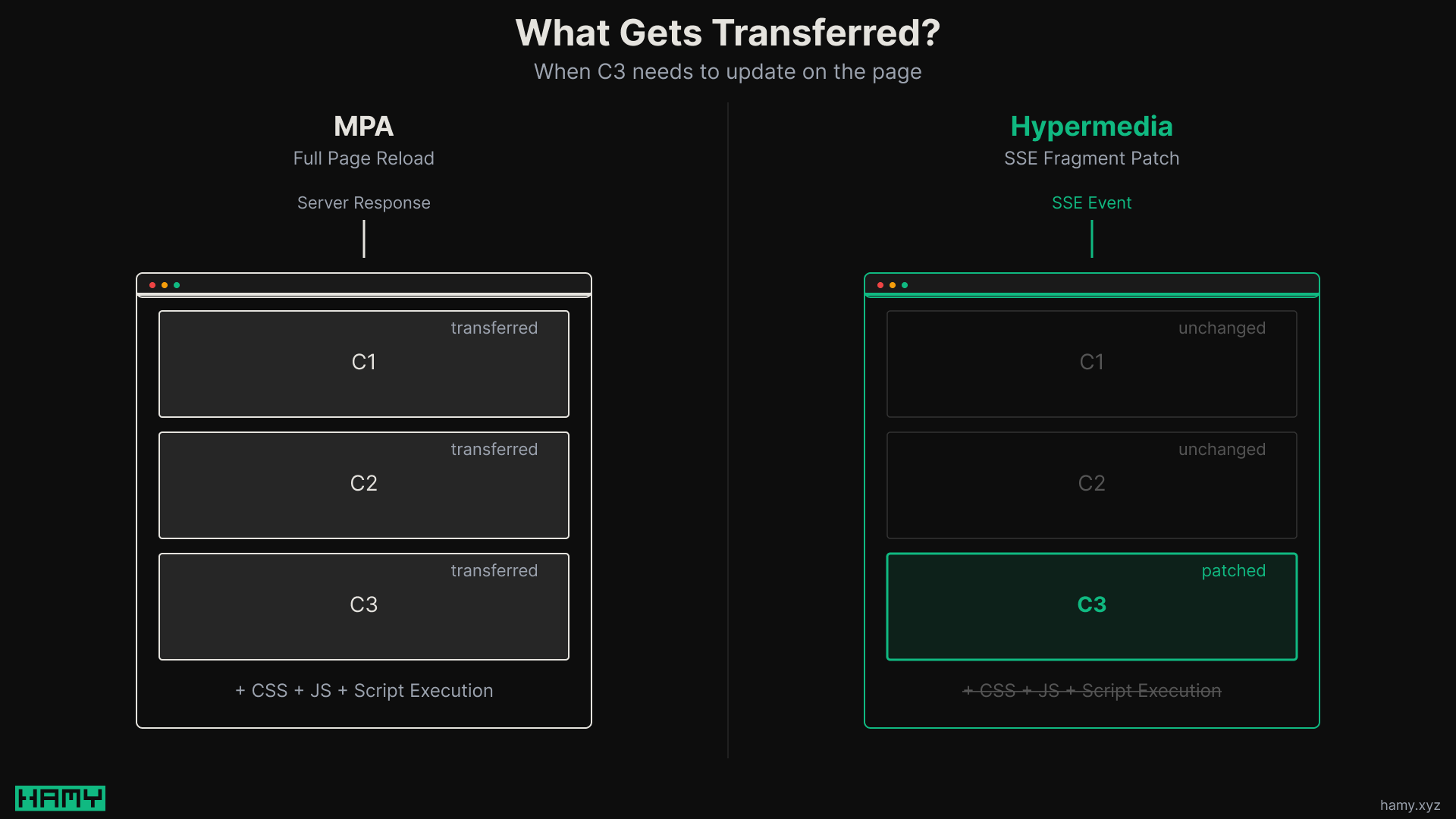
The core idea behind hypermedia frameworks is:
- The backend controls the frontend - little to no client-side logic
- You can partially rerender pages with HTML fragments - improving reactivity and composability of SSR HTML when compared to MPAs
- This reduces code complexity and can improve performance by reducing layers of transformation logic and duplication across client/server
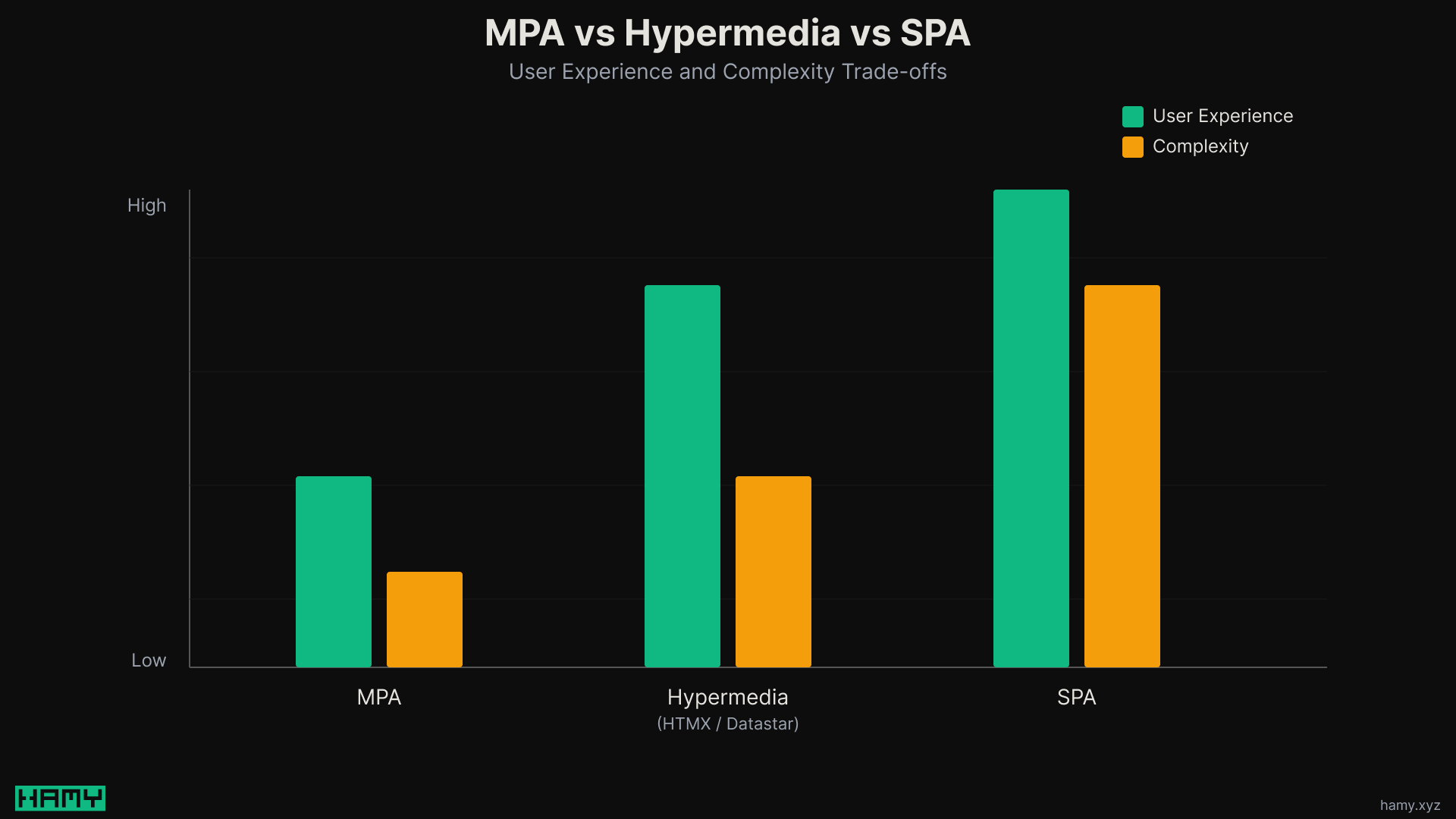
Datastar takes this a little further than others like HTMX by:
- SSE first - HTML fragments and signals all pass over same SSE connection
- Built in signals - so can do both client and server interactivity, similar to an Alpine + HTMX setup
In this example we're using 3 key server to client primitives:
- PatchElements - Server sends HTML fragments, Datastar places them in the DOM via CSS selectors
- PatchSignals - Server sends JSON, Datastar updates the reactive client-side signals (this is where Alpine is often used)
- ExecuteScript - Server tells the browser to run some javascript - for eg alerts or navigation
How it's built
We'll be focused mainly on the view layer and Datastar in this post to keep this guide streamlined and understandable. To see more details on the other layers, checkout the other posts in this series.
If you want the full source code of this project so you can clone it and run it yourself, checkout the HAMY LABS Code Example repo on GitHub. This is available to HAMINIONS Members.
Models & Errors
The Models and Errors code is largely the same as it was in the previous installment of the series:
- Todo - Domain representation of a Todo
- CreateTodo - Dto for deserializing Create request payloads
- TodoRow - Data representation of a Todo
#[derive(Clone, LightClone)]
struct Todo {
    id: Uuid,
    title: Arc<str>,
    completed: bool,
}

#[derive(Deserialize)]
struct CreateTodo {
    title: String,
}

#[derive(FromRow)]
struct TodoRow {
    id: Uuid,
    title: String,
    completed: bool,
}
The errors are also the same:
enum TodoError {
    NotFound(Uuid),
    Internal(sqlx::Error),
}
Service Layer
The Service Layer is similarly untouched:
- TodoService trait - interface with async list, get, create, complete, and delete methods
- SqliteTodoService - implementation that calls into sqlite
#[async_trait]
trait TodoService: Send + Sync {
    async fn list(&self) -> Result<Vec<Todo>, TodoError>;
    async fn get(&self, id: Uuid) -> Result<Todo, TodoError>;
    async fn create(&self, input: CreateTodo) -> Result<Todo, TodoError>;
    async fn complete(&self, id: Uuid) -> Result<Todo, TodoError>;
    async fn delete(&self, id: Uuid) -> Result<Todo, TodoError>;
}
Views - SSR HTML with Datastar Attributes via Maud
This is where we start to see Datastar. HTML templates include data-* attributes that Datastar interprets. If you're coming from HTMX this is similar to the hx-* attributes.
The views are split into page-based components. These are composed together to build the full page but each can be rendered independently which powers the individual component endpoints which is how we get partial rerenders.
Typically how this works is:
- Use coarse-grained components - given a domain object, how does it render on this page?
- Main endpoint for the page - renders the full DOM tree
- View endpoints under that page - render just the requested item
This is similar to the Backend for Frontend API design approach, but we return HTML fragments and signals instead of just JSON.
- Layout - The base layout of our page, note that it pulls in Datastar. Gotcha: Datastar's public API has been changing a lot as it goes through 1.0 RC candidates so you need to double check the version you're using on the frontend matches the SDK you're using on the backend if you use an SDK.
Index page views:
index_page- Takes a vec ofTodo(its props) and renders the full pagetodo_item- Takes aTodoand builds up the markup for that row
Detail page views:
todo_page- Renders the full pagetodo_detail_content- Renders the page content (useful for quick replacement)
fn layout(title: &str, content: Markup) -> Markup {
    html! {
        (DOCTYPE)
        html {
            head {
                meta charset="utf-8";
                meta name="viewport" content="width=device-width, initial-scale=1";
                title { (title) " - Todos" }
                script type="module" src="https://cdn.jsdelivr.net/gh/starfederation/datastar@1.0.0-RC.1/bundles/datastar.js" {}
                style {
                    "body { font-family: system-ui, sans-serif; max-width: 600px; margin: 2rem auto; padding: 0 1rem; }"
                    "form { display: inline; }"
                    "input[type=text] { padding: 0.4rem; font-size: 1rem; }"
                    "button { padding: 0.4rem 0.8rem; font-size: 1rem; cursor: pointer; }"
                    ".todo { display: flex; align-items: center; gap: 0.5rem; padding: 0.5rem 0; border-bottom: 1px solid #eee; }"
                    ".todo .title { flex: 1; }"
                    ".completed .title { text-decoration: line-through; color: #999; }"
                }
            }
            body {
                (content)
            }
        }
    }
}

// Index page views

fn todo_item(todo: &Todo) -> Markup {
    html! {
        div id={ "todo-" (todo.id) } class={ "todo" @if todo.completed { " completed" } } {
            span class="title" {
                a href={ "/todos/" (todo.id) } { (todo.title) }
            }
            @if !todo.completed {
                button data-on-click={ "@post('/todos/" (todo.id) "/complete')" } { "Complete" }
            }
            button data-on-click={ "@post('/todos/" (todo.id) "/delete')" } { "Delete" }
        }
    }
}

fn index_page(todos: &[Todo]) -> Markup {
    let remaining = todos.iter().filter(|t| !t.completed).count();
    layout(
        "Home",
        html! {
            h1 { "Todos" }
            form data-signals-title="''" data-on-submit__prevent="@post('/todos')" {
                input type="text" placeholder="What needs to be done?" data-bind="title" required;
                " "
                button type="submit" { "Add" }
            }
            p {
                span data-signals-remaining=(remaining) data-text="$remaining + ' remaining'" {
                    (remaining) " remaining"
                }
            }
            div id="todo-list" {
                @for todo in todos {
                    (todo_item(todo))
                }
            }
            @if todos.is_empty() {
                p { "No todos yet. Add one above!" }
            }
        },
    )
}

// Detail page views

fn todo_detail_content(todo: &Todo) -> Markup {
    html! {
        div id="todo-detail" {
            h1 { (todo.title) }
            p id="todo-status" {
                "Status: "
                @if todo.completed { "Completed" } @else { "Pending" }
            }
            p { "ID: " code { (todo.id) } }
            div id="todo-actions" {
                @if !todo.completed {
                    button data-on-click={ "@post('/todos/" (todo.id) "/detail/complete')" } { "Complete" }
                    " "
                }
                button data-on-click={ "@post('/todos/" (todo.id) "/detail/delete')" } { "Delete" }
                " "
                a href="/" { "Back to list" }
            }
        }
    }
}

fn todo_page(todo: &Todo) -> Markup {
    layout(&todo.title, todo_detail_content(todo))
}
Handlers and SSE Responses
We have two groups of handlers that correspond to each page - this is the backend for frontend idea.
index- the main list pagedetail- The single todo page
The mutation handlers are returning targeted SSE events. SSE sounds scary but really it's just a stream encoding format under the hood. We have a couple helpers we use to abstract the complexity:
- SSE helper:
sse_response()wraps aVec<Event>into an AxumSsestream - Datastar expects SSE format - Reading signals:
ReadSignals<CreateSignals>extractor reads thetitlesignal from the request body - Datastar sends signals as JSON when you@post
// Signals

#[derive(Deserialize)]
struct CreateSignals {
    title: String,
}

// SSE helper

fn sse_response(
    events: Vec<Event>,
) -> Sse<impl futures::Stream<Item = Result<Event, Infallible>>> {
    Sse::new(stream::iter(events.into_iter().map(Ok)))
}
Index handlers:
index_get- Page entrypoint, returns the full pageindex_create- Takes in theCreateSignals, creates by calling the service, gets all todos, calculates the !completed todos, patches the new todo item row to the end of the#todo-listelement usingElementPatchMode::Append, and updates the signals fortitleandremainingusingPatchSignalsindex_complete- Takes in the UUID of the todo to complete, calls service.complete(id), fetches the new list of todos, counts remaining items,PatchElementsthe new todo item row, and updatesremainingcount withPatchSignalsindex_delete- Takes in the UUID of the todo to delete, callsservice.delete(id), fetches all todos, counts remaining, removes the deleted todo row withPatchElements, and updatesremainingsignal withPatchSignals
async fn index_get(State(service): State<Arc<dyn TodoService>>) -> Result<Markup, TodoError> {
    let todos = service.list().await?;
    Ok(index_page(&todos))
}

async fn index_create(
    State(service): State<Arc<dyn TodoService>>,
    ReadSignals(signals): ReadSignals<CreateSignals>,
) -> Result<impl IntoResponse, TodoError> {
    let new_todo = service.create(CreateTodo { title: signals.title }).await?;
    let todos = service.list().await?;
    let remaining = todos.iter().filter(|t| !t.completed).count();

    Ok(sse_response(vec![
        PatchElements::new(todo_item(&new_todo).into_string())
            .selector("#todo-list")
            .mode(ElementPatchMode::Append)
            .into(),
        PatchSignals::new(format!(r#"{{"remaining": {remaining}, "title": ""}}"#)).into(),
    ]))
}

async fn index_complete(
    State(service): State<Arc<dyn TodoService>>,
    Path(id): Path<Uuid>,
) -> Result<impl IntoResponse, TodoError> {
    let todo = service.complete(id).await?;
    let todos = service.list().await?;
    let remaining = todos.iter().filter(|t| !t.completed).count();

    Ok(sse_response(vec![
        PatchElements::new(todo_item(&todo).into_string()).into(),
        PatchSignals::new(format!(r#"{{"remaining": {remaining}}}"#)).into(),
    ]))
}

async fn index_delete(
    State(service): State<Arc<dyn TodoService>>,
    Path(id): Path<Uuid>,
) -> Result<impl IntoResponse, TodoError> {
    service.delete(id).await?;
    let todos = service.list().await?;
    let remaining = todos.iter().filter(|t| !t.completed).count();

    Ok(sse_response(vec![
        PatchElements::new_remove(format!("#todo-{id}")).into(),
        PatchSignals::new(format!(r#"{{"remaining": {remaining}}}"#)).into(),
    ]))
}
Detail page handlers:
detail_get- Returns full detail page markupdetail_complete- Takes in the UUID of the todo to complete, callsservice.complete(id), and returns the updated todo detail content usingPatchElementsdetail_delete- Takes in the UUID of the todo to delete, callsservice.delete, and redirects to the index page withExecuteScript. Note: ThisExecuteScriptthing looks hacky but it's currently the standard way to do redirects and largely is how SPAs / HTMX does this as well - executing code on the client based on signals from the server.
async fn detail_get(
    State(service): State<Arc<dyn TodoService>>,
    Path(id): Path<Uuid>,
) -> Result<Markup, TodoError> {
    let todo = service.get(id).await?;
    Ok(todo_page(&todo))
}

async fn detail_complete(
    State(service): State<Arc<dyn TodoService>>,
    Path(id): Path<Uuid>,
) -> Result<impl IntoResponse, TodoError> {
    let todo = service.complete(id).await?;

    Ok(sse_response(vec![
        PatchElements::new(todo_detail_content(&todo).into_string())
            .selector("#todo-detail")
            .into(),
    ]))
}

async fn detail_delete(
    State(service): State<Arc<dyn TodoService>>,
    Path(id): Path<Uuid>,
) -> Result<impl IntoResponse, TodoError> {
    service.delete(id).await?;

    Ok(sse_response(vec![
        ExecuteScript::new("window.location = '/'").into(),
    ]))
}
Router + Main
Finally we spin up all dependencies and serve the webapp. The only thing that's changed here is we add a few more endpoints to handle the detail page's view handlers (the index page already had view handlers, those were just changed to Datastar under the hood).
#[tokio::main]
async fn main() {
    let pool = SqlitePool::connect("sqlite:todos.db?mode=rwc")
        .await
        .unwrap();

    let service: Arc<dyn TodoService> = Arc::new(SqliteTodoService::new(pool).await);

    let app = Router::new()
        // Index page + actions
        .route("/", get(index_get))
        .route("/todos", post(index_create))
        .route("/todos/{id}/complete", post(index_complete))
        .route("/todos/{id}/delete", post(index_delete))
        // Detail page + actions
        .route("/todos/{id}", get(detail_get))
        .route("/todos/{id}/detail/complete", post(detail_complete))
        .route("/todos/{id}/detail/delete", post(detail_delete))
        .with_state(service);

    let listener = tokio::net::TcpListener::bind("0.0.0.0:3000").await.unwrap();
    println!("Listening on http://localhost:3000");
    axum::serve(listener, app).await.unwrap();
}
Next
So that's a reactive todo app with Rust, Axum, Maud, and Datastar. It definitely has a bit of a learning curve and the endpoints tend to sprawl but it's all server-side rendered HTML and can streamline maintenance / development if you want to keep everything server side.
If you want the full source code, checkout the HAMY LABS Code Example repo on GitHub. This is available to HAMINIONS Members.
If you want to see how I spin up fullstack webapps with Rust, checkout CloudSeed Rust.
If you liked this post you might also like: