Why Amazon is ending support for older Kindles
If you own one of the following Kindles, you won’t be able to download new books after May 20: Kindle 1st Generation (2007), Kindle DX (2009), Kindle DX Graphite (2010), Kindle Keyboard (2010), Kindle 4 (2011), Kindle Touch (2011), Kindle 5 (2012), and the Kindle Paperwhite 1st Generation (2012). The Fire tablets that will no longer be supported are: Kindle Fire 1st Generation (2011), Kindle Fire 2nd Generation (2012), Kindle Fire HD 7 (2012), and Kindle Fire HD 8.9 (2012).
To check which model you have, go to Settings > Device options > Device info on your Kindle or Fire tablet. You might see a serial number instead of the model name. If that's the case, Google the serial number to find out which Kindle you own.
Amazon’s decision to end support for devices dating back to 2007 was a surprise to many Kindle users, leaving them with more questions than answers. In a statement to customers, Amazon said that the now-obsolete models “have been supported for at least 14 years — some as long as 18 years — but technology has come a long way in that time.”
But the company remains tight-lipped on exactly why the technology is no longer supported and the rationale behind the chosen models. According to security experts, it likely comes down to engineering overhead and ongoing maintenance.
“From a security perspective, there may be hardware-specific security vulnerabilities that cannot be patched with software. Rather than recalling a bunch of devices to fix them, it’s easier to issue credits and get people into newer devices than try to figure that out,” said Mark Beare, a cybersecurity expert at Malwarebytes.
There’s less of a security risk for older Kindles and Fire tablets, given their limited features. But Beare points out that devices designed years ago didn’t account for future security vulnerabilities and are difficult to patch after the fact.
“The longer they sit out in the wild, the harder they are to maintain through software updates, and that becomes a significant burden on engineering teams and a broad security risk,” he said.
Amazon says this will impact less than 3% of its Kindle e-reader and Kindle Fire customers worldwide. It’s unclear exactly how many Kindles are in the wild, but market research firm Market Growth Reports estimated that 72 million total Kindle devices had been sold as of 2024. So it’s safe to say that this move will brick a not-insignificant number of e-readers.
“Companies cutting support for devices is a giant and massive, increasing problem,” said Nathan Proctor, senior director of the Right to Repair Campaign with the nonprofit Public Interest Research Group.
“Electronic waste is the fastest-growing global waste stream, so when companies make these decisions, they have huge consequences for the ecosystem, and for the owners of those products,” he said.
Amazon offers a trade-in program to its customers: If you send in your old device, you’ll receive a rebate that you can use to purchase another eligible Amazon device. (The trade-in amount varies depending on the device.) The company says that it “takes unused devices and restores them, making them suitable for resale, or recycles them.” If your device isn’t eligible for a trade-in (and is no longer in good enough condition to resell), the company will help you send it to a recycler that’s “Amazon-approved.”
Devices that are losing support are older, which means the trade-in value will likely be low. The Kindle Keyboard from 2011, for example, can be traded in for up to $5. Keeping it as a memento (or giving it to a relative who’d enjoy the library of books on the device) might be better for the environment. You’ll also still be able to take advantage of the promo code that Amazon is offering if you decide to buy a new Kindle.
What this means for your older Kindle
If you own one of the affected Kindles, you’ll still be able to access all of the books that are already downloaded to your device. However, you’ll no longer be able to purchase, borrow, or download books to your device from the Kindle Store. You also won’t be able to use features like Send to Kindle or third-party app integrations like Libby and OverDrive.
It’s also unlikely that there will be any legal way to download content to your Kindle once Amazon ends support, but we plan to test this ourselves after May 20. And while you can sideload DRM-free (digital rights management–free) titles to the Kindle via USB from open-source platforms (like Project Gutenberg), it’s not the best option from a security standpoint.
“Kindle devices have a relatively small attack surface, and successful exploitation through ebook files is rare, though not impossible,” said Bogdan Botezatu, a senior director of threat research and reporting for cybersecurity software company Bitdefender.
Our advice: Upgrade or switch
Unfortunately, if your old Kindle can no longer download new books, there aren’t many options other than getting a new e-reader.

Amazon’s entry-level Kindle has a bright, 6-inch display, support for USB-C, and great battery life. It’s also compact and comfortable to travel with, so you can read on the go.
If you want to stay in the Amazon ecosystem, we currently recommend the entry-level Kindle for most people. It’s compact and portable, has a bright, 6-inch screen, and supports USB-C charging.
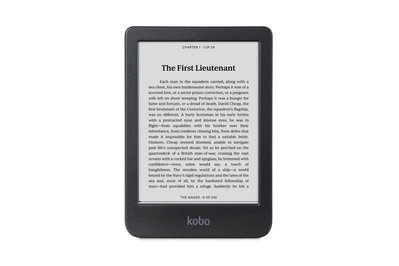
The Kobo Clara is a great alternative to Amazon’s Kindle. It’s just as portable, has a 6-inch display, and comes equipped with adjustable light and color temperature. You’ll also have OverDrive integration for checking out library books.
If you want to venture outside the Kindle ecosystem, we recommend the Kobo Clara BW. Its battery life isn’t as impressive as a Kindle’s, but it comes with a solid 6-inch screen, adjustable light and color temperature, and OverDrive integration for checking out library books.
This article was edited by Caitlin McGarry and Jason Chen.