DISCLOSURE: If you buy through affiliate links, I may earn a small commission. (disclosures)
For the past few weeks I've been using Claude Code from my phone and while it's not a 100% replacement for something like OpenClaw I've found it covers 80% of what I want without too many glaring security holes.
So in this post I'll share my setup and what I'm doing with it.
How I run Claude Code from my phone
My setup is simple - it uses features already shipped by Anthropic. This is by design - I don't want to invest in something fancy / complicated that's going to be rendered obsolete in the next 1-3 months.
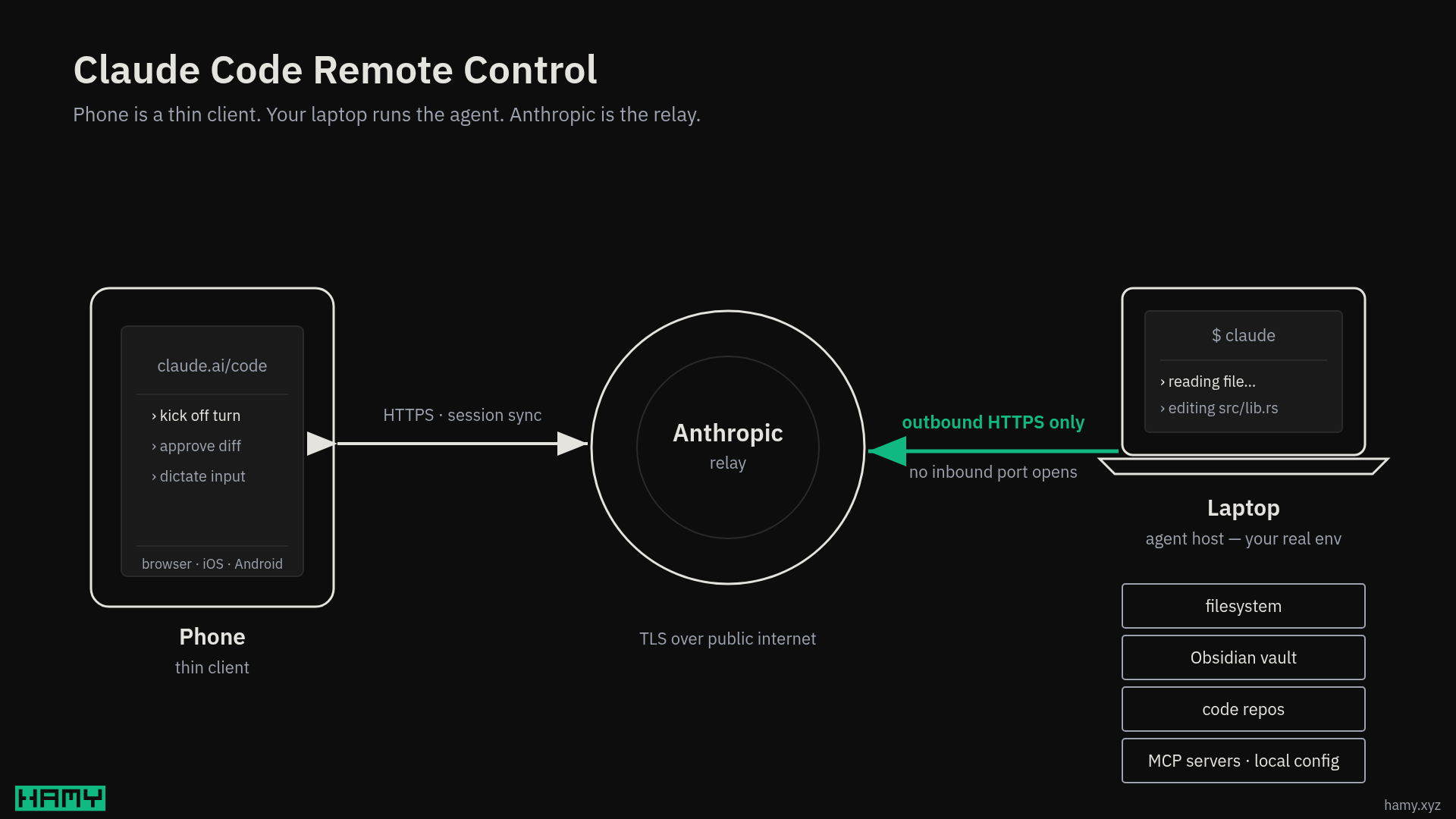
- Claude Code - Runs on my laptop + desktop with Remote Control on. This allows access to these sessions from the various Claude apps (web, desktop, mobile). You can set this up per session but I just have it on globally so I don't have to think about it. I also run Claude in auto mode so it can do most things without asking but is blocked from the worst things it may try to do.
- Claude mobile app - From the side bar, can access the
Codetab and see any active Claude Code sessions. So I can read outputs and send new commands.
Note that for this to work, the computer Claude Code is running on must stay on and connected to the internet. This is a bit wasteful but similar to the requirements for things like OpenClaw / Hermes so not much difference.
What I'm using my personal Claude for
There's a few major reasons I find this setup useful vs just using Claude via the app / web.
- Shared data - I use Obsidian as my second brain and while I've created projects in Claude that hold data about me, Obsidian is a much larger, more updated repository of it. So by having a persistent Claude with access to this I can read / update that data on the go.
- Check in from anywhere, kick off another run - Useful for long-running things whether they're coding tasks, research investigations, or just long chats. Can access while waiting at a doctor office, sitting on the couch, or eating lunch.
Examples of things I'm doing with it:
- Food + exercise coach - Built a plan to get a 6 pack by end of summer. Can ask Claude about my strategy, what exercises to swap in, what food I should eat to fit my remaining macros, and it understands my current plan and rules w/o extra prompts. Doing this on the go is useful because usually I'm in a gym or kitchen or restaurant when these queries come up. Example: Here's a menu, what options best fit my tastes and macros for the day.
- Kickoffs while away from computer - Kick off turns before I go to bed or while I'm out and about with the kid. A quick checkin to see where things are stuck and kick it off again.
- Research into the vault - Running research investigations around areas of life and having that research / findings be persisted into my Obsidian vault.
Things to keep in mind
This has become my personal OpenClaw - at least until an official one comes out from a big lab. But it's not perfect so a few tips / things to keep in mind.
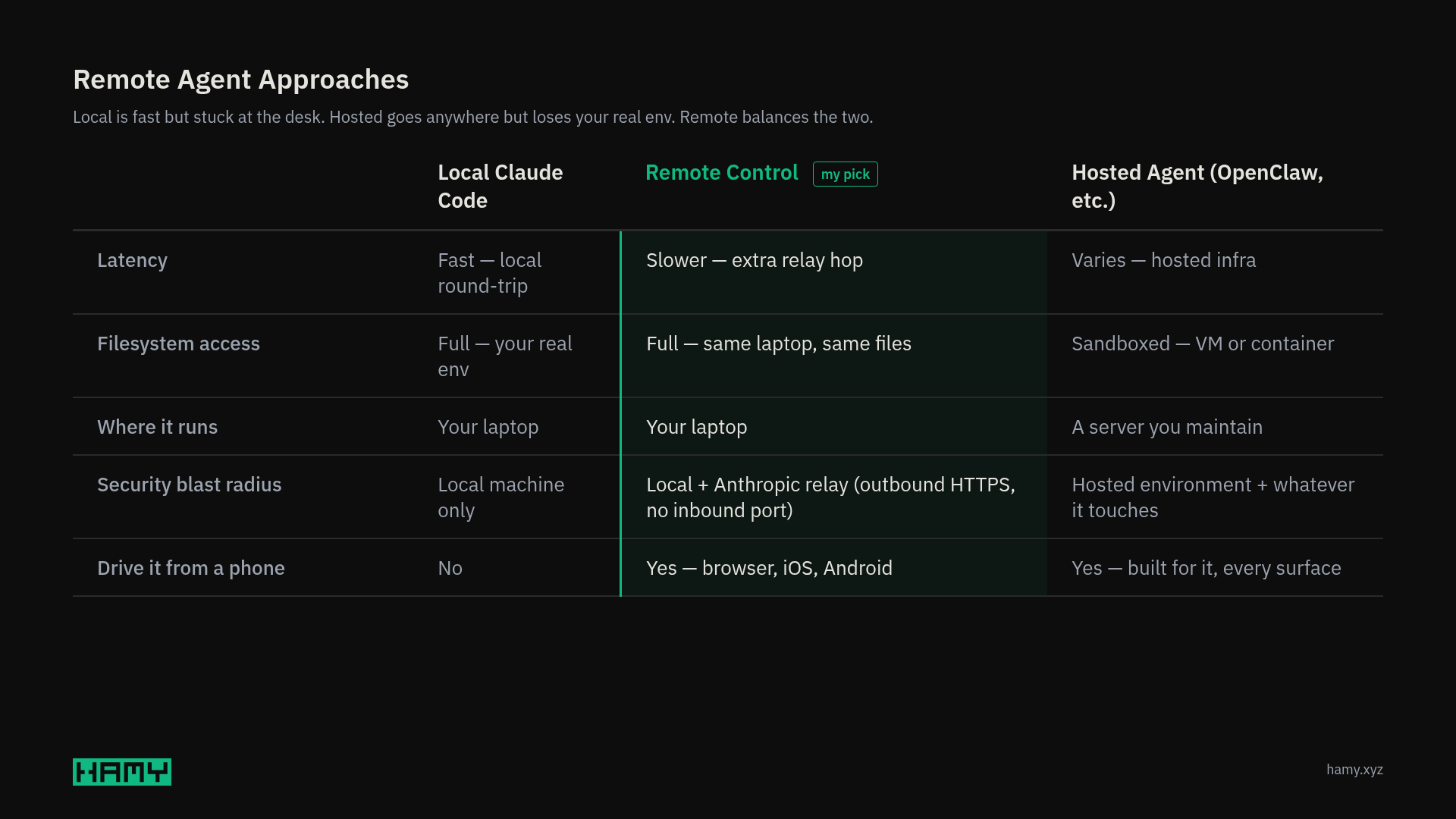
- Mental model - Need to remember that Claude Code is running on your computer not your phone. This can get complicated if you have many remote sessions across multiple computers. I tend to like to keep my primary files in the same locations across my computers to make things easier (like where my code repos and Obsidian vault live) and make a habit of pulling before doing anything / pushing outcomes of any session.
- Approvals can be a headache - If you're not running in auto mode you may get lots of approvals which can be annoying on small screens. You can get access to all the relevant data about what the AI is trying to do but takes a bit more scrolling.
- Code diffs on phone aren't great - So if you are a very careful diff reviewer, this won't work that well. But I'd also encourage you to try trusting the agent a bit more and only checking at checkpoints as that's typically much more effective / efficient. You can also add guardrails like have subagents review code for you to reduce the manual toil.
- Slower than local - I've found that this setup is typically slower than running locally, I think because of the round trip time syncing to your phone but I wouldn't be that surprised if it's also throttled somewhat vs direct runs.
- Your computer must stay on - So if you're running this on a personal computer it should be in a place with good wifi and connected to power and in a state where it doesn't sleep (but ideally does lock so passerby can't access all your data).
- This gives a lot of power to Anthropic - If they get hacked, you get hacked. Moreover LLMs still have a lot of potential attack vectors so be very careful about what you're asking / allowing your agent to do.
Next
I've found Claude Code from my phone to be very convenient. I'm still waiting on a full Her replacement but this works for now.
If you want to see what my AI workflows look like, I sync my full ai dotfiles repo monthly to the HAMY LABS Code Example Repo which is available to HAMINIONs Members.
If you like this post you might also like:
- How to Create Portable AI Skills Across Harnesses (Claude Code, Codex, Open Code) — your skills travel with you across harnesses; Remote Control is the same idea applied to where you run.
- I Built an AI Orchestrator and Ran It Overnight - Here's What Happened — the async-time / autonomous-run cousin of "kick off a turn from a walk."
- How to use Vim in Claude Code