2026-06-29 —
I have made a new firmware for my MIDI mangler box that lets me make the clock of the Roland MSQ-700 sequencer more stable.
The MSQ-700
The Roland MSQ-700 is an early (supposedly, the first) MIDI sequencer from 1984.
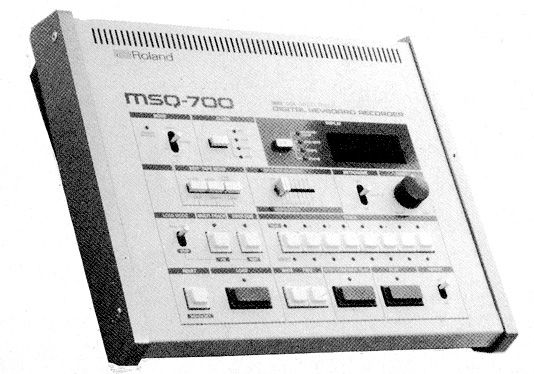 Image source: mu:zines
Its capabilities are very limited by modern standards but I find it such an endearing clunky machine.
What is wrong with the MSQ-700 clock
Nothing is wrong with the clock, unless you like editing audio on a beat grid.
In trying to make music with it, I ran into the problem that the internal clock of the MSQ-700 is not very stable. You can't tell this by listening to it, but when I try to edit a recording made with the MSQ-700 in a DAW on a grid, I find it impossible to set a single tempo for the recording. This makes editing the recording tedious because you can't just set the tempo once and then cut and paste using the beat grid. Every time you make a cut in the recording you have to zoom in and make sure you're cutting just before a beat in the music. When the tempo is steady you can cut without having to look at the audio waveform, which is much faster.
I don't know why exactly the clock is not that stable, but I do see in the service manual that it is the same oscillator circuit as that used in the TR-808, which is also known for not being super steady.
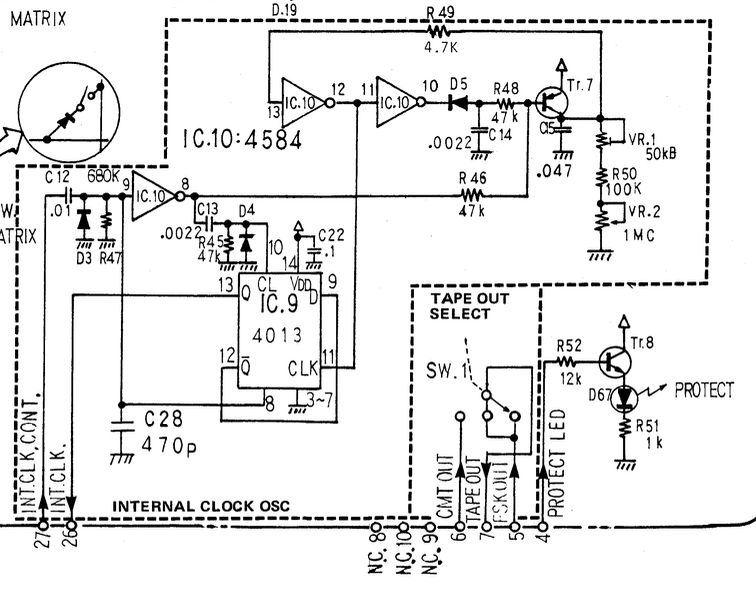
I want to restate that the instability of the clock is NOT a musical problem. If you quantize the notes it sounds as robotic as any other sequencer. It's only when editing that it becomes annoying.
How did I solve the "problem"
While the MSQ-700 has an internal clock, it can also follow an external clock from a number of different sources: MIDI, DIN sync and FSK tape sync. I had already figured out that the "can't edit on the grid" problem goes away when I drive the MSQ-700 from a steadier external clock.
Because I already have a little programmable box with MIDI ports and rotary encoder it seemed natural to me to solve the problem with MIDI. I'm too lazy to wire up a DIN sync output to a microcontroller but that would have been a good solution too. Now that I write this, I wonder if I can turn a Daisy Pod into a tape sync source...
Anyway, I used MIDI, which creates a problem because there is only one MIDI input port on the MSQ-700 and I also need that to enter note data into the sequencer. To solve this I wrote firmware for my MIDI box which copies the MIDI input to the MIDI output, and injects MIDI clock messages according to its internal timer.
Couldn't I have solved this some other way
Certainly. I could use some other sequencer than the MSQ-700 (but it's so cute!) or I could use a second sequencer to generate the combined MIDI notes+clock stream. I have done both these things but still I thought it would be fun, and less clunky, if I could make the clock a bit more steady with a microcontroller.
Programming challenges
I had to figure out how to make a steady clock signal. I chose to use a 16-bit timer on my microcontroller (an ATmega32u4) in CTC mode ("Clear Timer on Compare Match").
I used an interrupt handler to listen for the tempo timer, and I used a queue to send messages back to the main thread, where the MIDI IO happens.
It took me a while to figure out how to merge two streams of MIDI data (the keyboard on MIDI IN and the clocks from the interrupt handler), but it turned out pretty simple:
if (uart_rx(&in) && in != MIDI_CLOCK)
    push(&midi, in);
if (uart_tx_ready()) {
    int out;
    if (pop(&clock, &out) || pop(&midi, &out))
        uart_tx(out);
}
Keeping time is more important than getting the notes out straight away and the MIDI standard allows you to transmit a clock message in the middle of another message. That means I can inject the clocks into the incoming MIDI stream without worrying about MIDI message boundaries. If the device connected to the MIDI input of my clock box is sending out clock messages itself those would mess up the tempo of the MSQ-700 so I suppress any MIDI clock coming in from the MIDI input.
The final subtlety I want to mention is handling tempo changes. The timer of the MCU is counting up to a given number and resets every time it reaches that number. When there is a tempo change (the user turns the rotary encoder on the clock box) we need to update the target number of the counter. The main thread scans the rotary encoder and calculates the new target number. Because I saw occasional tempo glitches when turning the encoder, I decided to make the interrupt handler responsible for updating the OCR1A MCU register that holds the target number.
ISR(TIMER1_COMPA_vect) {
    int newcompare;
    while (pop(&compare, &newcompare))
        OCR1A = newcompare;
    push(&clock, MIDI_CLOCK);
}
This seems to have helped, I haven't seen the glitches when turning the tempo knob again. You can see the rest of the C code here.
Conclusion
This was a fun little project. Now I'm wondering if I can do the same thing by generating a tape sync FSK signal on Daisy Pod, in which case I wouldn't have to deal with merging MIDI streams.