I love markdown. If you know me, you probably know this. But I also like types. And what’s more untyped than a raw text document? So I sought to put an end to this madness.
I like to use Markdown to store information that you’d normally expect to be structured in a daatabase or JSON, because, well, it looks nice, and it’s just text. Here’s what a contact in my contacts folder looks like (it’s just a text file):
Imported with [Obsidian Markdown Importer](https://github.com/404Wolf/obsidian-contact-importer)
---

## Phones
| Type | Number |
| :----- | :----------------- |
| Backup | `c!(917) 246-7875` |
| Misc | `c!(929) 265-7180` |
## Emails
| Type | Address |
| :------------- | :----------------------------- |
| Misc | `c!wolf@404wolf.com` |
| Misc | `c!wsm32@case.edu` |
## Socials
| Type | Handle |
|:--------------|:--------------|
| GitHub | `c!404wolf` |
## Links
| Type | URL |
| :------- | :---------------------- |
| HomePage | `g!https://404wolf.com` |
## Other
| Type | Value |
|:--------------|:--------------|
| Birthday | `g!xxxxxxxx` |
---
This is me.It’s Markdown!
I’m a heavy user of Obsidian, a Markdown-first note taking desktop app where all of your nodes live as a simple hierarchy of Markdown files.
Storing my contacts this way is great, because I get to use all my favorite text tools to mess with it. I can use vim binds to edit contacts, search across them with ripgrep, and more. But they are just loose text. I want to force them to be structured.
Enter mdvalidate.
With mdvalidate, I now can force my contact documents to be of a specific
shape. mdvalidate lets you define a schema for a Markdown file. For the above
document, the schema would look like:
Imported with [Obsidian Markdown Importer](https://github.com/404Wolf/obsidian-contact-importer)
---

## Phones
| Type | Number |
| :---------------- | :------------------ |
| `phone_type:/.*/` | `phone_number:/.*/` |{,}
## Emails
| Type | Address |
| :------------------ | :------------- |
| `contact_type:/.*/` | `contact:/.*/` |{,}
## Socials
| Type | Handle |
|:-------------------|:--------------|
| `social_type:/.*/` | `social:/.*/` |{,}
## Links
| Type | URL |
| :--------------- | :---------------------- |
| `link_type:/.*/` | `link_url:/.*/` |{,}
## Other
| Type | Value |
|:------------------|:--------------|
| `other_type:/.*/` | `other_url:/.*/` |{,}
---
`comments`{,}And, in a blazingly fast <5ms 😂, I can extract all of the information:
$ mdv examples/cli/schema.md examples/cli/input.md - | jq
'{
  "comments": [
    "This is me."
  ],
  "contact": [
    "`c!wolf@404wolf.com`",
    "`c!wsm32@case.edu`"
  ],
  "contact_type": [
    "Misc",
    "Misc"
  ],
  "image_alt": "Image",
  "image_link": "6bf36ff64dfc6d8a.jpeg",
  "link_type": [
    "HomePage"
  ],
  "link_url": [
    "`g!https://404wolf.com`"
  ],
  "other_type": [
    "Birthday"
  ],
  "other_url": [
    "`g!xxxxxxxx`"
  ],
  "phone_number": [
    "`c!(917) 246-7875`",
    "`c!(929) 265-7180`"
  ],
  "phone_type": [
    "Backup",
    "Misc"
  ],
  "social": [
    "`c!404wolf`"
  ],
  "social_type": [
    "GitHub"
  ]
}'
So cool!
mdvalidate is a tool to validate the shape of Markdown. With mdvalidate,
you write schemas that define a shape of Markdown, and then check real
documents against them.
There are two main components right now, the schema definition language, which
I call mds (Markdown-schema), and a tool to both validate input documents
and extract arbitrary pieces of information from them. Right now, it’s all
packaged into a CLI, but evenutally I’d like to make it a Rust and Typescript
(wasm) library.
I created mdvalidate because it was something I wanted. I want a way to use
Markdown to store structured data. It’s prettier and more fun to write than
yaml, you can lay out information in a way that “looks nice,” and, it’s just
text, so you should be able to invent a way to store the same types of
information that any other associative markup language like JSON, yaml,
toml, etc can store.
I really couldn’t find any existing tools doing quite what I was looking for. There’s great tools like AST grep that can search across code, including Markdown via Treesitter. But there’s really no tool that is specifically meant for ensuring the structure of a Markdown document, and, in particular, extracting information. So I set out to build one.
Some important decisions in planning mdvalidate were defining an easy schema
lanugage looks like what it validates, supporting streaming input, and being
careful about expectations. Markdown is a convoluted language that comes in a
million flavors, and I’m only supporting what I think is the most important
subset for storing “data” in Markdown (so even though tables aren’t
CommonMark, they’re still a must).
“mdschema”
mdschema is the schema language I desinged for mdvalidate. It is made to
aesthetically look like the type of document that it is validating. Because of
this, you can could take any type of Markdown document you have already that
stores semi-structured data, and turn it into a schema that can match a category
of document.
Let’s look at a very basic example. To start, all “mdschema” files with vanilla Markdown validate themselves. So
Validates, but produces no output. An input document will validate itself! We can insert “matchers” into the Markdown, which are inline code spans with special internal content, to “capture” text:
And use regular expressions to force the text to be of a specific shape.
# Hello `name:/[A-Z][a-z]+/`There is special matcher syntax for various different types of Markdown nodes.
Suppose you store a task list in Markdown:
# Grocery list

 ## Food items
 - `food_item`{,}

 ## Cosmetics
 - `cosmetic`{,}
# Grocery list
## Food items
- Apples
- Oranges
## Cosmetics
- Shampoo{
"cosmetic": [
[
"Shampoo"
]
],
"food_item": [
[
"Apples"
],
[
"Oranges"
]
]
}Notice how “natural” it is to write up a schema for it.
You use repeating matchers, specifying {,} to say “as many list items of this
form as you want.”
Streaming
mdvalidate was made with streaming in mind, so you can also use it pipe input
(like LLM output) and validate the shape of its response.
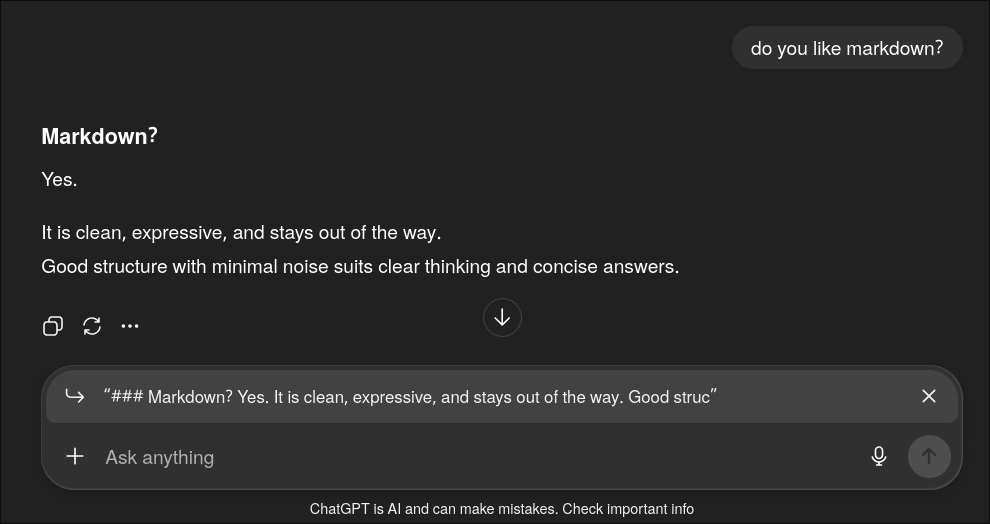
This is pretty cool, because alternatives these days are quite verbose, and it turns out that Markdown is pretty token efficient. Using Markdown to define a schema for an LLM to “fill out” might be a cool new way to do structured outputs!
For mdvalidate to be useful for this, we need to be able to short circuit.
For example, if we get something like:
# Hello there Wolf!# Hello t# Hello tbWe don’t have to keep waiting. We can know that it will not validate and exit early.
Here we have a simple schema that defines a list of items that have a word,
followed by a number. We have an input with many items, all of which are
valid except one in the middle. I wrote a tiny script that streams the
input file into mdvalidate via stdin, so you can see that once we have
enough info to know the document has an invalid portion, we can exit early.
This is super handy, since Markdown is the native language of LLMs. With
mdvalidate you can extract text out of an LLM response, terminate it early if
it violates the allowed shape, and be much more token efficient than using many
other techniques like JSON schema.
It turns out streaming is really complicated to implement, and requires validating trees that aren’t totally well formed yet. So there are probably some bugs lurking here.
mdvalidate is a rust project made with the help of
treesitter for incremental
parsing and this Markdown
grammar. I chose Treesitter so that streaming support would be possible, since
Treesitter is good at dealing with incomplete trees, and also so that I can
quickly recompute trees without starting from scratch. I’m also using
ariadne, a super cool pretty printer
Rust crate!
The development of mdvalidate is greatly simplified by the fact that the input
and schema both parse as valid markdown, so I didn’t really have to implement
any parsing or lexing logic!
Tree Zippers
At a high level, mdvalidate works by taking two abstract syntax trees for an
input markdown file and crawls them at the same time. At different points in the
schema, we should expect different elements in the input.
What's an AST?
An AST (abstract syntax tree) is a tree that represents the semantic relationships between elements in some language.
For example, code like x = 1 + 2 might be represented as:
Module
└─ Assign
   ├─ Name (x)
   └─ BinOp
      ├─ Constant (1)
      ├─ Add
      └─ Constant (2)
In Markdown, a document like # Hello would have an AST like:
document
└─ atx_heading
   ├─ atx_h1_marker (#)
   └─ heading_content
      └─ text (Hello)
Fun fact: Zed (editor) uses treesitter, the same incremental parser I’m using, and lets you preview an AST of your code in the editor live!
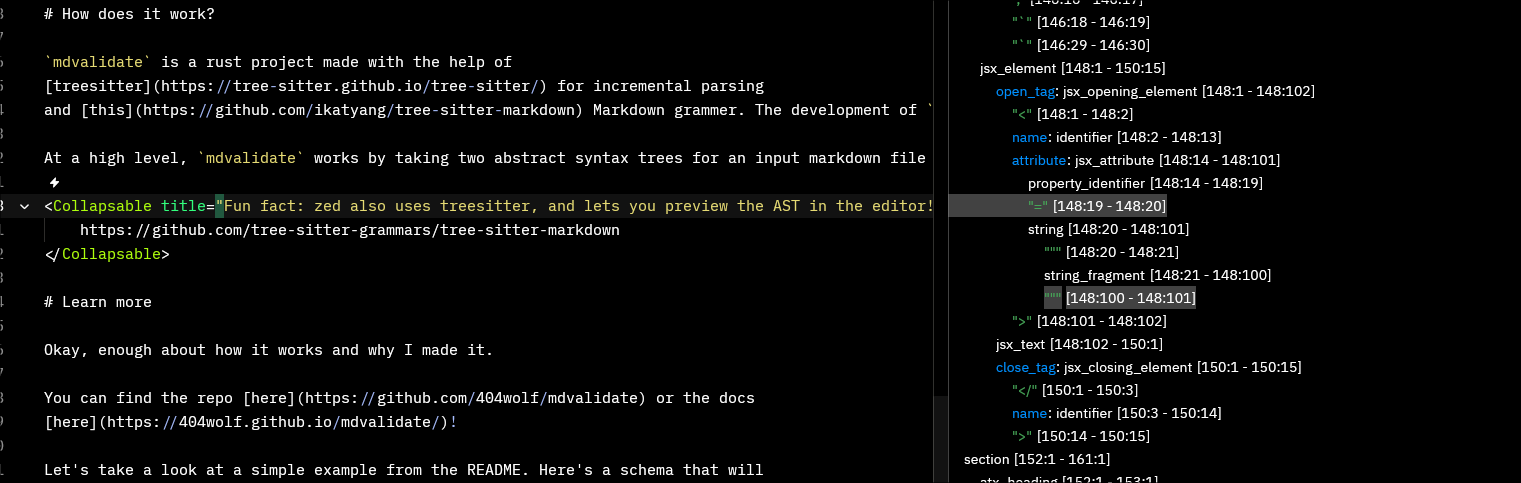
To check out the AST for a document in zed, open the run menu
ctrl+shift+p and type dev: open syntax tree view.
zed uses a different treesitter grammer than I am — this
one.
Consider this:
When we are looking at the input:
These are the actual syntax trees that Treesitter gives us:
document
└─ atx_heading
 ├─ atx_h1_marker
 └─ heading_content
    └─ text
document
└─ atx_heading
├─ atx_h1_marker
└─ heading_content
└─ textIn this case, we are doing “literal validation” where we want to make sure that each node matches exactly with the schema. To start, we put pointers here:
document <-- we are here
└─ atx_heading
 ├─ atx_h1_marker
 └─ heading_content
    └─ text
document <-- we are here
└─ atx_heading
├─ atx_h1_marker
└─ heading_content
└─ textAnd “walk” the tree…
document <-- matches ✔
└─ atx_heading <-- matches ✔
 ├─ atx_h1_marker <-- matches ✔
 └─ heading_content <-- matches ✔
    └─ text <-- matches ✔
document <-- matches ✔
└─ atx_heading <-- matches ✔
├─ atx_h1_marker <-- matches ✔
└─ heading_content <-- matches ✔
└─ text <-- matches ✔Recursing our way down. To know that a document is valid, we need to ensure that
the children are valid, to know that the child heading_content is valid, it
has to be the same kind of heading with the same text content.
I call this method the “zipper tree” method, because we’re “zipping” our way down the two ASTs making sure they are the same.
The implementation of this is conceptually simple. We look at the root document node, iterate over the siblings of the schema and input at the same rate, and figure out what kind of validator we need to use to compare them. When we get to more fun cases besides literals, this gets a little more tricky.
Matchers
Things get real complicated real fast. mdvalidate has the concept of
“matchers,” which are a mechanism to perform “captures.” A matcher has the form
`id:/re/`<extras>, where id is what the capture of the re regex pattern in
the output, and <extras> is for special cases like repeating lists. For
example,
# Hi `name:/[A-Z][a-z]+/`“extracts” my name from the header of some Markdown document.
If we look at our friend, the Zipper Tree, you’ll find:
document
└─ atx_heading
 ├─ atx_h1_marker
 └─ heading_content <-- we are here
    ├─ text
    └─ code_span
       └─ text
document
└─ atx_heading
├─ atx_h1_marker
└─ heading_content <-- we are here
└─ textAnd, when we are at the content container for the matcher, we will need to walk more nodes for the schema than we do the input. This is similar in the case of “repeated lists” too.
How do we go about implementing this? Abstraction, of course!
mdvalidate handles different types of node comparisons by using according
“Validators.” For the case of matchers, the call stack looks roughly like:
NodeVsNodeValidator::validate (document vs document)
└─ NodeVsNodeValidator::validate (heading vs heading)
   └─ HeadingVsHeadingValidator::validate
      └─ ContainerVsContainerValidator::validate
         └─ TextualVsTextualValidator::validate
           └─ MatcherVsTextualValidator::validate
            ├─ Validate prefix "Hi " ✔
            ├─ Match regex /[A-Z][a-z]+/ against "Wolf" ✔
            └─ Store capture {name: "Wolf"}
We start at the document root, recurse into the heading nodes, and then validate
the heading content. Textual containers are collections of inline textual nodes,
like *test*_test_ is a paragraph with a italic and subsequent bold node. When
we get to the text content, we find the matcher `name:/[A-Z][a-z]+/`,
validate the prefix “Hi ” matches, then apply the regex pattern to extract
“Wolf” and store it under the id “name”. We have to keep careful track of byte
offsets.
Each of these “validator” functions returns a validation result, which stores:
value: The resulting JSON value with all captures we just goterrors: A vector of all validation errors encounteredfarthest_reached_pos: The farthest position reached in both trees
As we keep going, we get a stack like:
---------
ValidationResult
  value: {name: "Wolf", ...},
  errors: [],
  farthest_reached_pos: { schema_idx: usize, input_idx: usize }
---------
...
---------
ValidationResult
  value: {name: "Wolf"},
  errors: [],
  farthest_reached_pos: { schema_idx: usize, input_idx: usize }
---------
Along the way, there’s some complicated cases we have to handle specially when certain nodes act like other nodes, which the different validators are able to delagate. For example, you can specify you expect a literal code node in your input by using a ”!” extra, like so
When we run ContainerVsContainerValidator::validate, when we check
that the number of children matches up, we have to consider the number of
children counting `wolf`! as a single node, since the AST looks like
document
└─ atx_heading
   ├─ atx_h1_marker
   └─ heading_content
      ├─ text
      ├─ code_span
      │  └─ text
      └─ text
But if we have
Then we actually don’t “coalesce” the ”!”.
You'd think something like counting nodes would be simple!
The actual algorithm I used to figure out how many nodes we expect in the input for some schema involves counting the nodes in the schema, and then subtracting the number of nodes we must collapse, by iterating over each node, and for each node, updating a correction factor using the following decision tree. Then, we subtract the two to find the number of nodes we expect.
we at matcher?
├── no
│   └── next is matcher?
│       ├── no -> collapse 0 nodes
│       └── yes
│           └── at text?
│               ├── no -> collapse 0 nodes
│               └── yes -> next is coalescing
│                           ├── no -> collapse 1 node
│                           └── yes -> collapse 0 nodes
└── yes
    ├── is coalescing?
    │   └── yes
    │       └── end is at end?
    │           ├── yes -> collapse 1 node
    │           └── no -> non text follows?
    │                       ├── yes -> collapse 1 node
    │                       └── no -> collapse 1 node
    └── no
        └── has extra text?
            ├── yes -> collapse 1 node
            └── no -> collapse 0 nodes
The Walker Abstraction
And then we can, in the context of a validator, pick up at the index one of our
callees left off at. In this case, TextualVsTextualValidator::validate will leave us
off at the end of the “textual container”, so there’s no more work left to be
done.
Treesitter makes dealing with positions like this relatively straightforward. you can use treecursors, which are mutable and keep state about where they are in the tree.
Using tree cursors usually looks something like this:
let tree = parser.parse("# Hello\n", None).unwrap();
let mut cursor: TreeCursor = tree.walk();

// document -> first child
cursor.goto_first_child();
println!("node kind: {}", cursor.node().kind());

// heading -> marker
cursor.goto_first_child();
println!("node kind: {}", cursor.node().kind());

// marker -> heading_content
cursor.goto_next_sibling();
println!("node kind: {}", cursor.node().kind());
All of the validator functions take immutable references to a cursor, which
has stateful information that is immediately useful, and then does validation,
picking up where that cursor is by cloning the cursor into a mutable new one, so
that we don’t mess up the callers’ state in case they choose not to leave off
where we finish.
To make it easier to maintain state, I created an abstraction over the two trees
we are walking called a
Validator.
This manages the state of where the schema node and input nodes currently last
left off, and makes it easy to load in more input incrementally by “remembering”
the previous state.
/// A Validator implementation that uses a zipper tree approach to validate
/// an input Markdown document against a markdown schema treesitter tree.
#[derive(Debug)]
pub struct Validator {
    /// The schema tree, which does not change after initialization.
    schema_tree: Tree,
    /// The full schema string. Does not change.
    schema_str: String,
    /// The current input tree. When read_input is called, this is replaced with a new tree.
    input_tree: Tree,
    /// The full input string as last read. Not used internally but useful for
    /// debugging or reporting.
    last_input_str: String,
    /// Whether we have received the end of the input. This means that last
    /// input tree descendant index is at the end of the input.
    got_eof: bool,
    /// Map of matches found so far.
    matches_so_far: Value,
    /// Any errors encountered during validation.
    errors_so_far: Vec<ValidationError>,
    /// Our farthest reached position.
    farthest_reached_pos: NodePosPair,
}
The validator has two important methods: read_input and validate.
`read_input` updates the `input_tree` by applying an "edit." Treesitter makes this extremely fast for us.
fn read_input(&mut self, input: &str, got_eof: bool) -> Result<(), ValidationError> {
    // Update internal state of the last input string
    self.state.set_last_input_str(input.to_string());

    // If we already got EOF, do not accept more input
    if self.state.got_eof() {
        return Err(ValidationError::ParserError(ParserError::ReadAfterEOF));
    }

    self.state.set_got_eof(got_eof);

    // Calculate the range of new content
    let old_len = self.input_tree.root_node().byte_range().end;
    let new_len = input.len();

    // Only parse if there's actually new content
    if new_len <= old_len {
        return Ok(());
    }

    // Parse incrementally, providing the edit information
    let edit = InputEdit {
        start_byte: old_len,
        old_end_byte: old_len,
        new_end_byte: new_len,
        start_position: self.input_tree.root_node().end_position(),
        old_end_position: self.input_tree.root_node().end_position(),
        new_end_position: {
            let lookup = LineColLookup::new(input);
            let (row, col) = lookup.get(new_len);
            Point { row, column: col }
        },
    };

    // We need to call edit() to inform the tree about changes in the source text
    // before reusing it for incremental parsing. This allows tree-sitter to
    // efficiently reparse only the modified portions of the tree. (it
    // requires the state to match the new text)
    self.input_tree.edit(&edit); // edit doesn't know about the new text content!

    let mut input_parser = new_markdown_parser();
    match input_parser.parse(input, Some(&self.input_tree)) {
        Some(parse) => {
            self.input_tree = parse;
            Ok(())
        }
        None => Err(ValidationError::ParserError(ParserError::TreesitterError)),
    }
}
And `validate` kicks off the chain, calling NodeVsNodeValidator::validate.
/// Validates the input markdown against the schema by traversing both trees
/// in parallel to the ends, starting from where we last left off.
pub fn validate(&mut self) {
    if self.got_eof() {
        self.set_farthest_reached_pos(NodePosPair::default());
        // Clear errors when revalidating from the beginning at EOF
        // to avoid duplicate errors from streaming validation
        self.errors_so_far.clear();
        self.matches_so_far = Value::Object(Map::new());
    }

    let got_eof = self.got_eof();
    let farthest_reached_pos = self.farthest_reached_pos();
    let schema_str = self.schema_str.clone();
    let input_str = self.last_input_str.clone();

    let validation_result = {
        let mut schema_cursor = self.schema_tree.walk();
        let mut input_cursor = self.input_tree.walk();

        // Go to where we last left off
        farthest_reached_pos.walk_cursors_to_pos(&mut schema_cursor, &mut input_cursor);

        let walker = ValidatorWalker::new(schema_cursor, &schema_str, input_cursor, &input_str);
        NodeVsNodeValidator.validate(&walker, got_eof)
    };

    self.push_validation_result(validation_result);
}
All in all, using mdvalidate as a library is really simple! It looks
something like:
pub fn process<R: Read>(
    schema_str: &String,
    input: &mut R,
    fast_fail: bool,
) -> Result<((Vec<ValidationError>, Value), Validator, String), ProcessingError> {
    let buffer_size = get_buffer_size();

    let mut input_str = String::new();
    let mut buffer = vec![0; buffer_size];

    // Create a new validator from a fragment of an input, and a complete schema
    let mut validator = Validator::new_incomplete(schema_str.as_str(), input_str.as_str())
        .ok_or(ValidationError::ValidatorCreationFailed)?;

    loop {
        let bytes_read = input.read(&mut buffer)?;

        // If we're done reading, mark EOF
        if bytes_read == 0 {
            validator.read_final_input(&input_str)?;
            validator.validate();

            break;
        }

        let new_text = std::str::from_utf8(&buffer[..bytes_read])?;
        input_str.push_str(new_text);

        validator.read_more_input(&input_str)?;
        validator.validate();

        // Check for fast-fail AFTER validation
        if fast_fail && validator.errors_so_far().count() > 0 {
            break;
        }
    }

    let errors: Vec<_> = validator.errors_so_far().cloned().collect();
    let matches = validator.matches_so_far().clone();

    Ok(((errors, matches), validator, input_str))
}
The process looks like this:
Validation Flow
Starting with some initial schema and input fragment, we align the cursors to where we last left off (stored in the validator’s internal state), validate as far as we can, and, if we got the EOF signal, report the errors and matches we’ve found so far, or otherwise update our farthest reached position and wait for more input. The new validation result is fed back into the validator state for the next cycle.
Now you have a high level idea of how it works!
There’s a lot more to come!
First, there’s just so much surface area. It’s kinda insane. So I need to finish polishing super specific things like streaming input support for tables with repeating matchers and writing oh so many more tests.
but then the fun roadmap: one of the things i’m most excited about is
generating json schemas from “mdschema”s, so that you can integrate
mdvalidate with your favorite existing tools.
This means going from something like:
# Hi `name:/[A-Z][a-z]+/`to
{
  "$schema": "http://json-schema.org/draft-07/schema#",
  "type": "object",
  "properties": {
    "name": {
      "type": "string",
      "pattern": "^[A-Z][a-z]+$"
    }
  },
  "required": ["name"]
}
This would let you “compile” your schemas into types that you can use in your languages to safely validate Markdown schemas into langauge-safe constructs.
I also really want to package mdvalidate into a language server! I’d
really like to be able to edit markdown files and get live validation. Red
squiggles, suggested fixes, etc.
One limitation here for implementing this is that validation assumes that the input is streamed. With a language server, edits can occur anywhere in the document, and right now we would need to walk the trees all the way down from the location of edit to revalidate. But this is probably still relatively fast.
And, in general, more LLM tinkering: there’s a few LLM related things I’d like to explore.
I’d like to fine tune a model to understand MDS natively, and tinkering more with the AI use case. And I’d like to try to quantify how much more token efficient Markdown is compared to JSON schema, and how much better the quality of structured output responses are when you use Markdown
Implementation wise, one of the annoyances of using Treesitter in Rust has been
that all of the node types are basically just raw, untyped strings. When
working on mdvalidate I came across a project called
“typesitter”, which can
automatically generate types for all of the different Treesitter nodes, which I
would love to eventually transition to.
Okay, now enough about how it works and why I made it.
You can find the repo here or the docs here!
But definitely note that it’s all a half baked proof of concept. There’s a lot left to do, and a lot of bugs!
If you’re excited about this idea, or have cool use cases, I’d love to hear! Email me!
Shout out to my friend Alessandro for
help pairing on some of the initial development of mdvalidate!