• ~1,000 words • 6 minute read
I've hosted this site on Netlify for years. It's been fine. Netlify is good at what it does, and for a static Eleventy blog with 400+ posts, "fine" is really all you need.
But I kept wanting one thing Netlify doesn't give you: server logs.
Not analytics. I have Plausible for that. I mean raw access logs. Who's pulling my RSS feed? Which bots are crawling the plain-text versions of posts I make available? Is anyone actually using the JSON feed? What curious search engines are visiting me in the ead of night? When a post hits the front page of Hacker News, what does that traffic actually look like at the request level? These kinds of questions and mysteries can only be surfaced when you start to dig into the raw access logs and start poking around.
Netlify doesn't offer this. Well, they sort of do, but not without giving them more money. I was already giving Cloudflare money, and I'm generally fond of their offerings, so I was more interested in finding a solution there.
Why Cloudflare
I already use Cloudflare heavily for other projects. Workers, R2, Pages, the AI stuff. My DNS was already proxied through them. So the question wasn't really "where should I move?" but "why haven't I moved yet?"
The answer was inertia. Netlify's deploy-on-push workflow is genuinely nice, and I didn't want to break something that's worked for me for nearly a solid decade. But once I actually sat down to do it, the migration was straightforward. The Eleventy build is identical. The _redirects file format is nearly the same (with some caveats I'll get to). And Cloudflare Pages gives you the same git-push-to-deploy experience. The truth is I had to change almost nothing in the repo itself.
The actual migration
The short version:
- Create a Cloudflare Pages project connected to the GitHub repo. Set the build command (
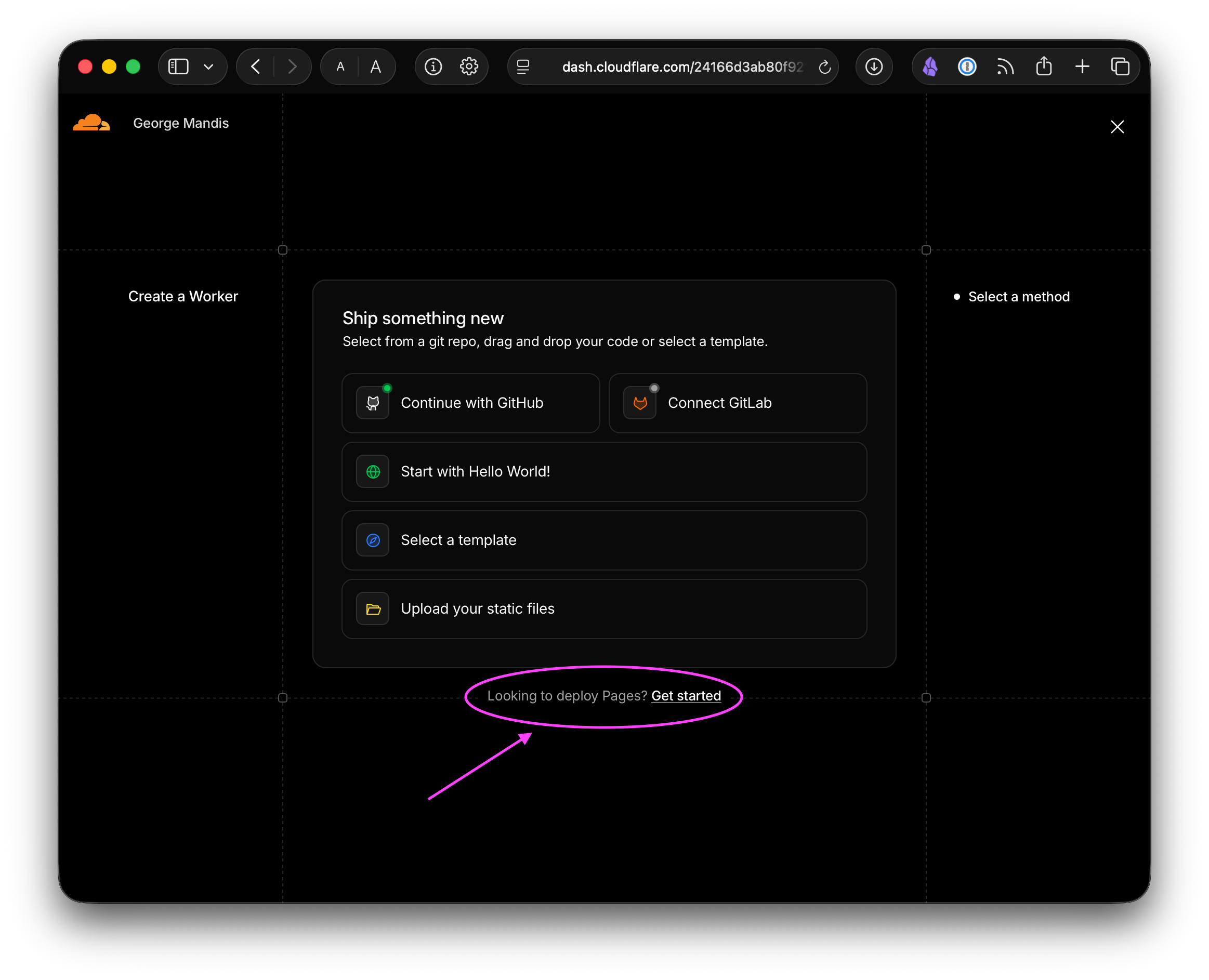
npm run build), output directory (_site), done. This part is genuinely easy once you find the right UI flow. Cloudflare's dashboard is... confusing. Workers and Pages are merged under one section, and the "Create" flow defaults to creating a Worker, not a Pages project. There's a small "Looking to deploy Pages?" link at the bottom of the page. I missed it twice.
Move the
/randomendpoint. I had a Netlify Function that fetches a special JSON array of all post URLs that Eleventy generates, picks one at random, and 302 redirects. Super hacky and one of my favorite things about my own site. This became a Cloudflare Pages Function atfunctions/random.js. Same logic, different export format (onRequestinstead ofexports.handler).Clean up
_redirects. Cloudflare Pages supports the same_redirectsformat as Netlify for simple path-to-path redirects. But it does not support two things I was using: cross-domain redirects (forgeorgemandis.com→george.mand.is, etc.) and200status proxying to external URLs. The cross-domain redirects moved to Cloudflare Redirect Rules in the dashboard. I had to look up the syntax for dynamic redirects and found Simon Willison's write-up on this more helpful than Cloudflare's own docs. Cloudflare has some amazing tools, but I wish they were more clearly and consistently documented sometimes. The proxy rules were for Plausible, which needed a different solution.Drop the dead weight. I had two other Netlify Functions that I wasn't using anymore: a Micropub endpoint for publishing from iA Writer and a home-rolled Stripe payment handler for sponsorships (I'm just leaning in to Github sponsors now for that).
The Plausible proxy problem
Here's where it got a little more interesting. I proxy Plausible Analytics through my own domain so it works even when ad-blockers block plausible.io. On Netlify, this was three lines in _redirects:
/js/script.js https://plausible.io/js/script.js 200
/js/script.tagged-events.js https://plausible.io/js/script.tagged-events.js 200
/api/event https://plausible.io/api/event 200
The 200 status tells Netlify to reverse-proxy the request rather than redirect. Cloudflare Pages doesn't support this. It didn't fit cleanly into Pages Functions either, because file-based routing means /js/script.js would need a file at functions/js/script.js.js. It technically could have worked, but would have been very strange.
The solution: a standalone Cloudflare Worker with route matching. The Worker intercepts requests to /js/script* and /api/event on my domain, proxies them to Plausible, and lets everything else pass through to Pages.
In the Cloudflare ecosystem, when in doubt, just throw another worker on the pile...
But I actually kind of liked this pattern. I ended up making this its own project and set it up as a GitHub template:
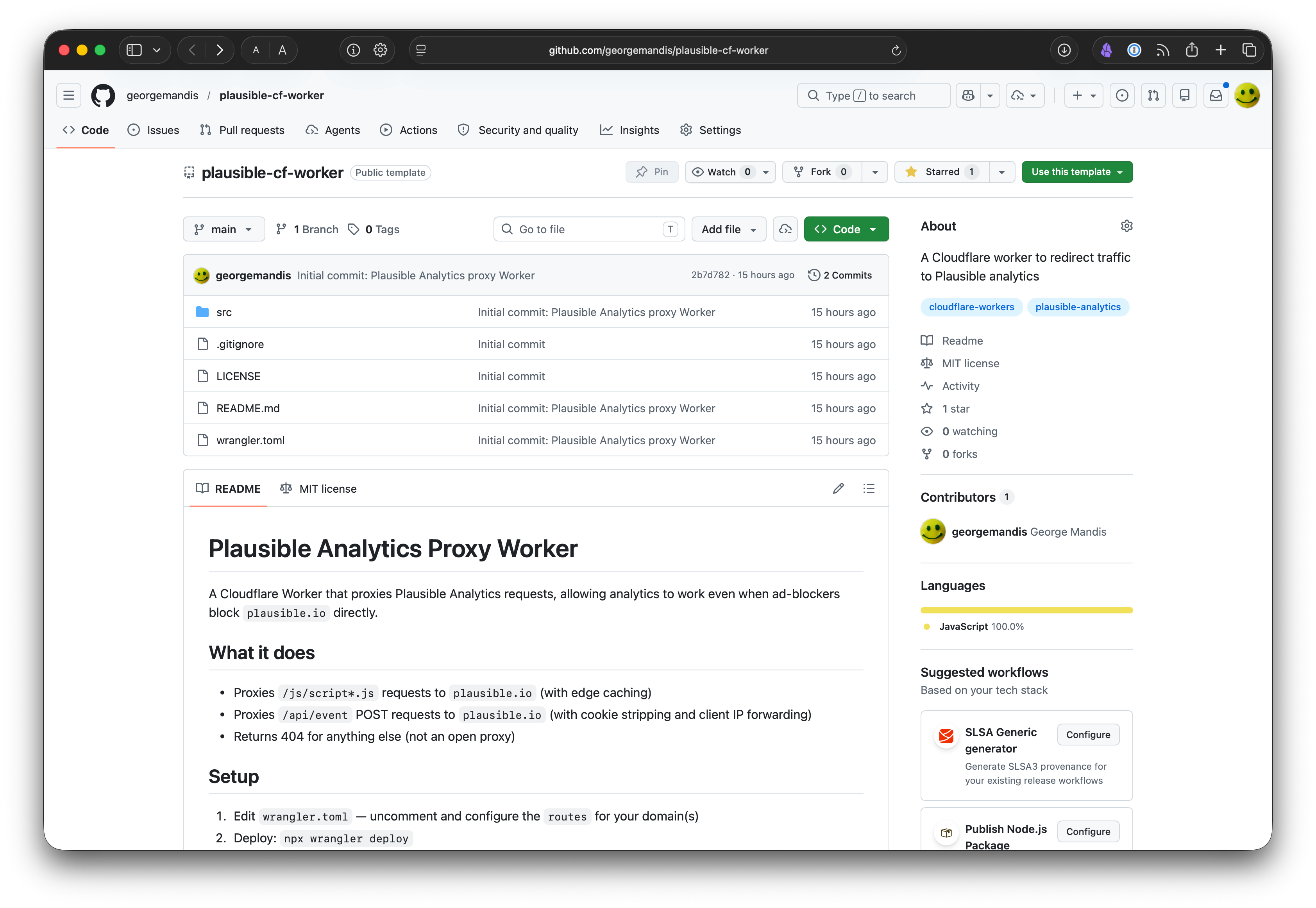
The code is about 70 lines, and it does a few things beyond a naive proxy:
- Edge caches the script so repeated page loads don't hit plausible.io at all
- Strips cookies from event POST requests for privacy
- Forwards the client IP via
X-Forwarded-Forso Plausible counts unique visitors correctly instead of seeing the Worker's IP - Returns 404 for anything else so it's not an open proxy to plausible.io
The nice thing about a standalone Worker with route-based matching is that it works independently of your hosting. It sits at the Cloudflare edge and intercepts matching requests before they reach your origin, whether that origin is Pages, Netlify, or anything else. It started working on my live site immediately, even before I finished the Pages migration, because the DNS was already proxied through Cloudflare.
This also means I can reuse it for any other site I proxy through Cloudflare. All I have to do is just add more routes to wrangler.toml:
routes = [
  { pattern = "george.mand.is/js/script*", zone_name = "mand.is" },
  { pattern = "george.mand.is/api/event", zone_name = "mand.is" },
  { pattern = "some-other-site.com/js/script*", zone_name = "some-other-site.com" },
  { pattern = "some-other-site.com/api/event", zone_name = "some-other-site.com" },
]
One npx wrangler deploy and it's live.
If you use Plausible and Cloudflare, feel free to copy the plausible-cf-worker template and tell me if it was useful.
The logging question
Right, the whole reason I initially did this.
My first attempt was a Pages middleware that logged every request to an R2 bucket. Structured JSON, organized by date and hour, the whole thing. It worked! I thought I was so clever avoiding the extra money Cloudflare wanted to charger for their Log Explorer offering (still less than Netlify, but why pay when you can be clever?).
And then I looked at my R2 dashboard an hour later and saw 6,900 Class A operations. At $4.50 per million operations, this was going to cost more per month than just buying Cloudflare's Log Explorer add-on ($1 per GB ingested), which at my traffic levels would cost approximately nothing.
So I deleted the middleware and bought Log Explorer. Sometimes the boring answer is the right one.
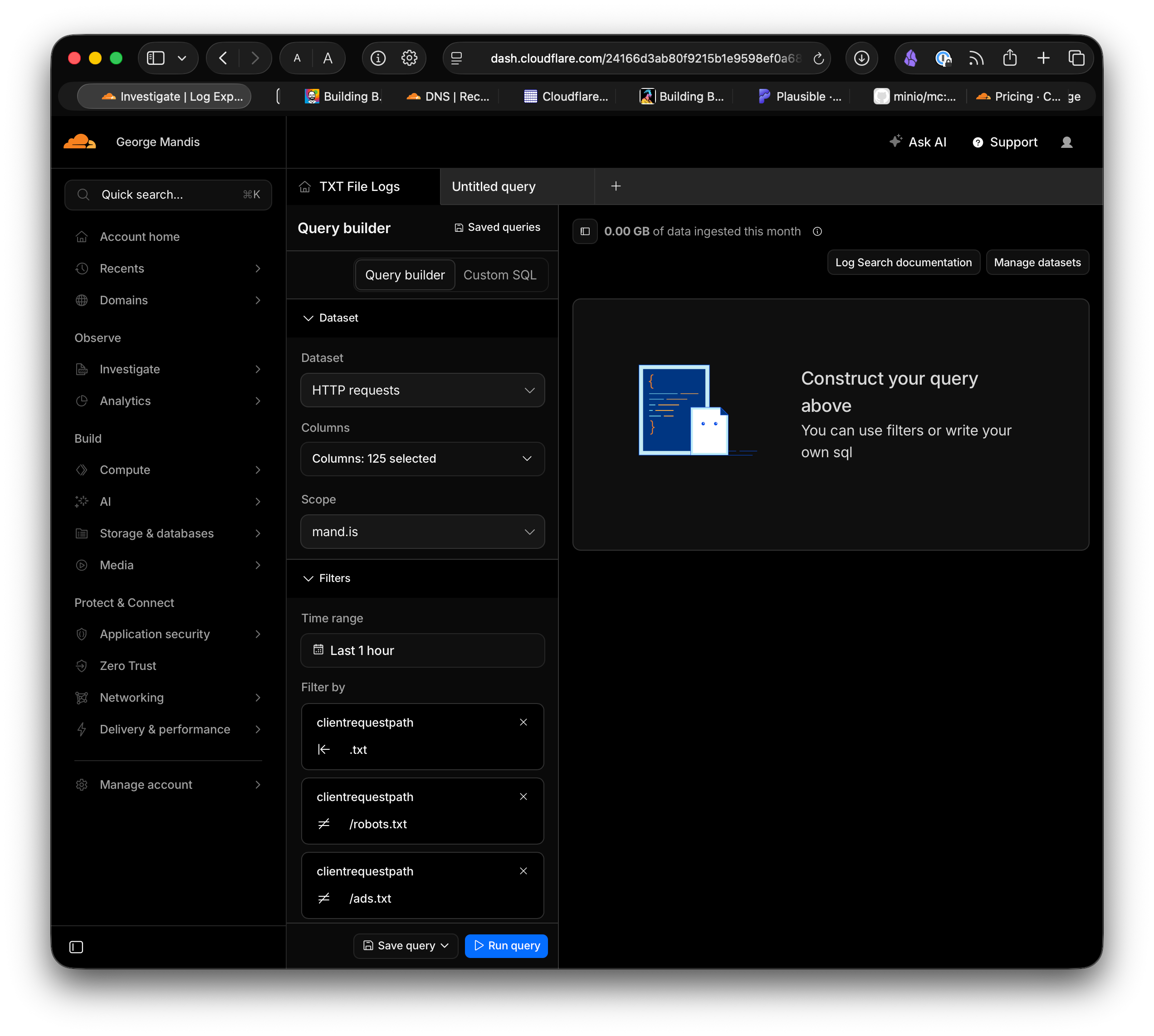
And truthfully, Log Explorer offers much more intersting logs than what I was home-rolling myself with this approach and a great interface for exploring them with. I can use their query builder to build filters along 125 different parameters. I have a nice little saved query specifically for trackign pings on my RSS feeds (the original question) as well as checking-in on who might actually be looking at the plain-text versions of my blog posts.
Was it worth it?
The site works the same as before—same build, same deploy flow, same content—but here are the things I gained:
- Access logs (finally!)
- The Plausible proxy as a reusable standalone thing (fun)
- Everything under one roof (DNS, CDN, hosting, workers, storage)
- The option to do more interesting things later (D1 for search? Workers for dynamic features? Durable Objects for real-time shenanigans? GUess we'll see!)
The things I learned:
- Cloudflare's dashboard UX for distinguishing Workers from Pages is kind of confusing
_redirectscompatibility between Netlify and Cloudflare Pages is close but not identical- Per-request R2 writes are expensive; think about Class A operations before you build a logging pipeline
- A standalone Worker with route matching is a pretty clean pattern for proxying third-party services through your domain (i.e. plausible-cf-worker)
If you're on Netlify and considering a move, the migration is less scary than it seems. The Eleventy build doesn't change at all. Most of the work is shuffling Netlify-specific things (functions, proxy redirects) into their Cloudflare equivalents.
--If you enjoyed reading this consider sponsoring my work on GitHub, subscribing to my newsletter or sharing it on Hacker News.
Published on Wednesday, May 13th 2026. Read this post as plain-text.