There are numbers every Python programmer should know. For example, how fast or slow is it to add an item to a list in Python? What about opening a file? Is that less than a millisecond? Is there something that makes that slower than you might have guessed? If you have a performance sensitive algorithm, which data structure should you use? How much memory does a floating point number use? What about a single character or the empty string? How fast is FastAPI compared to Django?
I wanted to take a moment and write down performance numbers specifically focused on Python developers. Below you will find an extensive table of such values. They are grouped by category. And I provided a couple of graphs for the more significant analysis below the table.
Acknowledgements: Inspired by Latency Numbers Every Programmer Should Know and similar resources.
Source code for the benchmarks
This article is posted without any code. I encourage you to dig into the benchmarks. The code is available on GitHub at:
https://github.com/mikeckennedy/python-numbers-everyone-should-know
📊 System Information
The benchmarks were run on the sytem described in this table. While yours may be faster or slower, the most important thing to consider is relative comparisons.
| Property | Value |
|---|---|
| Python Version | CPython 3.14.2 |
| Hardware | Mac Mini M4 Pro |
| Platform | macOS Tahoe (26.2) |
| Processor | ARM |
| CPU Cores | 14 physical / 14 logical |
| RAM | 24 GB |
| Timestamp | 2025-12-30 |
TL;DR; Python Numbers
This first version is a quick “pyramid” of growing time/size for common Python ops. There is much more detail below.
Python Operation Latency Numbers (the pyramid)
Attribute read (obj.x)                              14   ns
Dict key lookup                                     22   ns              1.5x attr
Function call (empty)                               22   ns
List append                                         29   ns              2x attr
f-string formatting                                 65   ns              3x function
Exception raised + caught                          140   ns             10x attr
orjson.dumps() complex object                      310   ns        0.3 μs
json.loads() simple object                         714   ns        0.7 μs   2x orjson
sum() 1,000 integers                             1,900   ns        1.9 μs   3x json
SQLite SELECT by primary key                     3,600   ns        3.6 μs   5x json
Iterate 1,000-item list                          7,900   ns        7.9 μs   2x SQLite read
Open and close file                              9,100   ns        9.1 μs   2x SQLite read
asyncio run_until_complete (empty)              28,000   ns         28 μs   3x file open
Write 1KB file                                  35,000   ns         35 μs   4x file open
MongoDB find_one() by _id                      121,000   ns        121 μs   3x write 1KB
SQLite INSERT (with commit)                    192,000   ns        192 μs   5x write 1KB
Write 1MB file                                 207,000   ns        207 μs   6x write 1KB
import json                                  2,900,000   ns      2,900 μs   3 ms   15x write 1MB
import asyncio                              17,700,000   ns     17,700 μs  18 ms    6x import json
import fastapi                             104,000,000   ns    104,000 μs 104 ms    6x import asyncio
Python Memory Numbers (the pyramid)
Float                                               24   bytes
Small int (cached 0-256)                            28   bytes
Empty string                                        41   bytes
Empty list                                          56   bytes          2x int
Empty dict                                          64   bytes          2x int
Empty set                                          216   bytes          8x int
__slots__ class (5 attrs)                          212   bytes          8x int
Regular class (5 attrs)                            694   bytes         25x int
List of 1,000 ints                              36,056   bytes         36 KB
Dict of 1,000 items                             64,952   bytes         65 KB
List of 1,000 __slots__ instances               81,000   bytes         81 KB
List of 1,000 regular instances                169,000   bytes        169 KB         2x slots list
Empty Python process                        16,000,000   bytes         16 MB
Python numbers you should know (detailed version)
Here is a deeper table comparing many more details.
| Category | Operation | Time | Memory |
|---|---|---|---|
| 💾 Memory | Empty Python process | — | 15.73 MB |
| Empty string | — | 41 bytes | |
| 100-char string | — | 141 bytes | |
| Small int (0-256) | — | 28 bytes | |
| Large int | — | 28 bytes | |
| Float | — | 24 bytes | |
| Empty list | — | 56 bytes | |
| List with 1,000 ints | — | 35.2 KB | |
| List with 1,000 floats | — | 32.1 KB | |
| Empty dict | — | 64 bytes | |
| Dict with 1,000 items | — | 63.4 KB | |
| Empty set | — | 216 bytes | |
| Set with 1,000 items | — | 59.6 KB | |
| Regular class instance (5 attrs) | — | 694 bytes | |
__slots__ class instance (5 attrs) |
— | 212 bytes | |
| List of 1,000 regular class instances | — | 165.2 KB | |
List of 1,000 __slots__ class instances |
— | 79.1 KB | |
| dataclass instance | — | 694 bytes | |
| namedtuple instance | — | 228 bytes | |
| ⚙️ Basic Ops | Add two integers | 19.0 ns (52.7M ops/sec) | — |
| Add two floats | 18.4 ns (54.4M ops/sec) | — | |
| String concatenation (small) | 39.1 ns (25.6M ops/sec) | — | |
| f-string formatting | 64.9 ns (15.4M ops/sec) | — | |
.format() |
103 ns (9.7M ops/sec) | — | |
% formatting |
89.8 ns (11.1M ops/sec) | — | |
| List append | 28.7 ns (34.8M ops/sec) | — | |
| List comprehension (1,000 items) | 9.45 μs (105.8k ops/sec) | — | |
| Equivalent for-loop (1,000 items) | 11.9 μs (83.9k ops/sec) | — | |
| 📦 Collections | Dict lookup by key | 21.9 ns (45.7M ops/sec) | — |
| Set membership check | 19.0 ns (52.7M ops/sec) | — | |
| List index access | 17.6 ns (56.8M ops/sec) | — | |
| List membership check (1,000 items) | 3.85 μs (259.6k ops/sec) | — | |
len() on list |
18.8 ns (53.3M ops/sec) | — | |
| Iterate 1,000-item list | 7.87 μs (127.0k ops/sec) | — | |
| Iterate 1,000-item dict | 8.74 μs (114.5k ops/sec) | — | |
sum() of 1,000 ints |
1.87 μs (534.8k ops/sec) | — | |
| 🏷️ Attributes | Read from regular class | 14.1 ns (70.9M ops/sec) | — |
| Write to regular class | 15.7 ns (63.6M ops/sec) | — | |
Read from __slots__ class |
14.1 ns (70.7M ops/sec) | — | |
Write to __slots__ class |
16.4 ns (60.8M ops/sec) | — | |
Read from @property |
19.0 ns (52.8M ops/sec) | — | |
getattr() |
13.8 ns (72.7M ops/sec) | — | |
hasattr() |
23.8 ns (41.9M ops/sec) | — | |
| 📄 JSON | json.dumps() (simple) |
708 ns (1.4M ops/sec) | — |
json.loads() (simple) |
714 ns (1.4M ops/sec) | — | |
json.dumps() (complex) |
2.65 μs (376.8k ops/sec) | — | |
json.loads() (complex) |
2.22 μs (449.9k ops/sec) | — | |
orjson.dumps() (complex) |
310 ns (3.2M ops/sec) | — | |
orjson.loads() (complex) |
839 ns (1.2M ops/sec) | — | |
ujson.dumps() (complex) |
1.64 μs (611.2k ops/sec) | — | |
msgspec encode (complex) |
445 ns (2.2M ops/sec) | — | |
Pydantic model_dump_json() |
1.54 μs (647.8k ops/sec) | — | |
Pydantic model_validate_json() |
2.99 μs (334.7k ops/sec) | — | |
| 🌐 Web Frameworks | Flask (return JSON) | 16.5 μs (60.7k req/sec) | — |
| Django (return JSON) | 18.1 μs (55.4k req/sec) | — | |
| FastAPI (return JSON) | 8.63 μs (115.9k req/sec) | — | |
| Starlette (return JSON) | 8.01 μs (124.8k req/sec) | — | |
| Litestar (return JSON) | 8.19 μs (122.1k req/sec) | — | |
| 📁 File I/O | Open and close file | 9.05 μs (110.5k ops/sec) | — |
| Read 1KB file | 10.0 μs (99.5k ops/sec) | — | |
| Write 1KB file | 35.1 μs (28.5k ops/sec) | — | |
| Write 1MB file | 207 μs (4.8k ops/sec) | — | |
pickle.dumps() |
1.30 μs (769.6k ops/sec) | — | |
pickle.loads() |
1.44 μs (695.2k ops/sec) | — | |
| 🗄️ Database | SQLite insert (JSON blob) | 192 μs (5.2k ops/sec) | — |
| SQLite select by PK | 3.57 μs (280.3k ops/sec) | — | |
| SQLite update one field | 5.22 μs (191.7k ops/sec) | — | |
| diskcache set | 23.9 μs (41.8k ops/sec) | — | |
| diskcache get | 4.25 μs (235.5k ops/sec) | — | |
| MongoDB insert_one | 119 μs (8.4k ops/sec) | — | |
| MongoDB find_one by _id | 121 μs (8.2k ops/sec) | — | |
| MongoDB find_one by nested field | 124 μs (8.1k ops/sec) | — | |
| 📞 Functions | Empty function call | 22.4 ns (44.6M ops/sec) | — |
| Function with 5 args | 24.0 ns (41.7M ops/sec) | — | |
| Method call | 23.3 ns (42.9M ops/sec) | — | |
| Lambda call | 19.7 ns (50.9M ops/sec) | — | |
| try/except (no exception) | 21.5 ns (46.5M ops/sec) | — | |
| try/except (exception raised) | 139 ns (7.2M ops/sec) | — | |
isinstance() check |
18.3 ns (54.7M ops/sec) | — | |
| ⏱️ Async | Create coroutine object | 47.0 ns (21.3M ops/sec) | — |
run_until_complete(empty) |
27.6 μs (36.2k ops/sec) | — | |
asyncio.sleep(0) |
39.4 μs (25.4k ops/sec) | — | |
gather() 10 coroutines |
55.0 μs (18.2k ops/sec) | — | |
create_task() + await |
52.8 μs (18.9k ops/sec) | — | |
async with (context manager) |
29.5 μs (33.9k ops/sec) | — |
Memory Costs
Understanding how much memory different Python objects consume.
An empty Python process uses 15.73 MB
Strings
The rule of thumb for strings is the core string object takes 41 bytes. Each additional character is 1 byte.
| String | Size |
|---|---|
Empty string "" |
41 bytes |
1-char string "a" |
42 bytes |
| 100-char string | 141 bytes |

Numbers
Numbers are surprisingly large in Python. They have to derive from CPython’s PyObject and are subject to reference counting for garabage collection, they exceed our typical mental model many of:
- 2 bytes = short int
- 4 bytes = long int
- etc.
| Type | Size |
|---|---|
| Small int (0-256, cached) | 28 bytes |
| Large int (1000) | 28 bytes |
| Very large int (10**100) | 72 bytes |
| Float | 24 bytes |

Collections
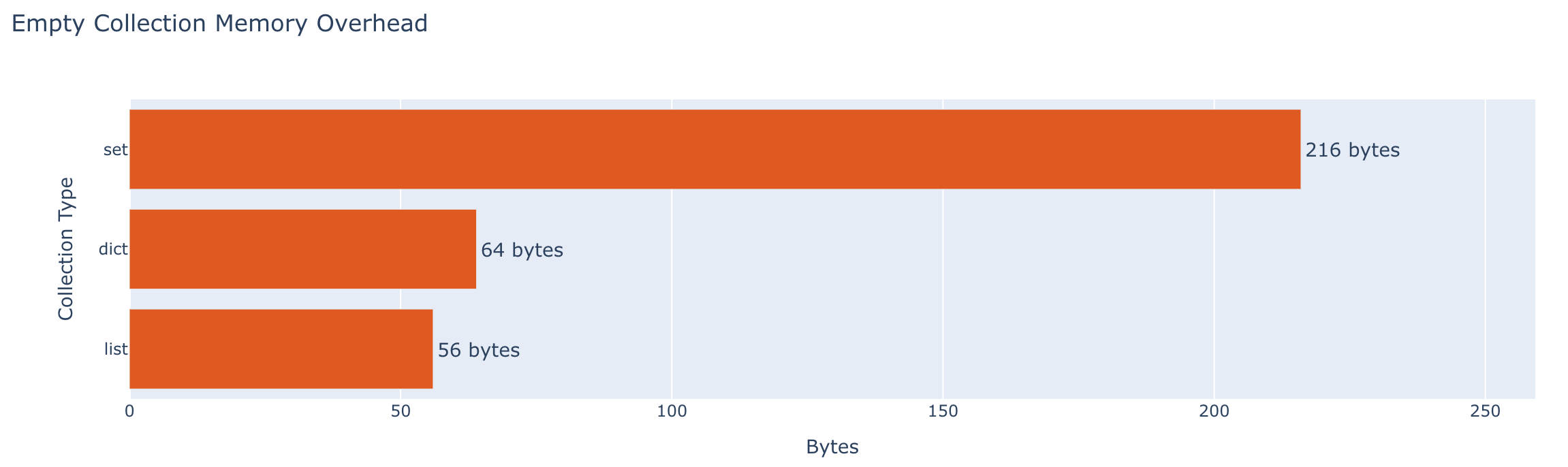
Collections are amazing in Python. Dynamically growing lists. Ultra high-perf dictionaries and sets. Here is the empty and “full” overhead of each.
| Collection | Empty | 1,000 items |
|---|---|---|
| List (ints) | 56 bytes | 35.2 KB |
| List (floats) | 56 bytes | 32.1 KB |
| Dict | 64 bytes | 63.4 KB |
| Set | 216 bytes | 59.6 KB |
Classes and Instances
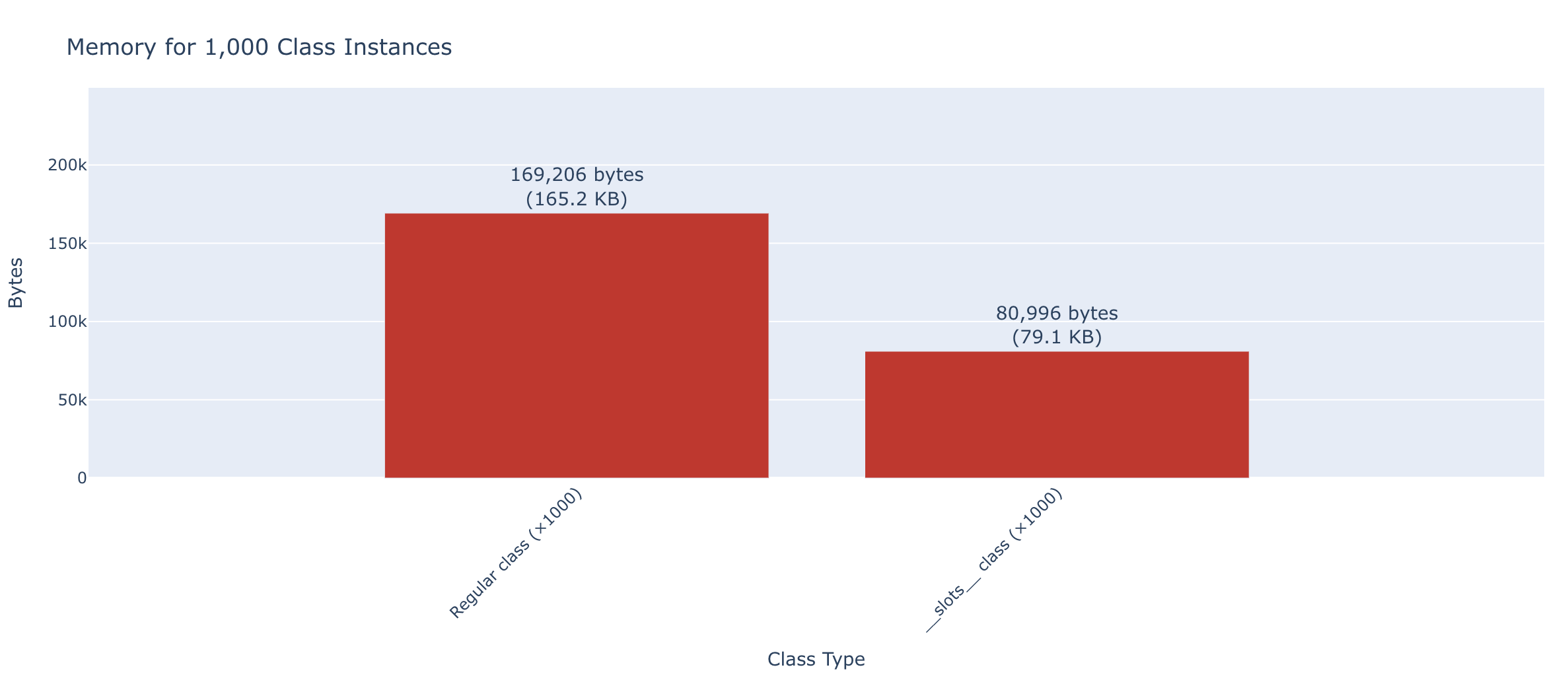
Slots are an interesting addition to Python classes. They remove the entire concept of a __dict__ for tracking fields and other values. Even for a single instance, slots classes are significantly smaller (212 bytes vs 694 bytes for 5 attributes). If you are holding a large number of them in memory for a list or cache, the memory savings of a slots class becomes very dramatic - over 2x less memory usage. Luckily for most use-cases, just adding a slots entry saves a ton of memory with minimal effort.
| Type | Empty | 5 attributes |
|---|---|---|
| Regular class | 344 bytes | 694 bytes |
__slots__ class |
32 bytes | 212 bytes |
| dataclass | — | 694 bytes |
@dataclass(slots=True) |
— | 212 bytes |
| namedtuple | — | 228 bytes |
Aggregate Memory Usage (1,000 instances):
| Type | Total Memory |
|---|---|
| List of 1,000 regular class instances | 165.2 KB |
List of 1,000 __slots__ class instances |
79.1 KB |
Basic Operations
The cost of fundamental Python operations: Way slower than C/C++/C# but still quite fast. I added a brief comparison to C# to the source repo.
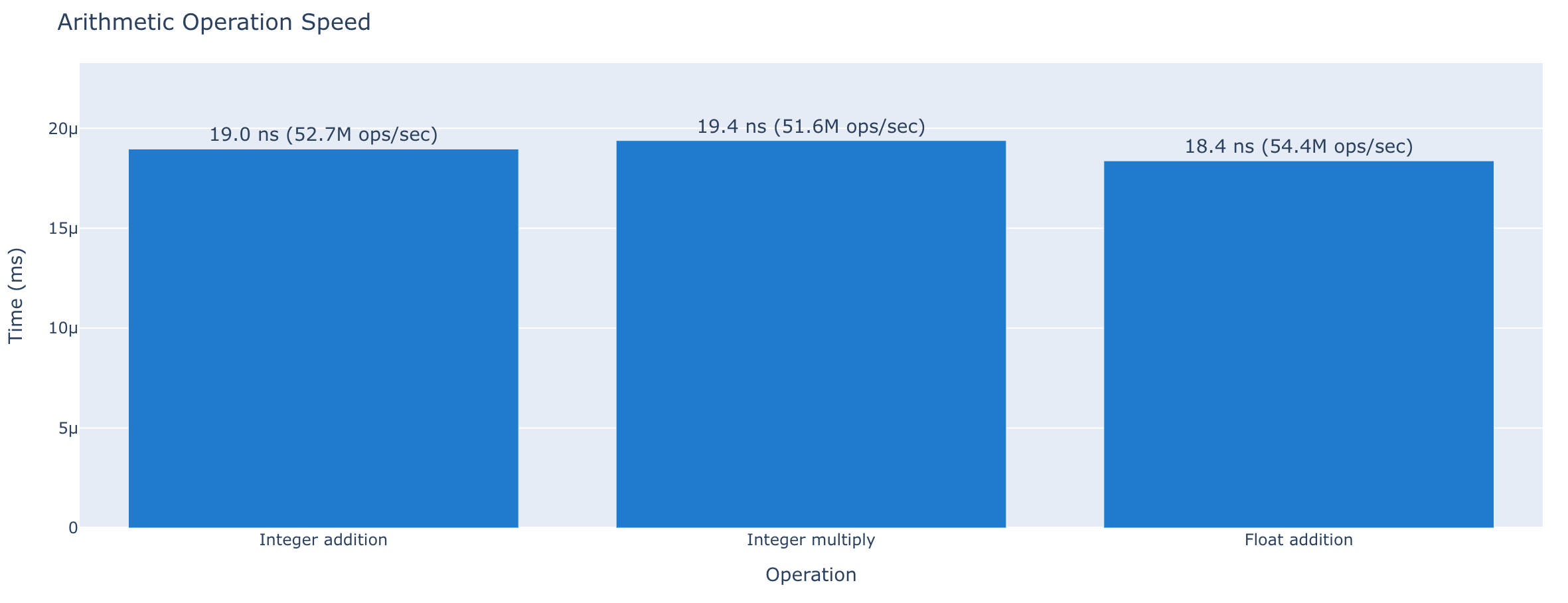
Arithmetic
| Operation | Time |
|---|---|
| Add two integers | 19.0 ns (52.7M ops/sec) |
| Add two floats | 18.4 ns (54.4M ops/sec) |
| Multiply two integers | 19.4 ns (51.6M ops/sec) |
String Operations
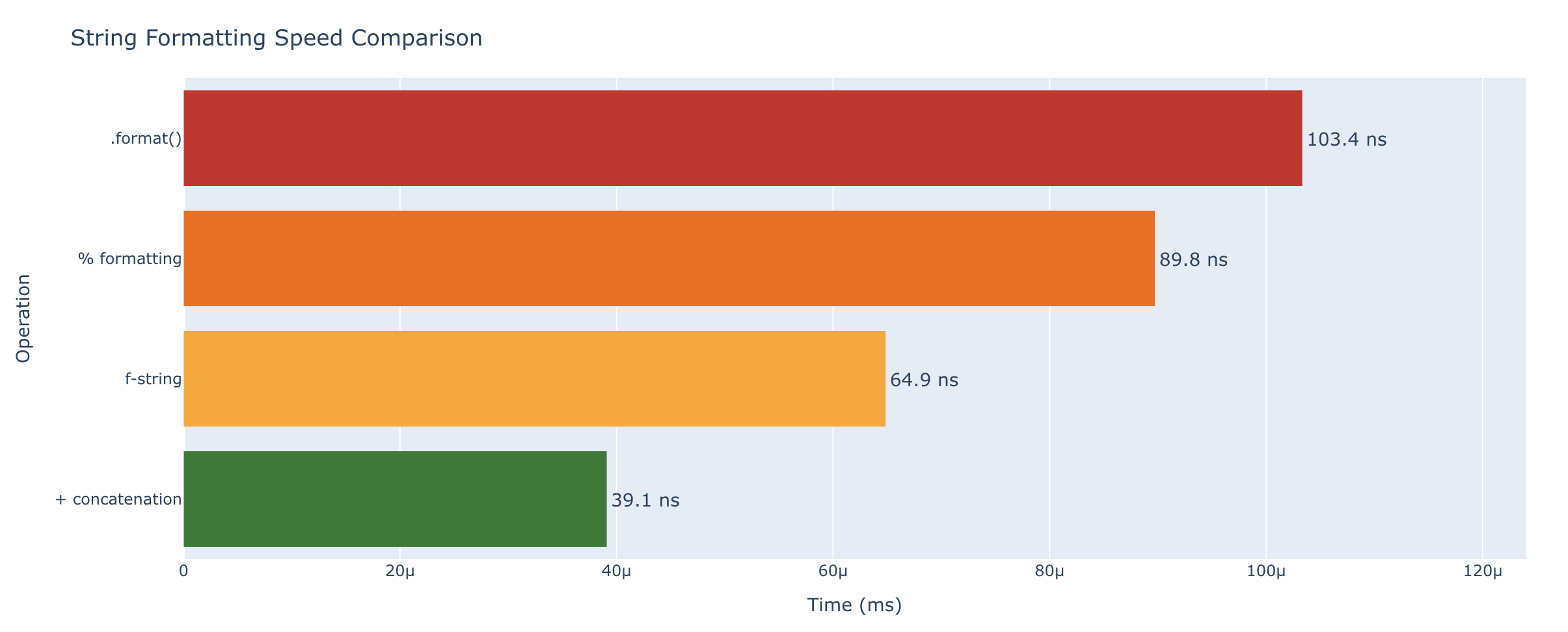
String operations in Python are fast as well. f-strings are the fastest formatting style, while even the slowest style is still measured in just nano-seconds.
| Operation | Time |
|---|---|
Concatenation (+) |
39.1 ns (25.6M ops/sec) |
| f-string | 64.9 ns (15.4M ops/sec) |
.format() |
103 ns (9.7M ops/sec) |
% formatting |
89.8 ns (11.1M ops/sec) |
List Operations
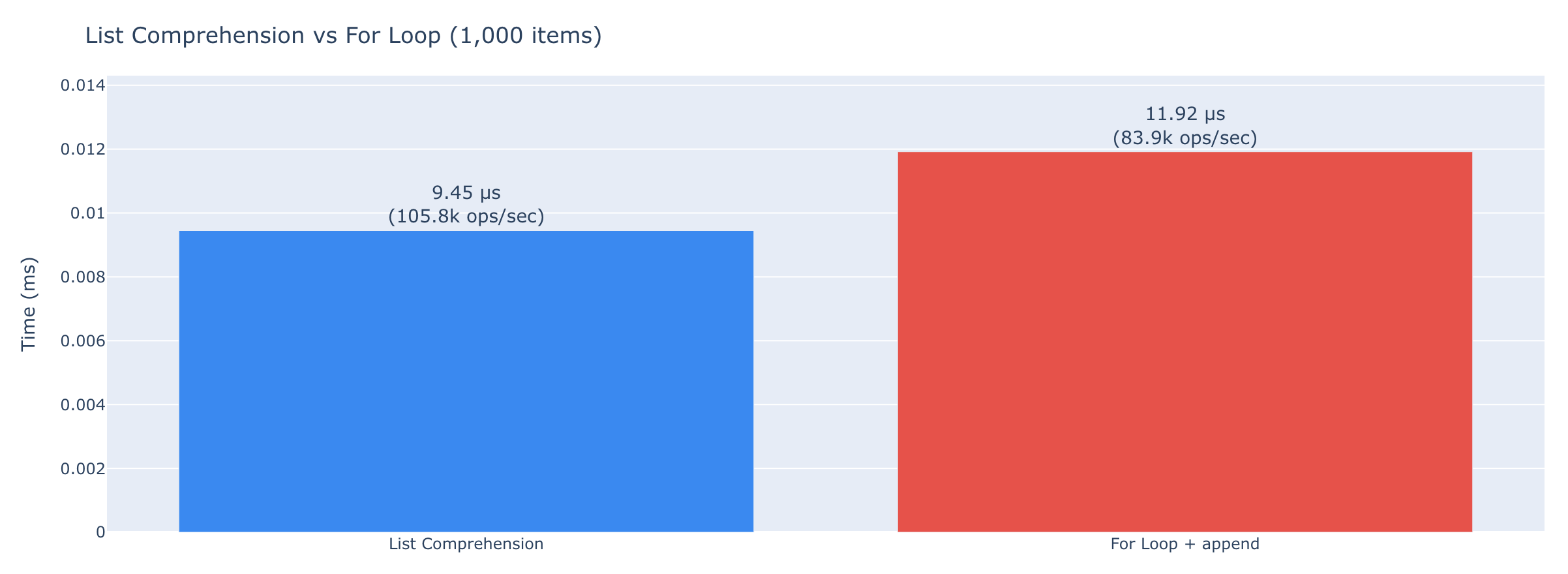
List operations are very fast in Python. Adding a single item usually requires 28ns. Said another way, you can do 35M appends per second. This is unless the list has to expand using something like a doubling algorithm. You can see this in the ops/sec for 1,000 items.
Surprisingly, list comprehensions are 26% faster than the equivalent for loops with append statements.
| Operation | Time |
|---|---|
list.append() |
28.7 ns (34.8M ops/sec) |
| List comprehension (1,000 items) | 9.45 μs (105.8k ops/sec) |
| Equivalent for-loop (1,000 items) | 11.9 μs (83.9k ops/sec) |
Collection Access and Iteration
How fast can you get data out of Python’s built-in collections? Here is a dramatic example of how much faster the correct data structure is. item in set or item in dict is 200x faster than item in list for just 1,000 items!
The graph below is non-linear in the x-axis.
Access by Key/Index
| Operation | Time |
|---|---|
| Dict lookup by key | 21.9 ns (45.7M ops/sec) |
Set membership (in) |
19.0 ns (52.7M ops/sec) |
| List index access | 17.6 ns (56.8M ops/sec) |
List membership (in, 1,000 items) |
3.85 μs (259.6k ops/sec) |

Length
len() is very fast. Maybe we don’t have to optimize it out of the test condition on a while loop looping 100 times after all.
| Collection | len() time |
|---|---|
| List (1,000 items) | 18.8 ns (53.3M ops/sec) |
| Dict (1,000 items) | 17.6 ns (56.9M ops/sec) |
| Set (1,000 items) | 18.0 ns (55.5M ops/sec) |
Iteration
| Operation | Time |
|---|---|
| Iterate 1,000-item list | 7.87 μs (127.0k ops/sec) |
| Iterate 1,000-item dict (keys) | 8.74 μs (114.5k ops/sec) |
sum() of 1,000 integers |
1.87 μs (534.8k ops/sec) |
Class and Object Attributes
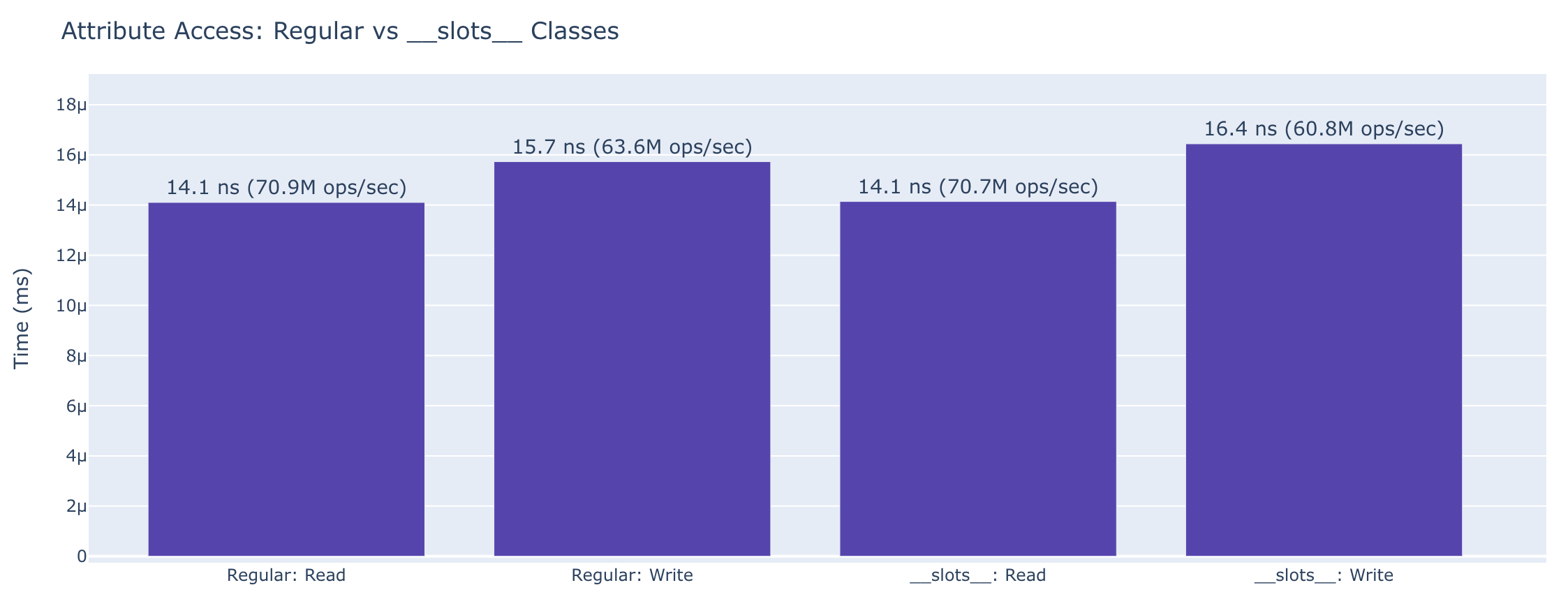
The cost of reading and writing attributes, and how __slots__ changes things. Slots saves over 2x the memory usage on large collections, with virtually identical attribute access speed.
Attribute Access
| Operation | Regular Class | __slots__ Class |
|---|---|---|
| Read attribute | 14.1 ns (70.9M ops/sec) | 14.1 ns (70.7M ops/sec) |
| Write attribute | 15.7 ns (63.6M ops/sec) | 16.4 ns (60.8M ops/sec) |
Other Attribute Operations
| Operation | Time |
|---|---|
Read @property |
19.0 ns (52.8M ops/sec) |
getattr(obj, 'attr') |
13.8 ns (72.7M ops/sec) |
hasattr(obj, 'attr') |
23.8 ns (41.9M ops/sec) |
JSON and Serialization
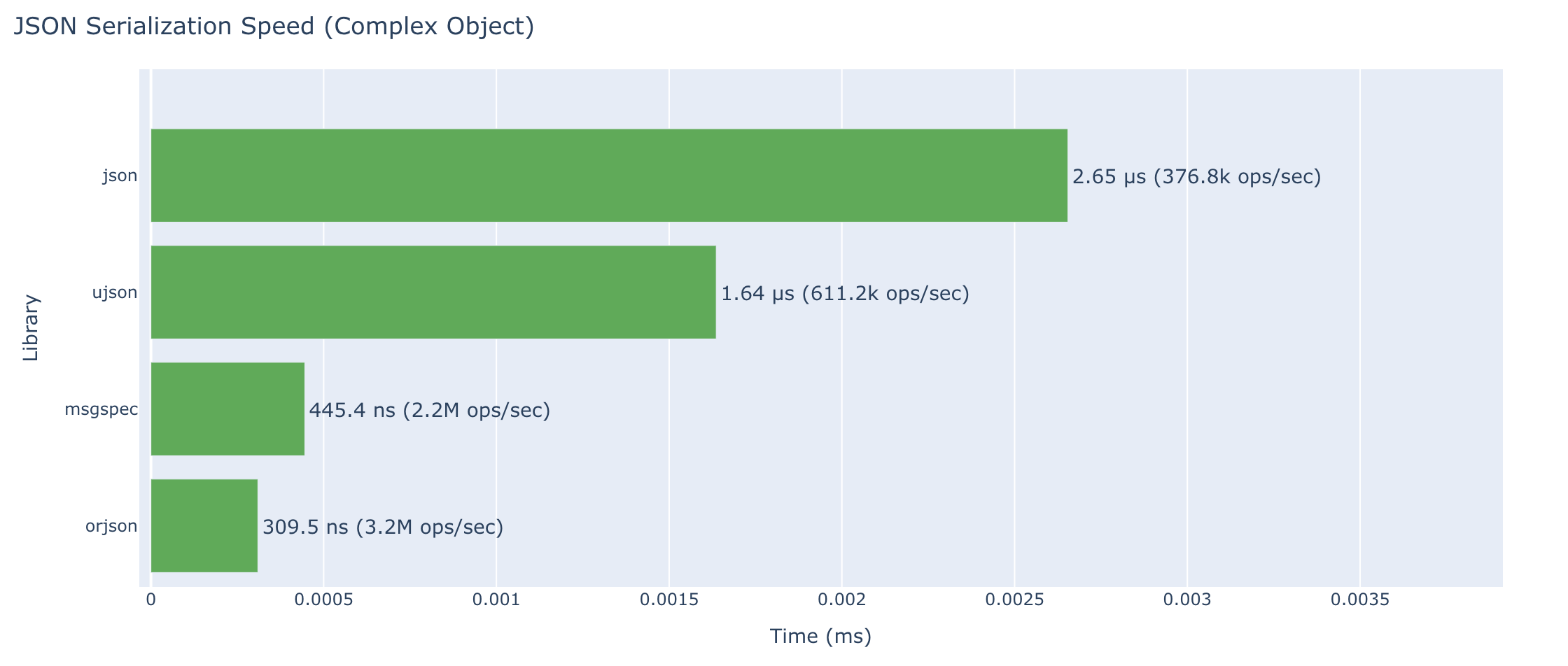
Comparing standard library JSON with optimized alternatives. orjson handles more data types and is over 8x faster than standard lib json for complex objects. Impressive!
Serialization (dumps)
| Library | Simple Object | Complex Object |
|---|---|---|
json (stdlib) |
708 ns (1.4M ops/sec) | 2.65 μs (376.8k ops/sec) |
orjson |
60.9 ns (16.4M ops/sec) | 310 ns (3.2M ops/sec) |
ujson |
264 ns (3.8M ops/sec) | 1.64 μs (611.2k ops/sec) |
msgspec |
92.3 ns (10.8M ops/sec) | 445 ns (2.2M ops/sec) |
Deserialization (loads)
| Library | Simple Object | Complex Object |
|---|---|---|
json (stdlib) |
714 ns (1.4M ops/sec) | 2.22 μs (449.9k ops/sec) |
orjson |
106 ns (9.4M ops/sec) | 839 ns (1.2M ops/sec) |
ujson |
268 ns (3.7M ops/sec) | 1.46 μs (682.8k ops/sec) |
msgspec |
101 ns (9.9M ops/sec) | 850 ns (1.2M ops/sec) |
Pydantic
| Operation | Time |
|---|---|
model_dump_json() |
1.54 μs (647.8k ops/sec) |
model_validate_json() |
2.99 μs (334.7k ops/sec) |
model_dump() (to dict) |
1.71 μs (585.2k ops/sec) |
model_validate() (from dict) |
2.30 μs (435.5k ops/sec) |
Web Frameworks
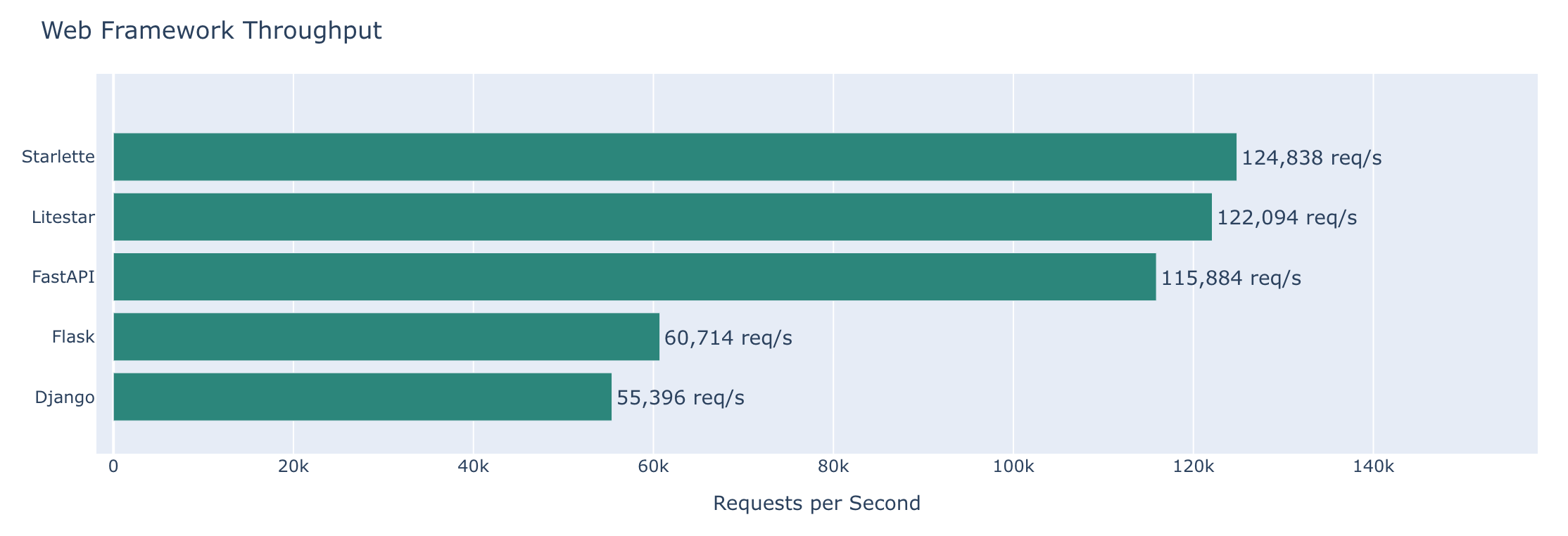
Returning a simple JSON response. Benchmarked with wrk against localhost running 4 works in Granian. Each framework returns the same JSON payload from a minimal endpoint. No database access or that sort of thing. This is just how much overhead/perf do we get from each framework itself. The code we write that runs within those view methods is largely the same.
Results
| Framework | Requests/sec | Latency (p99) |
|---|---|---|
| Flask | 16.5 μs (60.7k req/sec) | 20.85 ms (48.0 ops/sec) |
| Django | 18.1 μs (55.4k req/sec) | 170.3 ms (5.9 ops/sec) |
| FastAPI | 8.63 μs (115.9k req/sec) | 1.530 ms (653.6 ops/sec) |
| Starlette | 8.01 μs (124.8k req/sec) | 930 μs (1.1k ops/sec) |
| Litestar | 8.19 μs (122.1k req/sec) | 1.010 ms (990.1 ops/sec) |
File I/O
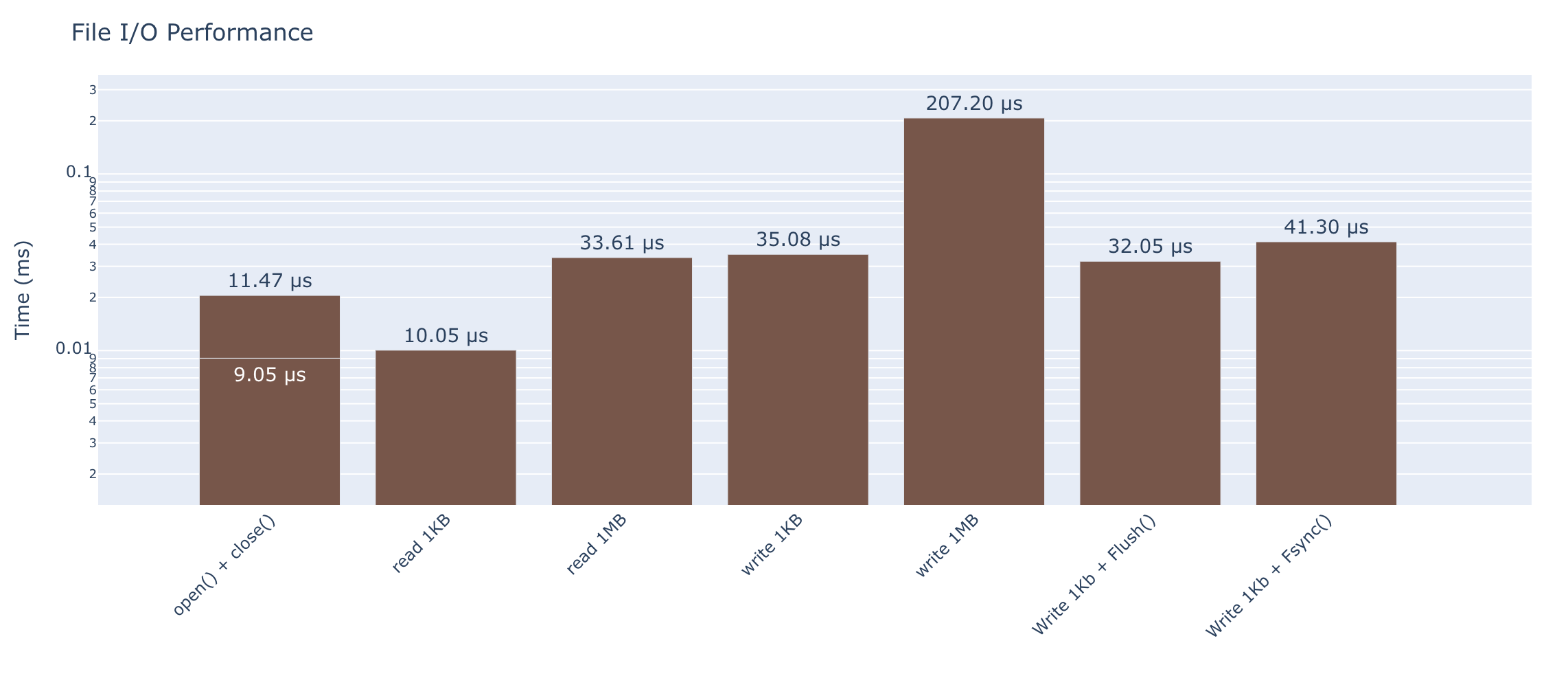
Reading and writing files of various sizes. Note that the graph is non-linear in y-axis.
Basic Operations
| Operation | Time |
|---|---|
| Open and close (no read) | 9.05 μs (110.5k ops/sec) |
| Read 1KB file | 10.0 μs (99.5k ops/sec) |
| Read 1MB file | 33.6 μs (29.8k ops/sec) |
| Write 1KB file | 35.1 μs (28.5k ops/sec) |
| Write 1MB file | 207 μs (4.8k ops/sec) |
Pickle vs JSON to Disk
| Operation | Time |
|---|---|
pickle.dumps() (complex obj) |
1.30 μs (769.6k ops/sec) |
pickle.loads() (complex obj) |
1.44 μs (695.2k ops/sec) |
json.dumps() (complex obj) |
2.72 μs (367.1k ops/sec) |
json.loads() (complex obj) |
2.35 μs (425.9k ops/sec) |
Database and Persistence
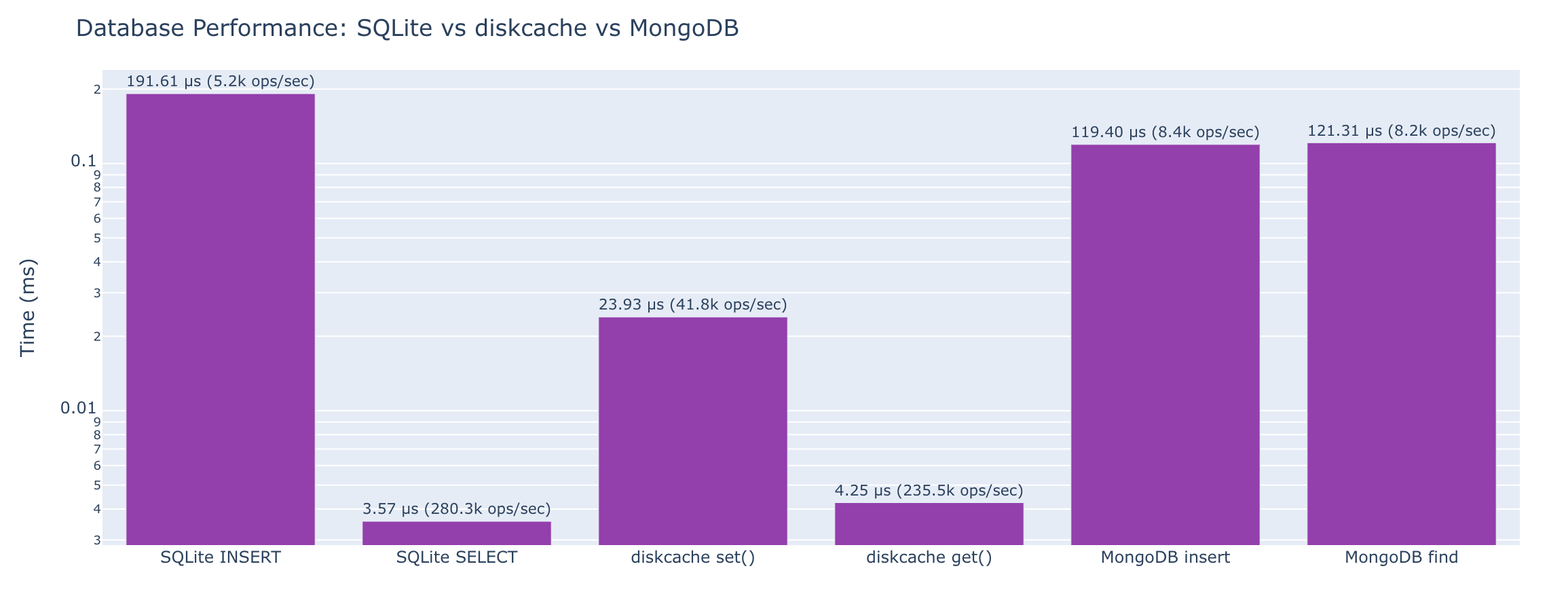
Comparing SQLite, diskcache, and MongoDB using the same complex object.
Test Object
user_data = {
    "id": 12345,
    "username": "alice_dev",
    "email": "alice@example.com",
    "profile": {
        "bio": "Software engineer who loves Python",
        "location": "Portland, OR",
        "website": "https://alice.dev",
        "joined": "2020-03-15T08:30:00Z"
    },
    "posts": [
        {"id": 1, "title": "First Post", "tags": ["python", "tutorial"], "views": 1520},
        {"id": 2, "title": "Second Post", "tags": ["rust", "wasm"], "views": 843},
        {"id": 3, "title": "Third Post", "tags": ["python", "async"], "views": 2341},
    ],
    "settings": {
        "theme": "dark",
        "notifications": True,
        "email_frequency": "weekly"
    }
}
SQLite (JSON blob approach)
| Operation | Time |
|---|---|
| Insert one object | 192 μs (5.2k ops/sec) |
| Select by primary key | 3.57 μs (280.3k ops/sec) |
| Update one field | 5.22 μs (191.7k ops/sec) |
| Delete | 191 μs (5.2k ops/sec) |
Select with json_extract() |
4.27 μs (234.2k ops/sec) |
diskcache
| Operation | Time |
|---|---|
cache.set(key, obj) |
23.9 μs (41.8k ops/sec) |
cache.get(key) |
4.25 μs (235.5k ops/sec) |
cache.delete(key) |
51.9 μs (19.3k ops/sec) |
| Check key exists | 1.91 μs (523.2k ops/sec) |
MongoDB
| Operation | Time |
|---|---|
insert_one() |
119 μs (8.4k ops/sec) |
find_one() by _id |
121 μs (8.2k ops/sec) |
find_one() by nested field |
124 μs (8.1k ops/sec) |
update_one() |
115 μs (8.7k ops/sec) |
delete_one() |
30.4 ns (32.9M ops/sec) |
Comparison Table
| Operation | SQLite | diskcache | MongoDB |
|---|---|---|---|
| Write one object | 192 μs (5.2k ops/sec) | 23.9 μs (41.8k ops/sec) | 119 μs (8.4k ops/sec) |
| Read by key/id | 3.57 μs (280.3k ops/sec) | 4.25 μs (235.5k ops/sec) | 121 μs (8.2k ops/sec) |
| Read by nested field | 4.27 μs (234.2k ops/sec) | N/A | 124 μs (8.1k ops/sec) |
| Update one field | 5.22 μs (191.7k ops/sec) | 23.9 μs (41.8k ops/sec) | 115 μs (8.7k ops/sec) |
| Delete | 191 μs (5.2k ops/sec) | 51.9 μs (19.3k ops/sec) | 30.4 ns (32.9M ops/sec) |
Note: MongoDB is a victim of network access version in-process access.
Function and Call Overhead
The hidden cost of function calls, exceptions, and async.
Function Calls
| Operation | Time |
|---|---|
| Empty function call | 22.4 ns (44.6M ops/sec) |
| Function with 5 arguments | 24.0 ns (41.7M ops/sec) |
| Method call on object | 23.3 ns (42.9M ops/sec) |
| Lambda call | 19.7 ns (50.9M ops/sec) |
Built-in function (len()) |
17.1 ns (58.4M ops/sec) |
Exceptions
| Operation | Time |
|---|---|
try/except (no exception raised) |
21.5 ns (46.5M ops/sec) |
try/except (exception raised) |
139 ns (7.2M ops/sec) |
Type Checking
| Operation | Time |
|---|---|
isinstance() |
18.3 ns (54.7M ops/sec) |
type() == type |
21.8 ns (46.0M ops/sec) |
Async Overhead
The cost of async machinery.
Coroutine Creation
| Operation | Time |
|---|---|
| Create coroutine object (no await) | 47.0 ns (21.3M ops/sec) |
| Create coroutine (with return value) | 45.3 ns (22.1M ops/sec) |
Running Coroutines
| Operation | Time |
|---|---|
run_until_complete(empty) |
27.6 μs (36.2k ops/sec) |
run_until_complete(return value) |
26.6 μs (37.5k ops/sec) |
| Run nested await | 28.9 μs (34.6k ops/sec) |
| Run 3 sequential awaits | 27.9 μs (35.8k ops/sec) |
asyncio.sleep()
| Operation | Time |
|---|---|
asyncio.sleep(0) |
39.4 μs (25.4k ops/sec) |
Coroutine with sleep(0) |
41.8 μs (23.9k ops/sec) |
asyncio.gather()
| Operation | Time |
|---|---|
gather() 5 coroutines |
49.7 μs (20.1k ops/sec) |
gather() 10 coroutines |
55.0 μs (18.2k ops/sec) |
gather() 100 coroutines |
155 μs (6.5k ops/sec) |
Task Creation
| Operation | Time |
|---|---|
create_task() + await |
52.8 μs (18.9k ops/sec) |
| Create 10 tasks + gather | 85.5 μs (11.7k ops/sec) |
Async Context Managers & Iteration
| Operation | Time |
|---|---|
async with (context manager) |
29.5 μs (33.9k ops/sec) |
async for (5 items) |
30.0 μs (33.3k ops/sec) |
async for (100 items) |
36.4 μs (27.5k ops/sec) |
Sync vs Async Comparison
| Operation | Time |
|---|---|
| Sync function call | 20.3 ns (49.2M ops/sec) |
Async equivalent (run_until_complete) |
28.2 μs (35.5k ops/sec) |
Methodology
Benchmarking Approach
- All benchmarks run multiple times and with warmup not timed
- Timing uses
timeitorperf_counter_nsas appropriate - Memory measured with
sys.getsizeof()andtracemalloc - Results are median of N runs
Environment
- OS: macOS 26.2
- Python: 3.14.2 (CPython)
- CPU: ARM - 14 cores (14 logical)
- RAM: 24.0 GB
Code Repository
All benchmark code available at: https://github.com/mkennedy/python-numbers-everyone-should-know
Key Takeaways
- Memory overhead: Python objects have significant memory overhead - even an empty list is 56 bytes
- Dict/set speed: Dictionary and set lookups are extremely fast (O(1) average case) compared to list membership checks (O(n))
- JSON performance: Alternative JSON libraries like
orjsonandmsgspecare 3-8x faster than stdlibjson - Async overhead: Creating and awaiting coroutines has measurable overhead - only use async when you need concurrency
__slots__tradeoff:__slots__saves significant memory (over 2x for collections) with virtually no performance impact
Last updated: 2026-01-01