Welcome back to another round of Simple Sudoku Solvers! If you are unfamiliar with the series, I suggest you start with the first post or by perusing the backlog. Depending on your familiarity with my work or this blog, this post will either feel natural or supremely odd, because today, we’ll be talking about Smalltalk, or more specfically Pharo Smalltalk inside Glamorous Toolkit.
I’m completely certain that Smalltalk, much like Lisp, is alien technology. It was handed to us by a higher power to taunt us, because it knew that we wouldn’t use it right and instead spend decades griping over wasted opportunities.
I spent years with Smalltalk, working on Glamorous Toolkit, and I loved it, but it also made me sad, because I knew nobody cares. Nobody cares how much more productive you are or how much more fun you have.
Now, the language is not perfect, of course. It has its pitfalls, its rot, its blind spots, and they can be extremely frustrating. There is a reason that I stopped working with it, of course, and it’s not just that the industry is living elsewhere.
But this blog post is not meant to be a personal history. We’re here to solve Sudokus. So let’s do that instead of punting any longer, shall we?
Why Smalltalk
Everything in Smalltalk is an object, and I don’t mean that in the regular OOP way. I mean everything. Booleans, integers, the VM, your IDE while you are typing and executing code—everything is an object, and everything can be inspected. There is a big emphasis on:
- liveness. We look at objects and data, not classes and code. Programs can be inspected while they are running, and we can interact with them.
- debuggability. This falls naturally out of liveness, of course, but it goes further than that. Tools are important, and debuggers are a special source of pride, wired together with inspectors.
- Layer on Glamorous Toolkit, and you are addng Moldability, the ability to make context-specific views for your live data, quickly and cheaply.
So, how does that look like?
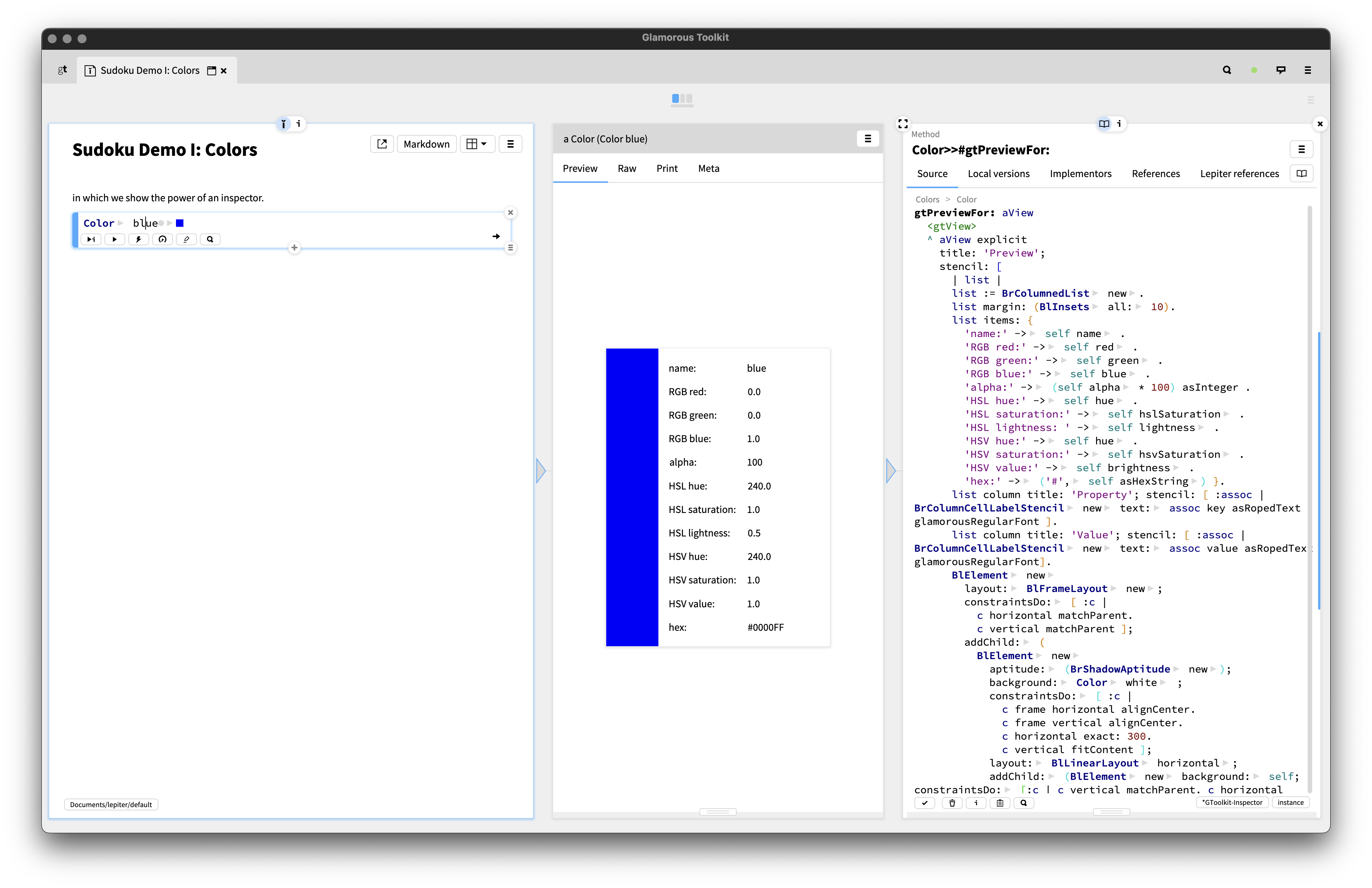
Fig. 1: Glamorous Toolkit, colors and all.
Here’s a picture. On the left, you see a notebook inside Glamorous
Toolkit that you can think of much like a Jupyter notebook. I jsut
executed the highlighted code cell containing Color blue,
executing the class-side method blue on the class
Color to create an instance of it that represents, well,
blue.
In the middle, you see an inspector on the created object. There are
multiple tabs, but we are in the view Live, which contains
a context-specific view on the color that shows the color and some other
representations such as RGB and so on.
On the right, we see the code of the method for that view. If I change the code and save the method, the view changes.
The entire workflow inside Glamorous Toolkit is to move between these panes (Miller columns, they are called) and execute code, write code, and go back and forth, always inspecting live things and working on a running program. It’s a pristine feedback loop1.
One thing I want to call out is that I’ll be using a weird format to highlight the code here because Smalltalk doesn’t have a nice way of throwing code on a page. We’ll be seeing methods (or messages, as they are called), and the bodies are indented. Sometimes there are multiple messages in one code block.
So, with that out of the way, let’s look at some code, shall we?
The implementation
By now, long-time readers know the shape of the solver by heart: fill in every cell we can deduce for free, and when we run out of those, guess at the most constrained cell and backtrack if the guess goes nowhere. We have built that same algorithm many times over at this point, and we are about to build it once more. What is interesting this time is how we model the board.
Every previous solver held it as a flat grid of numbers. The board was 81 integers, sometimes dressed up as 9 rows of 9. Rows, columns, and boxes were things we computed every time we needed them, with a little index arithmetic, sometimes straightforward, sometimes tricky. Finding a cell’s candidates meant to walk the row, column, and box, gather the digits already used into a set, and subtract it from the set 1 through 9.
Smalltalk nudges us somewhere else. When everything is an object, it’s natural not to derive these structures over and over, but to build them once and let the objects hold onto that knowledge. So a cell will be an object, each row, column, and box will be an object, and the board will be the object that wires them all together. Objects all the way down.
I’ll talk about representation first this time, because here the representation is what needs to be talked about. Then, as ever, outside-in through the solver.
The object model
There are three classes, and two of them are almost too small to talk about, so let’s clear those out of the way first.
A SudokuCell knows three things: its value
(0 while empty, 1 through 9 once
placed), its position, and the groups it
belongs to. The accessors are exactly what you’d expect, and emptiness
is a message we can check for:
isEmpty
    ^value = 0

isPlaced
    ^value > 0
A SudokuGroup is just a bag of 9 cells of distinct
digist, be it a row, a column, or a box. The reason for its existence is
that it can tell you is which digits are already in use:
placedValues
    ^(cells select: [:c | c isPlaced]) collect: [:c | c value] as: Set
In this function, we return (^) the celss
filtered by isPlaced, collect their value, and
shove that into a Set. We could make this terser, but I
didn’t want to overwhelm all of you folks who already have to deal with
a foreign syntax.
The SudokuBoard is where it gets interesting, because
its initialize is the part that actually builds the
graph:
initialize
    | rows cols boxes |
    cells := (1 to: 81) collect: [:_ | SudokuCell new].
    rows  := (1 to: 9) collect: [:_ | SudokuGroup new].
    cols  := (1 to: 9) collect: [:_ | SudokuGroup new].
    boxes := (1 to: 9) collect: [:_ | SudokuGroup new].
    1 to: 9 do: [:i |
        1 to: 9 do: [:j |
            | cell bi |
            cell := self at: i@j.
            cell position: i@j.
            bi := ((i - 1) // 3) * 3 + ((j - 1) // 3) + 1.
            cell addGroup: (rows  at: i).
            cell addGroup: (cols  at: j).
            cell addGroup: (boxes at: bi).
            (rows  at: i) addCell: cell.
            (cols  at: j) addCell: cell.
            (boxes at: bi) addCell: cell]]
Note: | var | fences declare temporary variables.
We make 81 cells and all the groups. Then we walk the grid once and,
for each cell, register it with its row, its column, and its box, and
register each of those groups back with the cell. The wiring is
bidirectional, and a cell knows the groups it belongs to. By the time
initialize returns, the entire constraint structure of a
Sudoku board is there, and no code will ever again have to compute
candidates again.
This means that this is the only place where the magic numbers appear.
Coordinates are Points, constructed through
i@j (Smalltalk’s way of writing the point at i
by j). The board turns a point into an index:
at: aPoint
    ^cells at: (aPoint x - 1) * 9 + aPoint y
And to load an actual puzzle, we hand the class method
from: a nested array of digits and let it fill the cells.
Class methods are often used as specialized constructors that way.
from: aNestedArray
    | board |
    board := self new.
    1 to: 9 do: [:i |
        1 to: 9 do: [:j |
            (board at: i@j) value: ((aNestedArray at: i) at: j)]].
    ^board
The solver
With the model in place, the solver ends up pretty similar to the Python reference from Episode I:
solve
    | board cell result |
    board := self copy.
    board propagate ifFalse: [^nil].
    board isSolved ifTrue: [^board].
    cell := board mrvCell.
    cell candidates do: [:v |
        | newBoard |
        newBoard := board copy.
        (newBoard at: cell position) value: v.
        result := newBoard solve.
        result isNil ifFalse: [^result]].
    ^nil
Should be readable even if the syntax is strange.
Work on a copy, deduce what we can, and error with nil
if that turns up a contradiction. If the board came back solved, return
it. Otherwise pick the most constrained empty cell, try each of its
candidates on a fresh copy, and recurse, returning the first attempt
that doesn’t come back nil. If they all fail, the board is
unsolvable.
We’re already done with the fiddly bits, after all.
Copying, unfortunately is not free:
copy
    | newBoard |
    newBoard := self class new.
    1 to: 81 do: [:k |
        (newBoard cellAt: k) value: (self cellAt: k) value].
    ^newBoard
We have to make our own deep copy. We’ve done that before, but I wanted to call it out explicitly.
Propagation
Propagation is the same loop we’ve run every time so far:
propagate
    | changed cands |
    changed := true.
    [changed] whileTrue: [
        changed := false.
        self emptyCells do: [:cell |
            cands := cell candidates.
            cands isEmpty ifTrue: [^false].
            cands size = 1 ifTrue: [
                cell value: cands anyOne.
                changed := true]]].
    ^true
We sweep the empty cells over and over until nothing changes. For
each one we ask for its candidates. No candidates means this track
doesn’t work, so we answer false and let backtracking
handle the rest. Exactly one candidate means the cell is solved. We set
it and flip the changed flag for another pass.
emptyCells reads almost tautological
(cells select: [:c | c isEmpty]).
Candidate search
This one is pretty simple now!
candidates
    | used |
    used := groups inject: Set new into: [:acc :g | acc union: g placedValues].
    ^(1 to: 9) asSet difference: used
That’s it. A cell already knows the three groups it lives in, so to
find what it could still be, it asks each of them for their members,
unions those answers into one set of used digits, and subtracts that
from the digits 1 through 9. inject:into: is Smalltalk’s
fold (think reduce), and union: and
difference: are plain old set messages. There isn’t a
single index anywhere in it.
Not a lot of row-masking or set-building here, so we move on, noting how nicely everything flows together already!
MRV selection
The last piece is choosing which cell to guess using our minimum-remaining-values heuristic. We guess where we have the fewest options.
mrvCell
    ^self emptyCells
        ifEmpty: [nil]
        ifNotEmpty: [:empties |
            empties inject: empties first into: [:best :cell |
                cell candidates size < best candidates size
                ifTrue:  [cell]
                ifFalse: [best]]]
Another inject:into:, this time folding the empty cells
down to a single winner. If there are no empty cells we return
nil, though in practice solve has already
checked isSolved before it ever gets here, I’m just a bit
paranoid.
Seeing the objects
I promised you moldability in the beginning, so let’s close that loop before we wrap up. Because cells, groups, and boards are objects, and because Glamorous Toolkit lets us bolt a custom view onto any object very cheaply, we can inspect the solver’s data the way we actually think about it, instead of squinting at a wall of numbers or even a dumb object inspector.
Any method tagged with the <gtView> pragma that
returns a configured view shows up as a tab in the inspector for that
object. On a cell, that’s four lines:
gtCandidatesFor: aView
    <gtView>
    ^aView list
        title: 'Candidates';
        items: [ self candidates asSortedCollection ];
        yourself
Now inspecting any cell gives me a “Candidates” tab listing exactly
the digits it could still legally take, computed live off the
candidates method the solver uses. The board gets the same
treatment with a gtGridFor: view that paints a real 9x9
grid (alternating box shading and all) using GT’s graphics layer, so I
can look at a whole board as a grid rather than a
printString.
Put it all together and a session looks like this:
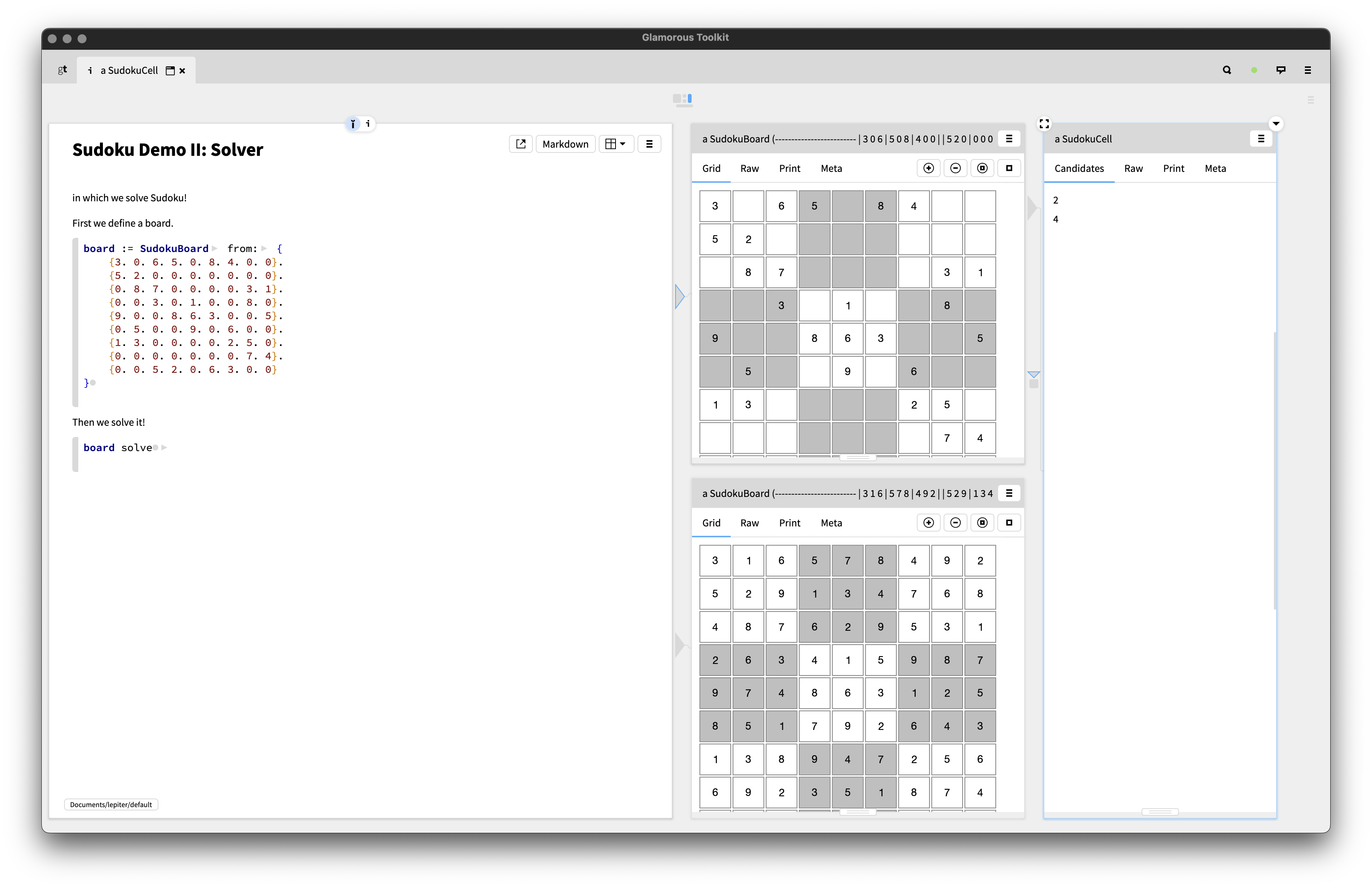
Fig. 2: Defining a board and solving it in a notebook, with the input grid, the solved grid, and an empty cell’s live candidates side by side.
On the left is the notebook: we define a board with
from: and send it solve. The two middle panes
are gtGridFor: views, the puzzle we started from on top and
the solved board below it. On the right I’ve drilled into a single empty
cell, and its “Candidates” tab shows the digits it can still take. Every
pane is just an object showing itself the way I want to see it.
None of this changed the algorithm by a single line. It’s pure inspection of regular object. But being able to see the thing I’m debugging in a shape I picked is a big part of why working like this is so fun!
Of course you shouldn’t do this in the end, but while you are actually building things, alongside the regular code, ideally in a live notebook.
Fin
We solved Sudoku again! For the first time in the series we did it by building a little world of objects instead of computing over a flat array. The algorithm underneath is the exact same loop we’ve always written, but here the structure it needs is already in the objects, so it almost feels free.
Pair that with the supreme liveness and the debugging and inspection facilities that offers, and you get an environment that sparks joy and is extremely underrated.
Thank you for sticking around for another one. The season isn’t done with us yet, so I’ll see you next time.
1. Unless you’re working on Glamorous Toolkit
itself inside Glamorous Toolkit, as I did for some years, in which case
it’s perfectly possible to bork your running instance irreparably. Just
try changing a method on the core class Object and see
where that takes you.