Godot has become one of the most popular game engines of the last few years. It is free, open source under the MIT license, and small enough to download and start using in minutes. Most Godot games are written in GDScript, the engine’s own scripting language.
Sooner or later, though, many projects need something that already exists as a C or C++ library: a simulation library, a database, a networking protocol, a machine learning runtime. GDScript cannot call native code, but Godot can load it through GDExtension, and godot-cpp, the official C++ bindings, lets you expose that code as regular engine classes. Writing the C++ code is the easy part. The hard part is the build: godot-cpp has to match your Godot version, and every library you add has to be compiled for each platform you ship to.
In this post we give a short tour of Godot, explain how C++ extensions work, and show how to bring C++ libraries into a Godot game with Conan and godot-cpp 10, now available in ConanCenter. As an example we will use flecs, an Entity Component System library, to simulate 100,000 particles inside a Godot scene.
A Quick Introduction to Godot
Godot is a general purpose engine for 2D and 3D games. Everything in a Godot project is built from two concepts:
- Nodes are the basic building blocks. Each node has a type (
Sprite2D,Camera3D,AudioStreamPlayer,Timer…), a set of properties you can edit in the Inspector, and callbacks such as_ready()or_process()that the engine calls during the game loop. - Scenes are trees of nodes saved to disk as
.tscnfiles. A scene can be a character, a menu or a whole level, and scenes can be instanced inside other scenes.
Behavior is usually added by attaching a script to a node. GDScript is a Python-like language designed for the engine, and it is great for gameplay logic because changes show up immediately without a compile step.
What makes Godot interesting for C++ developers is that the engine itself is written in C++, and it can load extensions written in C++ without being recompiled. A class that comes from one of these extensions becomes a regular engine class: it shows up in the editor next to the built-in nodes, with its properties in the Inspector, and GDScript can use it like any other node. The next section explains how these extensions work.
Extending Godot with C++
There are two ways to add C++ code to Godot:
- Engine modules are compiled into the engine itself. They have full access to the internals, but you need to build and ship your own copy of Godot, including the editor and export templates for every platform.
- GDExtension
loads a shared library (
.dll,.so,.dylib, or.wasmon the web) into an official, unmodified Godot build at runtime. The engine talks to the library through a stable C interface.
GDExtension is the recommended approach for most projects, and it is how many
popular plugins are distributed today. Because the C interface is verbose to
use directly, the Godot team maintains
godot-cpp, a C++ library that
wraps it with an API very close to the one used inside the engine. It provides
a C++ class for every engine class, such as Node2D, Sprite2D or Input.
Your own classes are regular C++ code that derives from those classes. A node written with godot-cpp looks like this:
#include <godot_cpp/classes/node2d.hpp>

namespace godot {

class MyNode : public Node2D {
    GDCLASS(MyNode, Node2D)

protected:
    static void _bind_methods() {}

public:
    void _process(double p_delta) override {
        // runs every frame
    }
};

} // namespace godot
Since version 10.0, a single godot-cpp release works with any Godot version
from 4.3 onwards. You pick one with the api_version build option, and
godot-cpp generates its C++ classes from the API of that version. An
extension built for Godot 4.3 also works in newer versions, but not in older
ones, so you usually pick the oldest Godot version you want to support.
Build targets and feature tags
There is one more concept you need to know before building anything. godot-cpp is compiled for one of three targets, named after the Godot builds that load the library:
template_debug: the default. Enables debug checks through theDEBUG_ENABLEDdefinition. This library is loaded by the editor and by debug exports.template_release: for release exports, with the debug checks removed.editor: for libraries that are only loaded by the editor.
Which library Godot loads is decided at runtime by a small .gdextension
file. It maps feature tags to library paths. The debug tag matches the
editor and debug exports, and the release tag matches release exports:
[configuration]
entry_symbol = "gdexample_library_init"
compatibility_minimum = "4.7"

[libraries]
macos.debug = "res://bin/libgdexample.template_debug.dylib"
macos.release = "res://bin/libgdexample.template_release.dylib"
linux.debug = "res://bin/libgdexample.template_debug.so"
linux.release = "res://bin/libgdexample.template_release.so"
windows.debug = "res://bin/libgdexample.template_debug.dll"
windows.release = "res://bin/libgdexample.template_release.dll"
The usual workflow
The Godot documentation recommends adding godot-cpp to your repository as a git submodule and building it together with your library using SCons. That works well for a first extension, but every project ends up compiling its own godot-cpp for each target, platform and architecture, and any third party library you wrap, such as a physics engine or a machine learning runtime, has to be vendored and built with matching flags for every platform Godot exports to.
Both are exactly the kind of problem Conan was built to solve.
Managing the Dependencies with Conan
With the godot-cpp recipe in ConanCenter, godot-cpp becomes a regular package. The two parameters discussed above are Conan options:
api_version: the Godot API version the bindings target, from4.3to4.7(the default).target:template_debug(the default),template_releaseoreditor.
Each combination is built once and then reused by every project that needs it, instead of being compiled inside each extension.
Your GDExtension becomes just another C++ project with dependencies. Any of the more than 1,900 libraries in ConanCenter, or one you package yourself with a Conan recipe, can be added next to godot-cpp, and Conan builds all of them consistently for every platform you target.
A Practical Example: A Swarm of 100,000 Particles
To show how this works in practice, we will write a GDExtension that
registers a new Swarm node. It simulates 100,000 particles that flee from
the mouse cursor and bounce off the window edges, and draws all of them in a
Godot scene.
The simulation runs on flecs, an Entity Component System (ECS) library for C and C++. In an ECS, entities are plain ids, components are plain data structs attached to them, and systems are functions that run over every entity that has a given set of components. Components of the same type are stored together in memory, which makes iterating over large numbers of entities very fast. That is why ECS is a popular choice for simulations, crowds or bullet hell games. It is also the kind of work where native code pays off, since updating this many entities every frame is much faster in C++ than in GDScript.
You can find the complete example in the Conan examples2 repository:
$ git clone https://github.com/conan-io/examples2.git
$ cd examples2/examples/libraries/godot-cpp/gdextension
The src folder contains the extension code, and demo is a regular Godot
project that loads it.
Declaring the dependencies
The conanfile.py requires godot-cpp and flecs from ConanCenter:
from conan import ConanFile
from conan.tools.cmake import CMake, CMakeToolchain, cmake_layout


class GDExtensionExample(ConanFile):
    package_type = "shared-library"
    settings = "os", "compiler", "build_type", "arch"
    generators = "CMakeDeps"

    def requirements(self):
        self.requires("godot-cpp/10.0.0")
        self.requires("flecs/4.1.6")

    def layout(self):
        cmake_layout(self)

    def generate(self):
        tc = CMakeToolchain(self)
        # Godot picks the library to load by its build "target", so we name
        # the output after the target godot-cpp was built with
        tc.cache_variables["GODOTCPP_TARGET"] = str(self.dependencies["godot-cpp"].options.target)
        tc.generate()

    def build(self):
        cmake = CMake(self)
        cmake.configure()
        cmake.build()
The only Godot specific detail is in generate(). We read the target
option of the godot-cpp dependency and pass it to CMake, so the name of the
library always matches the godot-cpp binary it was linked against.
The CMakeLists.txt
cmake_minimum_required(VERSION 3.15)
project(gdexample LANGUAGES CXX)

find_package(godot-cpp REQUIRED CONFIG)
find_package(flecs REQUIRED CONFIG)

add_library(gdexample SHARED
    src/register_types.cpp
    src/swarm.cpp
)
target_link_libraries(gdexample PRIVATE godot-cpp flecs::flecs_static)

# Output as demo/bin/libgdexample.<target>.<ext>, the path the
# demo/bin/gdexample.gdextension file points Godot to. The generator
# expression prevents multi-config generators from adding a Release/ subfolder
set_target_properties(gdexample PROPERTIES
    OUTPUT_NAME "gdexample.${GODOTCPP_TARGET}"
    PREFIX "lib"
    LIBRARY_OUTPUT_DIRECTORY "$<1:${CMAKE_SOURCE_DIR}/demo/bin>"
    RUNTIME_OUTPUT_DIRECTORY "$<1:${CMAKE_SOURCE_DIR}/demo/bin>"
)
This is a completely standard CMake project. The extension is a shared
library that links godot-cpp and flecs statically, so there is a single
library file to ship. We write it straight into demo/bin so Godot finds it
without an extra copy step.
Writing the node
The Swarm class derives from Node2D and owns the flecs world. The
components of each particle are plain structs. The GDCLASS macro adds the
boilerplate that Godot’s class system needs, and _bind_methods() declares
what Godot can see, in this case the count and flee_radius properties.
Once the class is registered, they appear in the Inspector and can be used
from GDScript. This is a simplified view of the class:
struct Position { float x, y; };
struct Velocity { float x, y; };

class Swarm : public Node2D {
    GDCLASS(Swarm, Node2D)

    int count = 100000;
    double flee_radius = 150.0;
    flecs::world world;
    ...

protected:
    static void _bind_methods() {
        ClassDB::bind_method(D_METHOD("set_count", "count"), &Swarm::set_count);
        ClassDB::bind_method(D_METHOD("get_count"), &Swarm::get_count);
        ADD_PROPERTY(PropertyInfo(Variant::INT, "count"), "set_count", "get_count");
        // ... and the same for flee_radius
    }
    ...
};
The rest of the node connects both worlds. _ready() creates one flecs
entity per particle and a flecs system that updates them. It also sets up a
MultiMesh,
which draws many instances of the same mesh in a single draw call, because
one Godot node per particle would be far too heavy for 100,000 of them.
Every frame, _process() hands the mouse position to flecs, runs the systems
with world.progress(), and copies the resulting positions back into the
MultiMesh. Again, this is a simplified view, and the full code is in the
repository:
void Swarm::_ready() {
    // One entity per particle, with a Position and a Velocity component
    for (int i = 0; i < count; i++) {
        world.entity().set<Position>({ ... }).set<Velocity>({ ... });
    }

    // A system that runs for every entity with both components
    world.system<Position, Velocity>("Move").each([this](flecs::iter &it, size_t, Position &p, Velocity &v) {
        // flee from the mouse, move, and bounce off the window edges
    });

    // A MultiMeshInstance2D child node that draws all the particles
    ...
}

void Swarm::_process(double p_delta) {
    mouse = get_local_mouse_position();
    world.progress(static_cast<float>(p_delta));

    // Copy the position of every entity into the MultiMesh buffer
    render_query.each([&](const Position &p, const Velocity &v) { ... });
    multimesh->set_buffer(buffer);
}
Registering the extension
Finally, register_types.cpp registers the class when Godot loads the
library:
void initialize_gdexample_module(ModuleInitializationLevel p_level) {
    if (p_level != MODULE_INITIALIZATION_LEVEL_SCENE) {
        return;
    }
    GDREGISTER_RUNTIME_CLASS(Swarm);
}
We register Swarm with GDREGISTER_RUNTIME_CLASS. By default, the code of
a GDExtension class also runs inside the editor, so _ready() and
_process() would start the simulation while you are editing the scene. A
runtime class is only a placeholder in the editor: you can add it to a
scene and set its properties, but its code only runs when the game is
running.
The same file defines gdexample_library_init(), the entry point named in
the .gdextension file. It is a few lines of boilerplate that look the same
in every extension.
Building and running
With everything in place, building the extension is a single command:
$ conan build . --build=missing
...
[100%] Linking CXX shared library .../demo/bin/libgdexample.template_debug.dylib
[100%] Built target gdexample
Conan resolves godot-cpp and flecs, downloads precompiled binaries from ConanCenter when they exist for your configuration, builds the rest from source, generates the CMake integration and finally builds the extension.
Note: godot-cpp requires C++17. If your default profile uses an older standard, which is the case for MSVC, add
-s compiler.cppstd=17to the command.
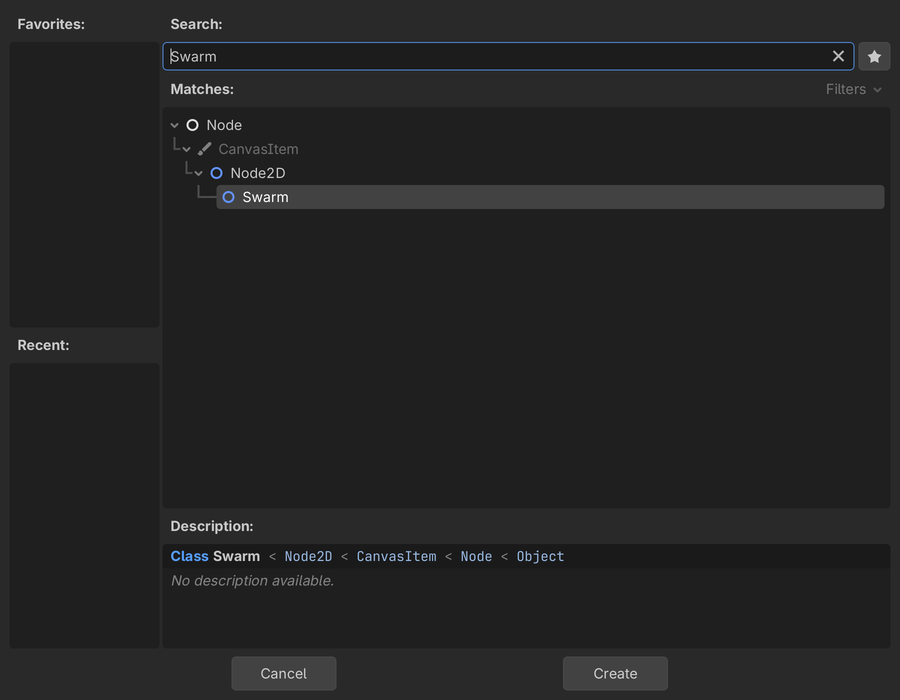
Now start Godot 4.7, click “Import” in the Project Manager, and select
demo/project.godot. When the project opens, Godot reads
bin/gdexample.gdextension, loads the library, and Swarm becomes available
like any built-in node. You can find it in the “Create New Node” dialog,
under Node2D:
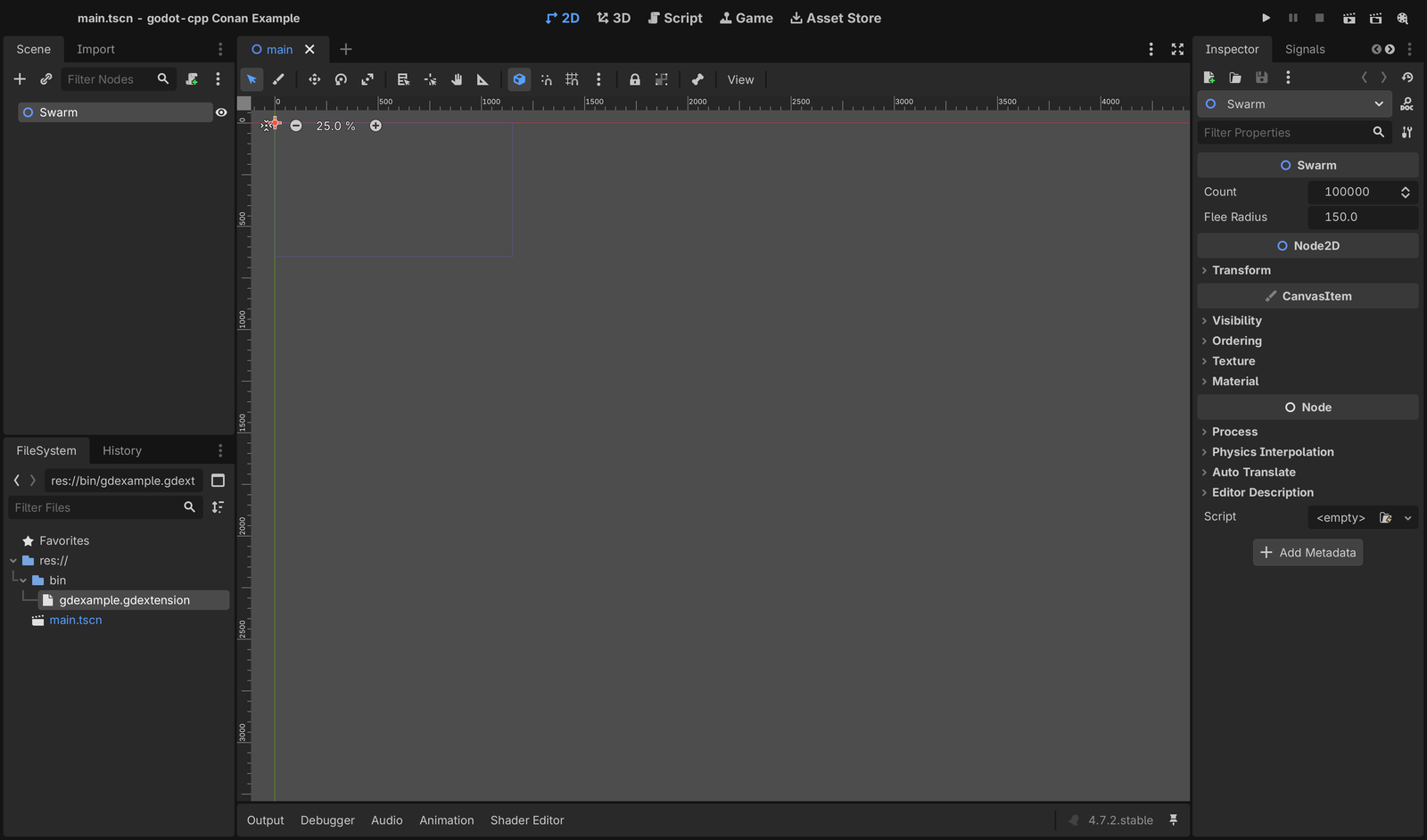
The main scene of the demo already contains a Swarm node. Selecting it
shows count and flee_radius in the Inspector, the two properties we bound
in _bind_methods():
Press Play to run the scene, and move the mouse over the window to push the
particles around. Then stop it, change count or flee_radius in the
Inspector, and play it again to see how the swarm behaves with more particles
or a wider flee radius.
Conclusion
GDExtension and godot-cpp let you write engine classes in C++, and Conan takes care of building godot-cpp and any other C++ library your extension needs. This is also a big advantage when you distribute the extension: building it for every platform you ship to only takes changing the settings of the build.
Note for Linux: By default, the extension links
libstdc++dynamically, so the target system must provide a version at least as new as the one used to build it. For broad compatibility, build the extension and its dependencies against a toolchain and system libraries compatible with the oldest distribution you intend to support. Alternatively, linklibstdc++statically and hide its symbols with a linker version script.
Try the complete example and check the godot-cpp documentation to learn more about writing extensions. If you have any feedback or run into any issues, please let us know in the Conan GitHub repository.
Happy game development!
This post was written with AI assistance and reviewed by humans.